
.svg)
.svg)

.svg)
.svg)


%20(1).jpg)
.jpg)
Our Apps Have Driven
5X AOV | 2X Conversions | $30M+ Additional Revenue
5X AOV | 2X Conversions | $30M+ Additional Revenue
.svg)


5.0 (3000+ Reviews)


Shopify Apps





.svg)

This blog covers how to create mix and match gift sets on Shopify: the three practical paths are using multivariate products without an app, using the Shopify Bundles app, or using a dedicated mix and match bundle app like Easy Bundle Builder.
Multivariate products work for fixed combinations: they fit small fixed gift sets under 20 variants but cap at 100 total variants per product and offer no customer-facing build-your-own experience.
Shopify Bundles app supports curated gift sets: customers can pick variants of pre-chosen products, but the product lineup is fixed by the operator and cannot be swapped.
Easy Bundle Builder enables true mix and match: categories, selection rules, tiered discounts, and an AI onboarding flow that can build the gift set structure for you.
Style cohesion is what separates a curated gift set from a chaotic one: theme, color palette, price tier, and visual presentation matter even more when customers are picking the items themselves.
Mix and match gift sets are one of the most flexible gifting formats a Shopify store can offer. The customer gets to personalize what goes inside their gift box, and the Shopify store operator gets a flexible format that lifts average order value while showcasing complementary products together. Setting up a Shopify mix and match bundle for gifting, however, raises a practical question: what is the right setup approach for your store, and how do you make the resulting gift set look curated rather than thrown together? This guide covers three setup paths in detail (two of them without a third-party app), plus a dedicated section on how to build mix-and-match gift sets with style cohesion using real Shopify store examples.
A mix and match gift set is a curated bundle where the customer assembles their own combination from a set of pre-selected products. Unlike a fixed gift box (where the contents are predetermined), a mix and match gift set gives the customer choice within constraints: pick 3 candles from 8 options, fill a snack box with 5 of 12 available items, or build a skincare set across categories like cleanser, moisturizer, and serum.
A Shopify mix and match bundle becomes a gift set specifically when it is positioned for gifting: presented with packaging, themed around an occasion or recipient, and curated for cohesion rather than maximum variety.
Three core elements define a successful mix and match gift set:
1. A defined product pool the customer chooses from
2. Selection rules (how many items, from which categories, with what limits)
3. A bundle price (often with a built-in discount for buying as a set)
There are three practical ways to build a Shopify mix and match bundle for gift sets, ordered from simplest to most flexible. The right one depends on how much customer choice you want to enable and how scalable the setup needs to be. The table below summarizes each approach.
[Insert overview table here: three rows comparing Multivariate Products, Shopify Bundles app, and Easy Bundle Builder across How It Works, Customer Choice, and Best For]
If you want true "pick any 3 from these 10" flexibility, the third approach is the practical one. The first two are useful when the gift set is mostly fixed and you only want to give customers limited choice.
The simplest way to create a mix and match gift set on Shopify (without any app) is to model the gift set as a single product with multiple variants, where each variant represents a specific combination customers can pick.
When this works well:
• Small gift sets with 4 to 20 fixed combinations
• Operators who do not want to install or pay for an app
• Stores with simple inventory where each combination has its own stock
Setup:
Step 1: In the Shopify admin, go to Products and click Add product.
Step 2: Name the product (for example, "Holiday Candle Gift Set") and add a description.
Step 3: Scroll to the Variants section and click Add options.
Step 4: Define the option labels (for example, Option 1: "Item 1," Option 2: "Item 2") and add the option values for each (Candle, Soap, Lotion, etc.).
Step 5: Shopify auto-generates all combinations of the option values. Delete any combinations you do not want to offer.
Step 6: Set individual prices, SKUs, and inventory levels for each variant.
Step 7: Upload a photo for each variant combination so customers see the actual gift set they are choosing.
Pitfalls to know:
Shopify caps products at 100 variants total[1]. If your gift set has 5 categories with 5 options each, you hit the cap at 25, and beyond that, this approach breaks down.
Inventory tracking is tied to each variant individually, not the underlying components. If "Candle" sells out in one combination, it does not auto-deduct from other combinations that include the same candle.
There is no customer-facing pick-your-items interface. Customers select from a dropdown of pre-built combinations.
This method is reasonable for very simple, fixed gift sets. It is not a true mix and match experience.
Shopify's native Bundles app (free, made by Shopify) lets operators create a bundle product where customers can choose variants of pre-chosen components. It is closer to a curated gift set than multivariate products, but the products in the bundle are fixed by the operator.
When this works well:
• Curated gift sets where you want customers to pick variants (size, color, scent) of pre-selected items
• Operators who want native Shopify functionality without a paid third-party app
• Inventory that needs to deduct automatically from each component product
Setup:
Step 1: Install Shopify Bundles from the Shopify App Store. The app is free and made by Shopify[2].
Step 2: Open the app and click Create bundle.
Step 3: Name the bundle (for example, "Skincare Starter Gift Set").
Step 4: Add the specific products you want included in the gift set (for example, Cleanser, Toner, Moisturizer).
Step 5: For each component, decide whether customers can pick variants (size, scent, etc.) at checkout.
Step 6: Set the bundle price or apply a discount off the sum of component prices.
Step 7: The bundle appears as a product in your Shopify catalog. Add it to a relevant collection (for example, Gift Sets).
Pitfalls to know:
Customers cannot swap which products go into the bundle. The lineup is fixed at setup, so this is not suitable for true build-your-own gift box experiences.
Discount logic is limited compared to dedicated bundle apps. You can set a flat discount, but tiered structures (more items equals bigger discount) are not built in.
The Shopify Bundles app works well when the gift set is mostly curated and customer choice is limited to variant-level decisions. For true mix and match, the next method is the right path.
For genuine mix and match gift sets where customers choose which products go into their own bundle, a dedicated app like Easy Bundle Builder is the practical option. It supports both single-step and multi-step bundle flows, includes step-level and category-level selection rules, and handles inventory and pricing logic automatically[3].
There are two paths to set up a gift box bundle in Easy Bundle Builder.
After installing Easy Bundle Builder, the AI onboarding workflow can build a gift box bundle for you automatically. Tell it what kind of gift set you want to create, and it sets up the structure (categories, steps, products, discount logic) based on your description. This is the fastest path for operators who want a working starting point they can customize, rather than building from scratch.
For operators who want full control over the structure from the start, the manual setup walkthrough below covers the full flow.
Step 1: In the Easy Bundle Builder app, click Create Bundle.
Step 2: Select the bundle experience: Mix-and-Match Bundles. This enables customers to select various product combinations within total quantity limits.
Step 3: Choose the flow structure:
• Single-step: Customers pick all items on one page (best for gift sets where everything is visible at once)
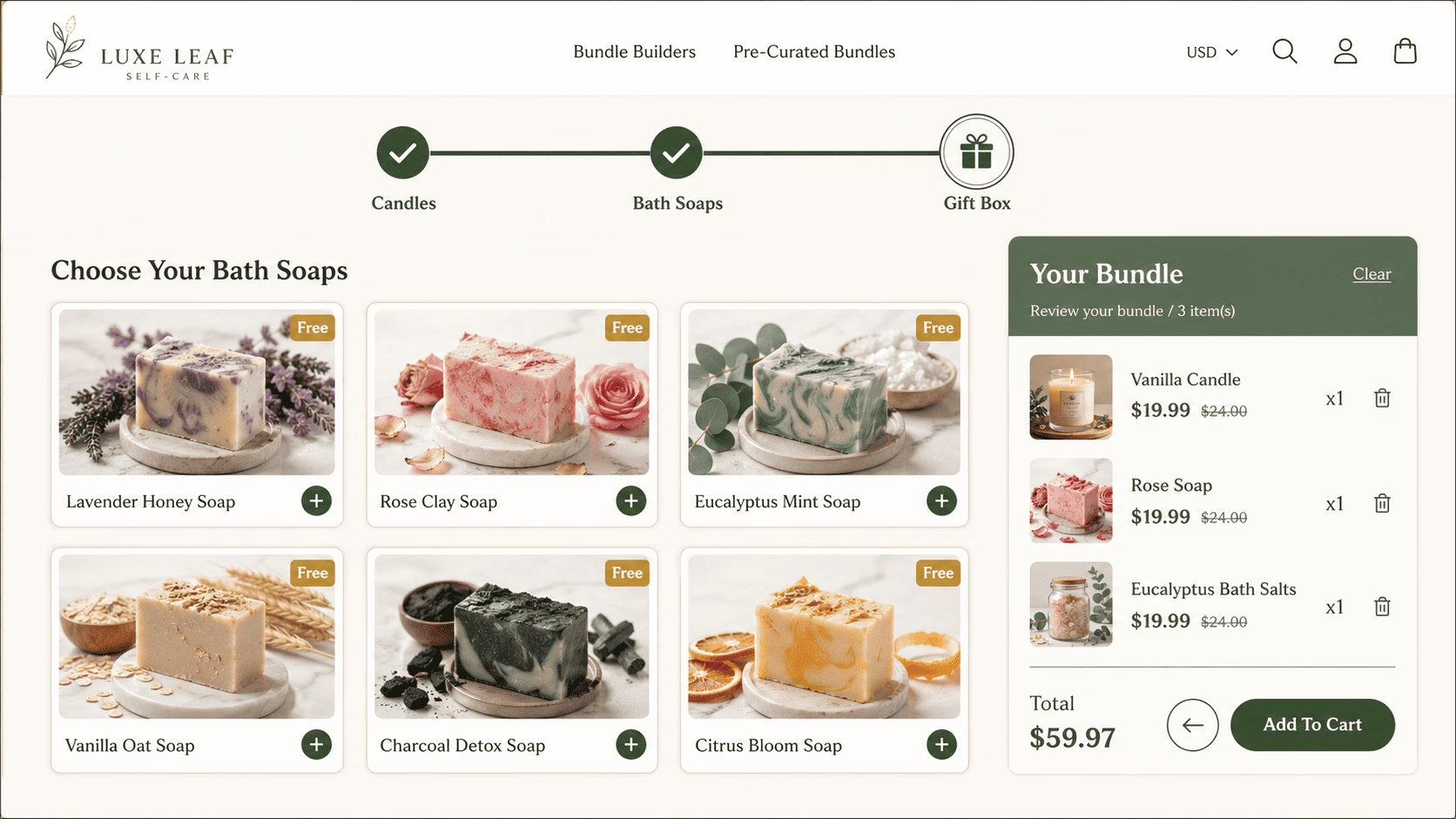
• Multi-step: Customers progress through stages (best for gift sets with a logical sequence, like "Step 1: Choose a Box → Step 2: Fill the Box → Step 3: Add a Greeting Card")
Step 4: Select the full-page product template (Landing Page Builder) so the gift box experience occupies its own dedicated page rather than sitting inline on a regular product page.
Step 5: Pick a design and click Create. The app automatically generates a Virtual Parent Bundle Product behind the scenes for inventory and checkout.
Step 6: Configure the structure using Steps and Categories[4]. Steps are separate pages in the bundle journey; Categories are product groupings within a single Step. For a gift set, you might use Step 1 for a curated container choice and Step 2 with three Categories (Candles, Soaps, Lotions) where the customer picks a defined number from each.
Step 7: Add products to each category. Rename the steps and categories to match the gift set's framing (for example, rename "Step 1" to "Choose Your Box" or "Category 1" to "Candle Selection").
Step 8: Set selection rules:
• Step-level rules: Apply minimum quantity requirements per step (for example, "minimum 2 products in Step 1 before the Next button enables")
• Category-level rules: Apply specific quantity requirements per category (for example, "exactly 1 candle, exactly 2 soaps, exactly 1 lotion")
Step 9: Configure discounts. Choose between fixed amount off, percentage off, or fixed price bundle. Tiered discount structures are supported (for example, 5% off at 2 items, 10% off at 4 items, 15% off at 6 items)[3].
Step 10: Customize the design to match your brand. Click Preview Bundle to launch the design wizard. Select a template that fits the gift set's positioning (premium minimalist, playful, seasonal, etc.). Then customize the visual elements:
• Brand colors: Set primary and secondary colors to match your existing storefront. The bundle page should look like a continuation of the rest of the site, not a generic third-party widget.
• Typography: Match font choices to the rest of your storefront wherever the app allows.
• Corner styles: Choose rounded or square corners consistent with your store's design system.
• Imagery: Use the same style of product photography as your main catalog. Inconsistent product photos are the single most common reason a gift set looks off-brand, even when everything else is set up correctly.
All design elements remain editable after the bundle is live, so you can iterate based on how customers actually use the bundle page.
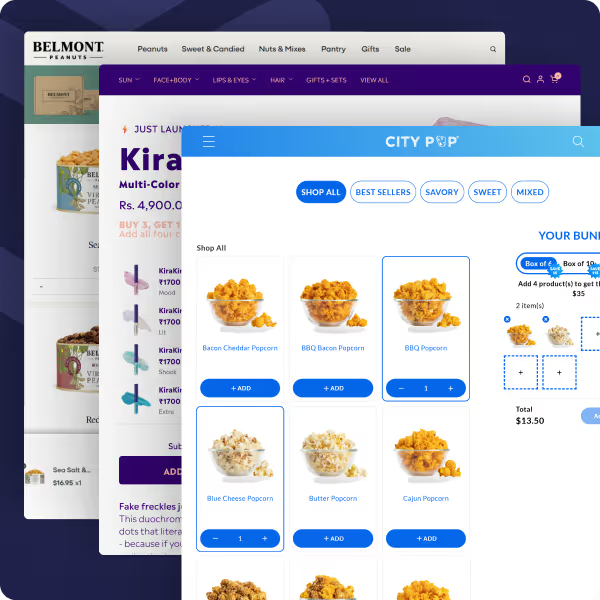
Real Shopify mix and match bundle examples built with Easy Bundle Builder[5]:
• Freudebox (gifting) runs a build-your-own gift box experience on a dedicated landing page where customers select items step by step.
• Kimirica (beauty and wellness gifting) uses a similar BYOB gift box flow themed around luxury self-care products.
• Sodii (health and fitness) uses a single-step landing page where customers build their own electrolyte set.
• Nutrition Kitchen (food) uses a multi-step flow for meal bundles where customers progress through clear stages.
• Graze Cheese (food) uses an inline product page builder for "Pick Your Six," limiting customer choice to six cheeses for cohesion.
• Give Me Cosmetics lets customers build a haircare bundle directly on the product page.
For a deeper comparison of mix and match bundle apps, see our best Shopify mix and match bundle apps guide.
Style cohesion is what separates a $20 thrown-together box from a $60 gift set people actually want to give. It is the hardest part of running a mix and match gift set program, and it is where most setups fall short: the customer is the one picking the items, not the operator, so cohesion has to be designed into the system rather than enforced after the fact.
The most efficient way to deliver style cohesion at scale is to use an advanced bundle builder app, not a basic bundle tool. Apps like Easy Bundle Builder give operators drag-and-drop control over the bundle's visual presentation: layout, color palette, typography, button styling, product card design, and how the entire flow looks on the storefront. This means the bundle page can be made to match the rest of the brand exactly, which is the foundation of style cohesion. With native Shopify Bundles, this level of design control is not available.
Once the right tooling is in place, style cohesion becomes a curation discipline. The principles below cover the full system, from app setup to product photography to inventory governance.
A drag-and-drop bundle builder lets operators control every visual element of the bundle page without touching code. With Easy Bundle Builder specifically, brand colors, typography, product card layouts, button styles, progress indicators, and step transitions can all be customized to match the rest of the storefront. The result: the bundle page reads as a continuation of the brand, not a generic third-party widget. This is the single biggest unlock for style-cohesive mix and match gift sets, because no amount of product curation can overcome a bundle page that visually clashes with the rest of the store.
Anchor each bundle around a defined style theme before selecting products. Themes like "Minimalist Monochrome," "Coastal Casual," "Studio Edit," or "Cozy Winter" give the curation a unifying logic that goes beyond price tier or category. Use consistent color palettes, materials, or occasion-based logic as the foundation. Kimirica does this well: their build-your-own gift box stays inside a tight luxury beauty theme, so any combination the customer picks looks intentional. Document the style rules per bundle in Shopify metafields, and tag products with a consistent taxonomy (for example, bundle-style:coastal, bundle-tier:premium) so the framework is reusable across multiple gift sets.
Choose items that are visually and functionally complementary, not items that compete with each other. The most reliable structure is one hero product plus 2 to 3 supporting items (accessories, add-ons, complements) that elevate the hero. Graze Cheese's "Pick Your Six" follows this logic: the cheeses are deliberately curated to pair with each other rather than overlap. Avoid substitutes (items that solve the same problem) because they create internal cannibalization within the bundle and dilute the perceived value. The total item count sweet spot for gift sets is 3 to 6 items, with 3 to 5 product options per category. Fewer feels light for a gift; more starts looking like a haul rather than a curated set.
The single biggest driver of perceived cohesion is photography. Shoot all bundle components together in a single lifestyle image when possible, since this gives customers a vision of the finished gift set even before they start picking. Use a consistent background, lighting setup, and model or prop style across every bundle product detail page. Include a flat-lay or styled grid showing all components together, not just individual product shots. Crate 61 maintains tight color palette consistency across every soap available in their bundle, so any combination the customer picks looks cohesive in the box.
Use a repeatable naming template like "[Style Theme] Bundle – [Occasion or Use Case]" (for example, "Studio Edit Bundle – Work From Home" or "Coastal Bundle – Summer Hosting"). The naming alone signals curation. Bundle descriptions should tell a style story rather than list products: explain why these items go together, what occasion they suit, and what the recipient's experience will be. Freudebox frames the entire build-your-own gift box around the act of gifting, which gives every product the same narrative anchor.
Bundle pricing should offer roughly 10 to 20 percent savings versus buying the items individually. This is enough to incentivize the bundle without eroding margin or signaling clearance. Display the "compare at" price prominently so customers see the value calculation. Avoid deep discounts on premium-positioned gift sets, since a 50 percent off luxury gift set reads as poor quality, not as a deal. The price tier across all available bundle items should also match: mixing a $5 sample with a $50 full-size product creates visual and value imbalance.
A mix and match gift set is only as available as its scarcest component, so inventory governance matters more than for a standard product. Set up low-stock alerts at the component level, not just the bundle level. Use Shopify Flow to auto-unpublish or flag bundles when any component drops below a defined threshold. For operators using a 3PL, confirm the fulfillment partner can pick-and-pack multi-SKU bundles as a single shipped unit, since many 3PLs default to shipping each component separately if not configured otherwise.
A/B test bundle compositions (swap one component, hold the rest) before committing to a full lifestyle photoshoot or marketing investment. Track bundle attach rate and AOV lift month over month, since these are the metrics that tell operators whether a particular gift set is working. Use a duplicate, unpublished theme to QA the bundle product detail page layout before pushing the gift set live, especially when launching a new style theme that has not been tested with real customers.
One additional lever worth building in: offer a "Most Popular Combination" or "Editor's Pick" preset alongside the mix and match flow. Customers facing too much choice often abandon the bundle entirely. A curated preset captures the customers who would otherwise fall out from decision fatigue, while still keeping the build-your-own option available for those who want full control.
The pattern across all of these principles is the same: constraint creates cohesion. The job of a mix and match gift set on Shopify is not to give the customer maximum freedom. It is to give them just enough freedom to feel personalized, while still ensuring whatever they end up with looks like a thoughtful, on-brand gift.
Choosing between the three setup approaches depends on how much customer choice your gift sets require, how many gift set variations you plan to offer, and how scalable the operation needs to be.
• You have a small number of fixed gift set combinations (under 20 total)
• You do not need a build-your-own customer interface
• You want to avoid installing any app
• The products in your gift set are fixed
• You want customers to pick variants (size, scent, color) of those fixed products
• You want native Shopify functionality with automatic component-level inventory deduction
• You want true mix and match: customer picks which products go in
• You need step-level or category-level selection rules
• You want tiered discount logic ("the more you bundle, the more you save")
• You want a dedicated landing page or full-page product template for the gift set
• You want AI-assisted setup for a gift box structure
For a deeper comparison of mix and match bundle apps, see our best Shopify mix and match bundle apps guide. For a broader overview of mix and match bundles beyond gift sets, see our guide on creating mix and match bundles on Shopify[6].
Operators setting up mix and match gift sets for the first time tend to repeat the same mistakes. The fixes are simple if you know what to watch for.
Too many product options per category. Listing 20 candles in a "pick 3" gift set creates decision fatigue, not delight. Limit each category to 3 to 5 thoughtful options.
Ignoring price tier when curating product pools. Mixing $5 and $50 items in the same gift set creates value imbalance and inventory headaches. Tier the products and offer the cheap and expensive options as separate gift sets.
Not setting clear selection rules. A mix and match gift set with no minimum quantity often gets bought as a single item with the bundle discount applied, which destroys margin. Set hard minimums per step or per category.
Forgetting visual cohesion in product photography. A gift set built on inconsistent product photos (different backgrounds, lighting, styles) looks unprofessional even if the products themselves are strong.
Not offering a curated preset option. Customers facing too much choice abandon the bundle. Offer a default "we picked these for you" option alongside the mix and match flow.
Skipping gift-set-specific positioning. A bundle called "Build Your Own Bundle" is generic. A bundle called "Build Your Hostess Gift Set" or "Build Your Mother's Day Set" has direct gift intent and ranks better in both Google and conversational AI queries.
What to track once a gift set is live:
• Conversion rate of the bundle page versus the rest of the catalog
• Average bundle order value relative to single-product orders
• Most-picked combinations (signal for which products to keep, which to retire)
• Drop-off rate by step in multi-step flows (high drop-off indicates step rules are too strict or too vague)


.avif)


