
.svg)
.svg)

.svg)
.svg)


Our Apps Have Driven
5X AOV | 2X Conversions | $30M+ Additional Revenue
5X AOV | 2X Conversions | $30M+ Additional Revenue
.svg)


5.0 (3000+ Reviews)


Shopify Apps





.svg)

If you have ever wanted to let customers pick their own products and build a personalized bundle directly on your Shopify store, this is the guide for you. Build Your Own Bundle (BYOB) is one of the highest-converting bundle formats in e-commerce because it combines personalization, perceived value, and a strong incentive to add more to the cart.
The hard part is not the idea. It is the execution.
Merchants who try to wire this up natively hit variant limits, inventory headaches, or a checkout that looks wrong. Therefore, in this guide, we shall look at the ways in which you can start building your own bundle on Shopify, easily and without writing a single line of code.
A Build Your Own Bundle is a shopping experience in which customers choose which products to include in their bundle from a curated product pool. You define the rules: how many items, from which categories, with what constraints. The customer fills the bundle however they like. At checkout, it appears as one clean order with a built-in discount.
BYOB differs from a fixed bundle, in which the product combination is predetermined. It is also different from a quantity break, which is volume pricing for a single SKU. BYOB is specifically the "pick your own items" format.
A strong BYOB experience has three elements:
Merchants use BYOB across a range of formats: gift boxes, skincare sets, snack boxes, pet supply kits, starter packs, and replenishment subscriptions. The structure is the same. What changes are the product pool, the branding, and the occasion?
Before going into setup, we need to understand why BYOB consistently outperforms fixed bundles in AOV and conversion.
Also read: How to Bundle Products on Shopify: A Complete Guide (2026)
The simplest way to create BYOB without an app is to model the bundle as a single Shopify product with multiple variants, where each variant represents a specific product combination. Do note, this is not a true BYOB, just an option to create a bundle with some choices. For a true “build your own bundle” you need a Shopify app.
When this works:
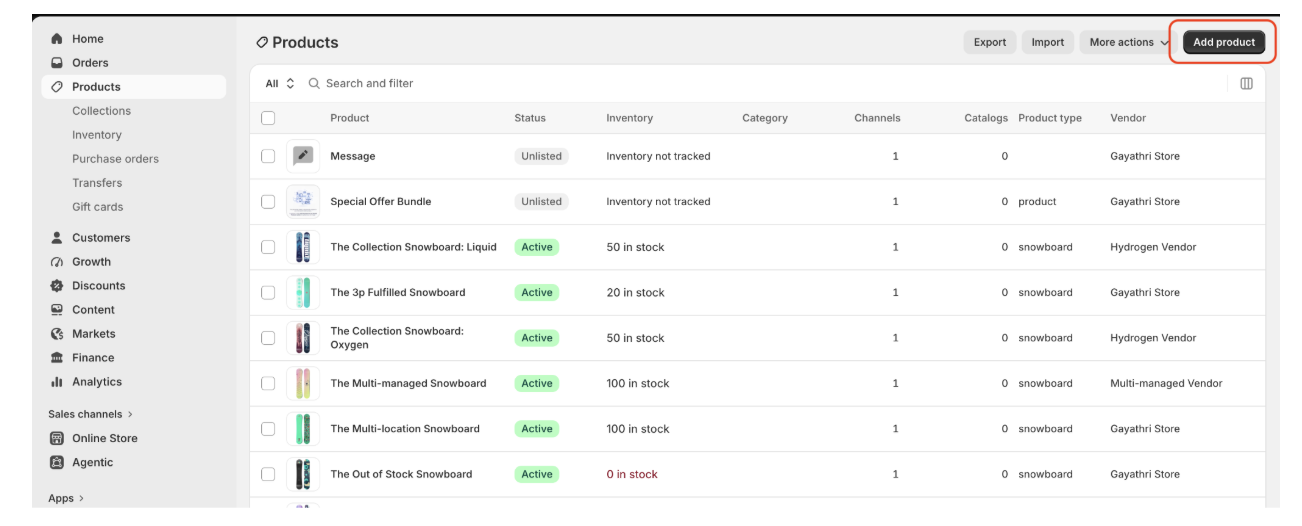
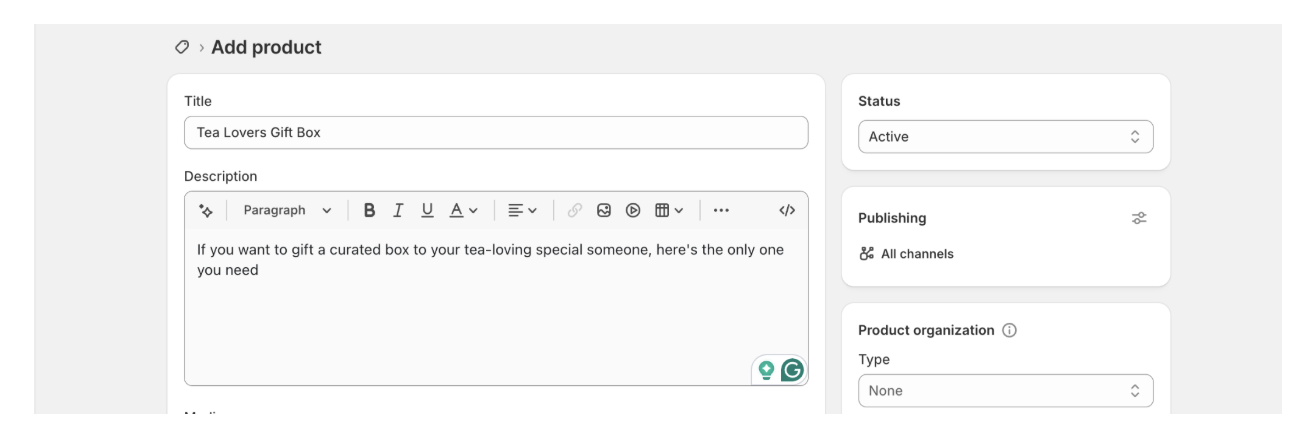
Step 3: Scroll to the Variants section and click Add options
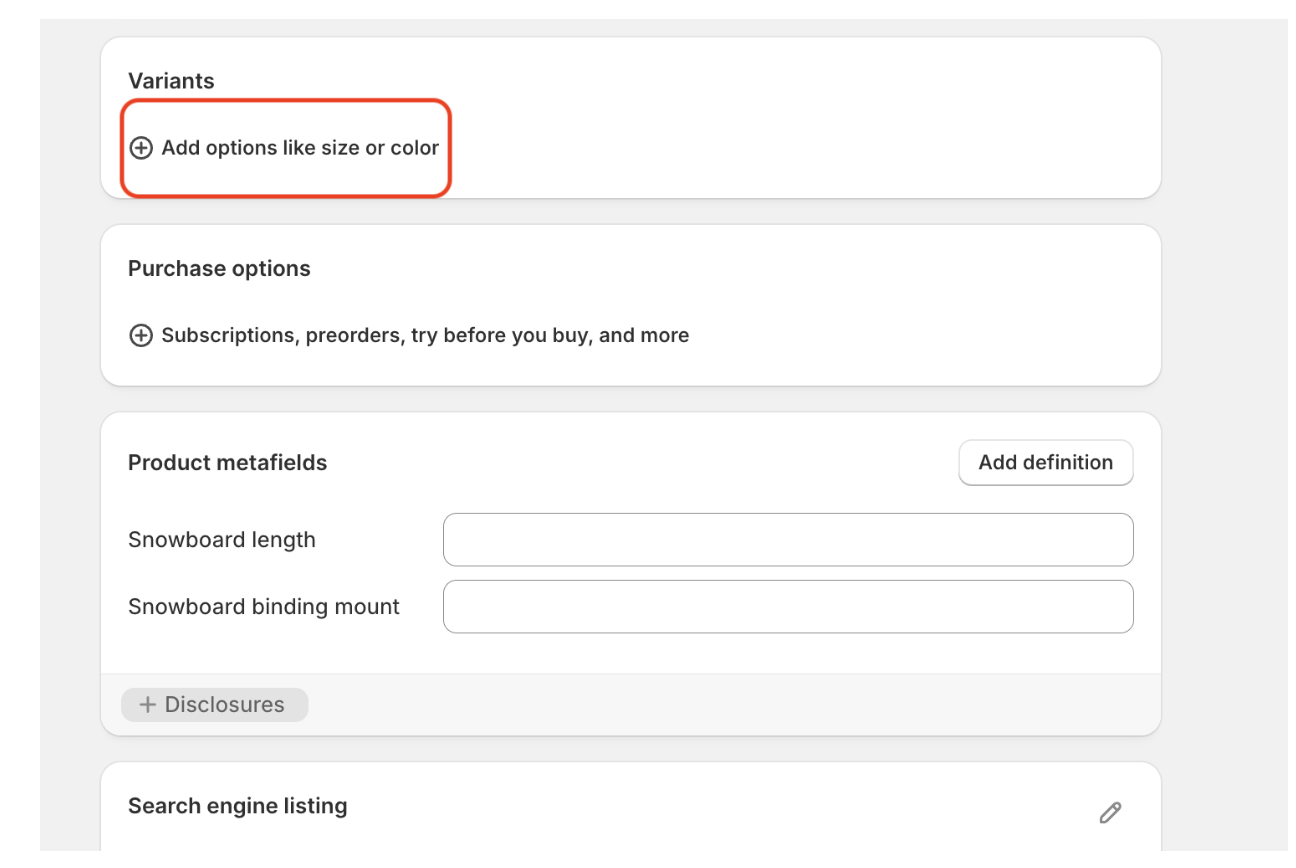
Step 4: Define the option labels (Item 1, Item 2) and list the possible values for each (e.g., Earl Grey, Chamomile, Peppermint)

Step 5: Shopify automatically generates all combinations. Delete any that you do not offer.
Step 6: Set prices, SKUs, and inventory levels for each remaining variant.
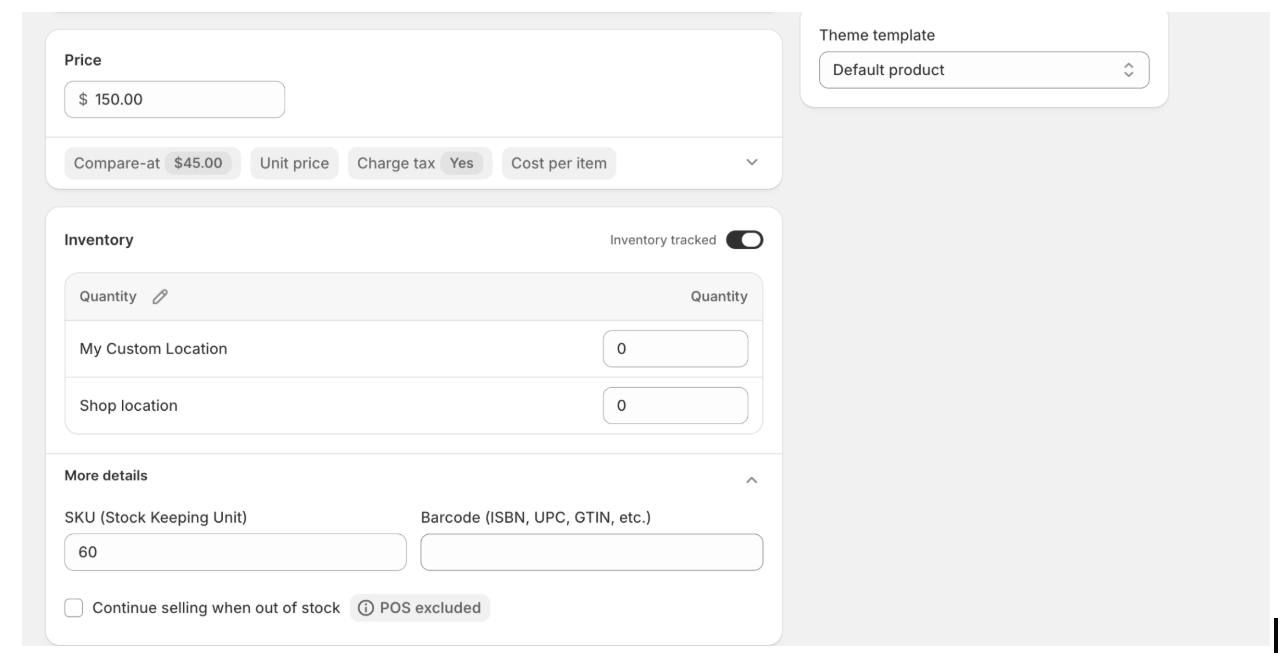
Step 7: Upload a product image for each variant combination so customers see exactly what they are selecting.
Shopify's own Bundles app is free, built by Shopify, and useful for creating fixed curated bundles where customers can pick variants of pre-selected products. But before you go through the setup, there is one thing worth knowing upfront.
The Shopify Bundles app does not support BYOB.
Shopify explicitly states that mix-and-match bundles are not supported. Customers cannot choose which products go into their bundle. They can only pick variants (size, color, scent) of the products you pre-selected. If your goal is a true "pick your own items" experience, this app will not get you there, and the setup below will not change that.
What it does support is a fixed, curated bundle where the lineup is set by you. If that is what you need, here is how to set it up.
When this works:
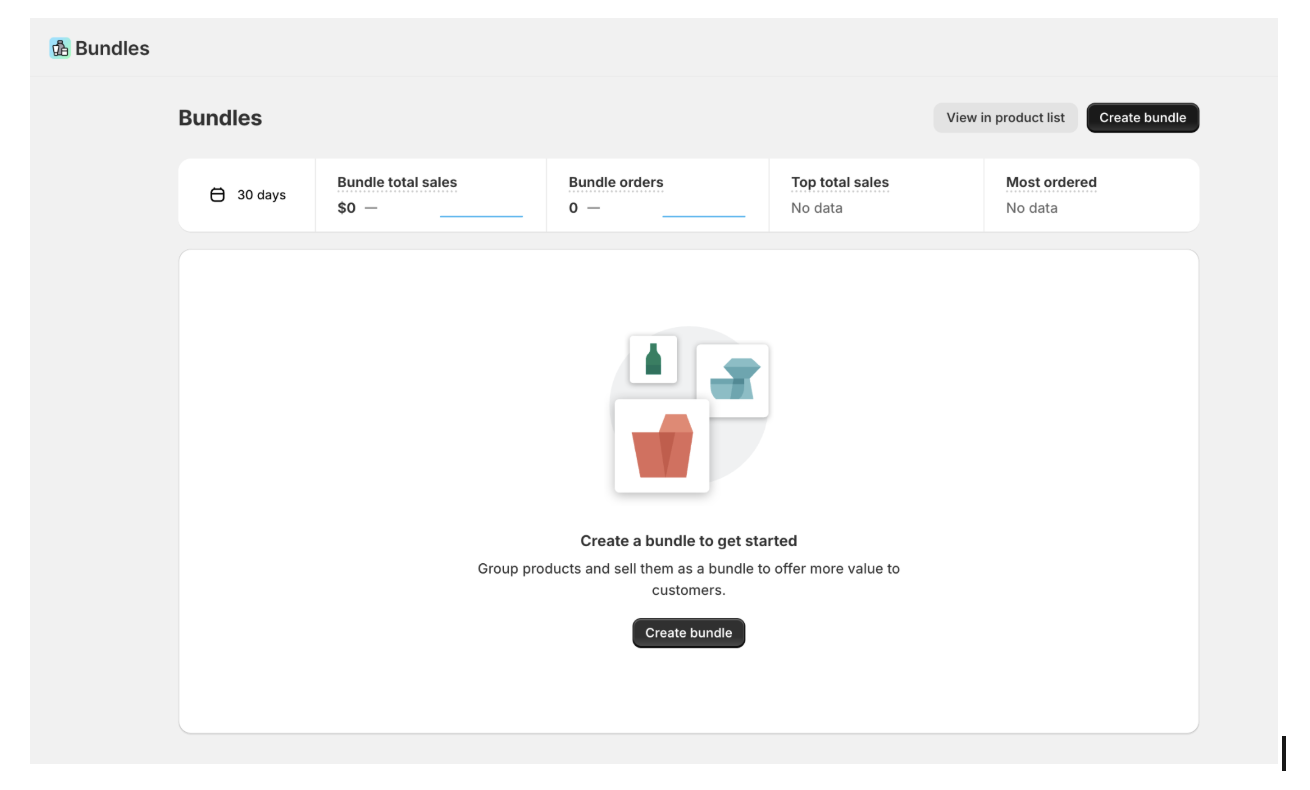
Step 3: Name the bundle and add the specific products you want included. For demo purposes, we have chosen the snowboard bundle and added a few products
Step 4: For each component, decide whether customers can choose variants at checkout (e.g., size, rate, colour)
Step 5: Set the bundle price or apply a flat percentage discount, edit the SKUs, and add images by choosing the variants and clicking on the button above.
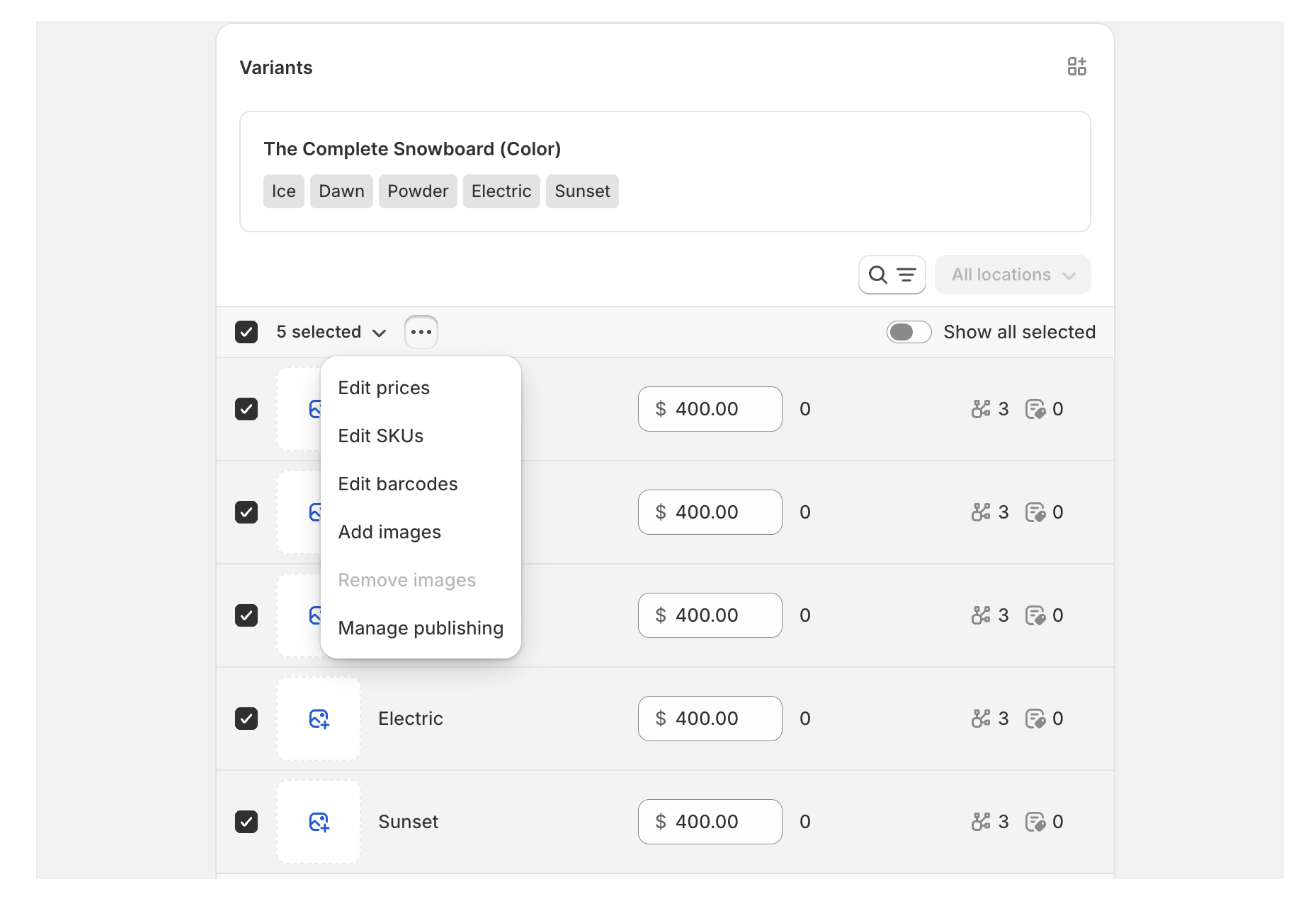
Step 6: The bundle appears as a product in your Shopify catalogue. Add it to a collection.
The Shopify Bundles app is a reasonable starting point for fixed bundles. For any store that wants customers to choose their own products, a dedicated BYOB app like Easy Bundle Builder is the practical next step.
Easy Bundle Builder is a dedicated Shopify app for BYOB, mix-and-match bundles, gift boxes, quantity breaks, and product-page bundle flows. Rated 4.9 on the Shopify App Store with over 965 reviews and the "Built for Shopify" badge, it is the most complete no-code solution for stores that want a real customer-driven bundle experience.
Easy Bundle Builder is consistently rated among the top-reviewed apps in its category, not just for features but for the support behind them. Merchants regularly cite the ease of setup and the responsiveness of the support team as reasons they stay, which matters when you are launching a bundle experience for the first time and need things to work quickly.
The core difference from the native options is that Easy Bundle Builder gives customers genuine product choice within the rules you set. You define the category structure, the selection logic, and the discount tiers. The customer fills the bundle however they like. Inventory syncs in real time, checkout is clean, and the whole experience can be built without a developer.
There are two setup paths: AI-assisted and manual. Both produce the same result. The difference is speed.
After installing Easy Bundle Builder, the AI bundle creator lets you describe your offer in plain language and builds the bundle structure for you. Tell it something like: "I want customers to pick any 5 items from our wellness collection at a 15% discount." The app sets up the category structure, selection rules, and discount logic automatically. You review, adjust, and publish.
This is the fastest path for merchants who want a working starting point without having to configure every setting manually.
Step 1: Install Easy Bundle Builder
Install Easy Bundle Builder from the Shopify App Store. The app is free to install, with a free trial available.
Step 2: Click Create Bundle and Select Your Bundle Type
Open the app and click Create Bundle. Select Mix-and-Match Bundles as your bundle type. This configuration enables true customer-driven product selection with quantity rules.
Step 3: Choose Your Flow Structure
Decide between a single-step and multi-step flow.
Multi-step flows work especially well for gifting because they mirror how customers think about assembling a gift: one category at a time.
Step 4: Select Your Display Location
Choose whether the bundle appears embedded on an existing product page or on a dedicated full-page landing page. The landing page option is better for BYOB experiences because it gives the bundle its own URL, allows for richer branding, and creates a cleaner shopping flow without the distractions of a standard product page.
Step 5: Choose a Design and Create
Pick a design template from the drag-and-drop editor. Easy Bundle Builder generates a Virtual Parent Bundle Product in the background, which handles inventory tracking and checkout behavior automatically.
Step 6: Add Your Products and Categories
Add the products that customers can choose from. Organize them into categories if you are using a multi-step flow (for example, Category 1: Candles, Category 2: Soaps, Category 3: Face Masks). Set the minimum and maximum items per category and per step.
Step 7: Set Your Discount
Easy Bundle Builder supports six discount types:
Discounts apply automatically when the bundle is built. They stack cleanly with existing Shopify discount apps without conflicts.
Step 8: Configure Checkout Behaviour
Bundles in Easy Bundle Builder appear at checkout as a single line item, with each product listed below it. This keeps checkout clean and prevents the order summary from looking fragmented. Order value is preserved, and the bundle logic holds through Shopify's native checkout.
Step 9: Enable Inventory Sync
Real-time inventory sync is on by default. Each component product's stock updates immediately when a bundle is purchased. For stores that use 3PL fulfillment providers, Easy Bundle Builder's 3PL integrations ensure accurate fulfillment and prevent overselling after bundle purchases.
Step 10: Publish and Test
Preview the bundle experience, test a purchase in development mode, and then publish. Your BYOB page is live.
Merchants often worry that bundles create inventory issues where individual products oversell. Easy Bundle Builder resolves this fear through real-time, component-level inventory synchronization.
When a customer purchases a bundle, the app decrements the stock of each product individually. If any product in the bundle sells out mid-session, it automatically becomes unavailable for selection. Because the app runs on Shopify's native Cart Transformation API, this inventory sync and the single-line-item checkout function run reliably through Shopify's infrastructure, Shop Pay, and third-party fulfillment flows without needing custom development.
This is the most important operational advantage of using a dedicated bundle app over the multivariate product workaround, where inventory sync at the component level simply does not exist.
Discount logic is where most native bundle setups fail. Easy Bundle Builder solves this with six built-in discount types that apply automatically and stack with existing Shopify discount apps.
All six types apply without the customer entering a code. The discount logic is built into the bundle flow, not in Shopify's discount system. This means it does not conflict with sitewide promotions running at the same time.
BYOB is a format, not a single use case. These are the setups that perform well across different store types.
Gift boxes: "Build your own gift box" is one of the highest-converting seasonal formats. Let customers pick 5 items from a curated pool, choose a message card, and have the bundle shipped as a gift. Multi-step flows work especially well here.
Starter kits: New customers buying into a category for the first time benefit from a "build your starter kit" experience. It is lower friction than navigating the full catalog and encourages a higher first-purchase basket size.
Replenishment sets: "Build your monthly refill bundle" works well for consumables (skincare, supplements, food, and beverages). Customers pick their regulars, apply a bundle discount, and place a recurring order.
Seasonal promos: BYOB during BFCM, Valentine's Day, or Mother's Day perform well because gift-givers want to personalize their gifts. A BYOB landing page with urgency messaging and tiered discounts is a strong promotional format.
Product discovery bundles: A "try any 3" format at a reduced price reduces the friction of trying new SKUs. This is particularly useful for stores with deep catalogs where customers repeatedly default to the same 2 to 3 items.
For replenishment bundles and recurring sets, Easy Bundle Builder also supports subscription flows. It handles the front-end Build Your Own Bundle experience for the first order and works seamlessly with Appstle, Skio, and Bold for recurring billing from there.
Setup alone does not determine BYOB performance. How the bundle looks and functions on the storefront matters as much as the underlying logic.
The Shopify Bundles app is a reasonable starting point for stores that want to test fixed bundles without a paid app. For any store serious about BYOB, the feature gap makes Easy Bundle Builder the clear practical choice.
Launch is the beginning, not the finish line. These metrics tell you whether your BYOB experience is working.
Pro Tip: Easy Bundle Builder's built-in analytics dashboard tracks bundle views, purchases, conversion rates, and revenue in one place. The most useful comparison is your bundle AOV against your overall store AOV: the gap is your clearest proof of the impact of bundling. You can also see which product combinations convert best and which traffic sources are driving bundle sales, which shapes both your next bundle offer and your promotion strategy.


.avif)


