Mobile-first optimization is essential as most ecommerce traffic now comes from mobile devices.
Streamlining checkout with tools like Checkout Wiz reduces friction and boosts conversions, including post-purchase upsells.
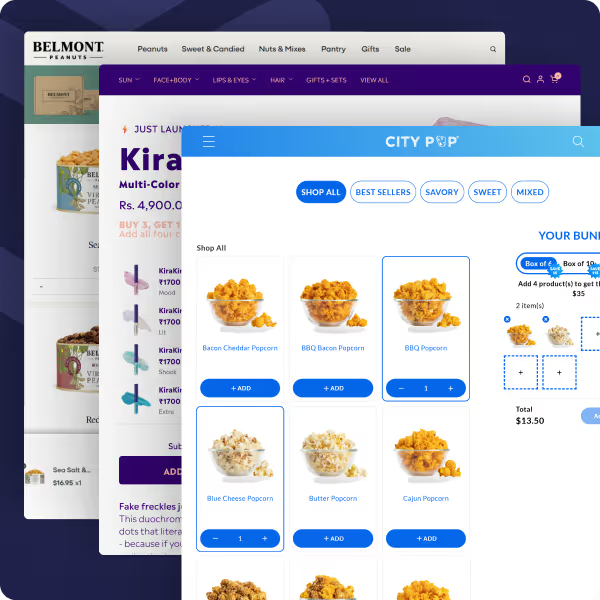
Product pages convert better with mobile optimized bundles and quantity breaks using Easy Bundle Builder to increase AOV.
Thumb-friendly UX, sticky CTAs, and scannable content improve engagement and reduce drop offs.
Mobile-native features like chat buttons, swipeable galleries, and one tap navigation enhance convenience and speed.
Implementing even one of these quick wins can drive immediate improvements in conversion rate and customer experience.
Introduction
The way people shop has changed — and it’s happening in the palm of their hands. Today, over 70% of ecommerce traffic comes from mobile devices, yet many online stores still focus their optimization efforts on desktop. The result? Missed conversions and frustrated shoppers.
A mobile-first strategy ensures your store is designed for small screens, fast performance, and seamless checkouts. And the good news? You don’t need a massive redesign to see results.
By applying a few quick wins, you can improve conversions, average order value (AOV), and customer experience almost instantly.
In this guide, we’ll share 5 mobile-first ecommerce hacks you can implement right away — from checkout optimization with Checkout Wiz to product bundling with Fly, along with UX, copy, and mobile-specific enhancements.
1. Streamline Checkout with Checkout Wiz (and Post-Purchase Boosts)
The checkout flow is the single most critical part of your mobile store.
A complicated or slow checkout is the #1 reason shoppers abandon their carts. To maximize conversions, you need a mobile-first checkout that’s simple, fast, and optimized for one-hand use.
How to Optimize Mobile Checkout
Reduce form fields → Only ask for essentials (name, email, shipping, payment).
Enable autofill & mobile keyboards → Let browsers and wallets fill in details.
Add one-tap wallets → Apple Pay, Google Pay, Shop Pay make payments frictionless.
Power Up with Checkout Wiz
With Checkout Wiz, you can transform Shopify’s checkout into a high-converting engine. The app helps you:
Add upsell blocks, banners, and trust signals directly in checkout.
Run A/B tests to find the best-performing layout.
Personalize checkout experiences for different segments.
Quick win: Insert a sticky trust badge (“Secure Checkout” or “Free Returns”) under your pay button. This small change can instantly boost mobile conversion confidence.
Post-Purchase Opportunities
Mobile-first optimization doesn’t stop once the order is placed. The thank-you page and post-purchase upsells are perfect for:
Collecting quick feedback with mobile-friendly surveys.
Displaying discount codes for the next order.
Quick win: Add a post-purchase cross-sell offer with Checkout Wiz — for example, if someone buys shoes, show them socks at a discounted price.
2. Supercharge Product Pages with Easy Bundle Builder
Your product page is the decision-maker. On mobile, shoppers don’t scroll endlessly — they scan. That means you need to make the page not only persuasive but also revenue-optimized. One of the best ways to do this is through bundling and quantity breaks.
Why Bundles Work on Mobile
Increase AOV: Shoppers love “Buy More, Save More” offers. Bundling naturally encourages bigger baskets.
Simplify decision-making: Instead of choosing multiple products separately, customers can add a pre-curated bundle in one tap.
Mobile-friendly sales psychology: Clear discounts and free gift triggers motivate quick purchases.
Create tiered discounts and volume pricing (“Buy 2, Save 10%” → “Buy 3, Save 20%”).
Design native Shopify widgets that match your brand without slowing down load times.
Add free gifts, upsell blocks, and subscriptions directly on product pages.
Track bundle performance with advanced analytics to see what drives AOV.
💡 Quick win: Place a sticky bundle widget below your “Add to Cart” button on mobile. This ensures customers see bundle offers before checking out.
Real Results from Bundling
Merchants using Easy Bundle Builder report significant AOV increases (15–40%) by combining volume discounts with strategic upsells.
Reviews highlight its zero impact on page speed — a crucial factor for mobile conversions.
Plus, its hands-on support ensures bundles integrate smoothly with side carts and checkout extensions.
3. Design for Thumbs (Thumb-Friendly UX)
When it comes to mobile shopping, convenience equals conversion. Most users browse with one hand, which means their thumb does all the work. If your store isn’t designed around the thumb zone — the natural area a thumb can reach without strain — you risk losing sales.
Thumb-Friendly Best Practices
Place CTAs in the thumb zone → Keep “Add to Cart” and checkout buttons at the bottom of the screen for easy reach.
Make buttons tappable → Aim for a minimum size of 44px by 44px, as recommended by Apple’s Human Interface Guidelines.
Avoid edge elements → Don’t place essential buttons too close to screen edges where accidental taps are common.
Quick Win: Sticky Add-to-Cart
A simple yet powerful tactic is adding a sticky “Add to Cart” bar that stays visible as users scroll. This removes friction — customers don’t need to scroll back up to buy.
Example: A clothing store keeps size selection and a sticky CTA pinned at the bottom. Shoppers can add instantly while browsing images.
A Baymard study shows improving mobile UX can boost conversion rates by 35% or more.
Mobile users expect one-hand navigation, so if actions feel clumsy, they bounce fast.
💡 Pro tip: Test different button colors and sizes via A/B testing — small visual changes can have a big CRO impact on mobile.
4. Use Scannable Content & Microcopy
Mobile shoppers don’t read — they scan. Long paragraphs that might work on desktop become overwhelming on small screens. To keep users engaged and informed, your product pages and checkout copy must be short, structured, and benefit-driven.
How to Make Content Mobile-Friendly
Use bullet points → Highlight key product features (size, material, shipping) in quick scan-friendly lists.
Break text into sections → Collapsible accordions for details like reviews, FAQs, or size guides.
Lead with benefits, not specs → Instead of “Material: 100% cotton,” say “Soft, breathable 100% cotton for all-day comfort.”
Microcopy That Builds Trust
Small bits of text near CTAs and forms make a big difference in mobile conversion.
Trust signals → Add phrases like “Secure Checkout,” “Free Returns,” or “Ships in 24 hours” near action buttons.
Error prevention → Inline validation (“Please enter a valid email”) avoids frustrating re-entries on mobile keyboards.
Urgency cues → Use subtle reminders like “Only 3 left — order now” (but avoid fake scarcity).
💡 Quick win: Add a “Free Shipping & Easy Returns” note under the Add to Cart button. It’s short, scannable, and reassures shoppers instantly.
Why It Matters
Studies show 79% of people scan online content instead of reading word by word.
Clear, scannable mobile copy reduces bounce rates and pushes shoppers closer to checkout.
5. Leverage Mobile-Specific Features
One of the biggest advantages of mobile commerce is the ability to use features that don’t translate well to desktop. By leveraging mobile-native tools, you can improve engagement, reduce friction, and make shopping feel more natural.
Mobile-First Features to Implement
Chat integrations → Add WhatsApp or Messenger buttons for instant customer support. Shoppers are already using these apps daily.
Sticky discount banners → Floating promo codes or limited-time offers that remain visible as users scroll.
Swipeable image galleries → Mobile users expect to swipe, not click. Use horizontal galleries for product photos and variants.
One-tap navigation → Floating menus or quick-action buttons for cart, checkout, or wishlists.
Quick Wins
Add a floating WhatsApp button for pre-sale questions. It builds trust and removes hesitation.
Use a sticky “10% OFF Today” banner to keep promotions visible without cluttering the product page.
Implement swipeable product galleries so shoppers can explore multiple images without tapping.
Why It Matters
According to Shopify, one-tap checkouts and chat integrations can increase mobile conversions by 20–30%.
Mobile users value speed and simplicity. Adding these features aligns with their natural behavior, reducing drop-offs.
💡 Pro tip: Always test these features with real customers. Too many floating elements can distract; focus only on what drives conversions.
Conclusion
Mobile-first isn’t just a buzzword — it’s the foundation of a successful ecommerce store. With over 70% of online shoppers browsing on their phones, optimizing your store for mobile is no longer optional. The good news? You don’t need a complete redesign to see results.
By applying these 5 mobile-first ecommerce hacks — from checkout optimization with Checkout Wiz, to revenue-boosting bundles with Fly, to thumb-friendly UX, scannable content, and mobile-native features — you can unlock quick wins that increase conversions and average order value (AOV).
Start small. Even one change, like adding a sticky CTA or a post-purchase upsell, can deliver a noticeable lift in sales. Once you see results, layer on more hacks to build a store that’s not just mobile-friendly but mobile-first.
💡 Action step: Run a quick mobile audit today. Pick one hack from this list, implement it this week, and track the impact on conversions.
Hurrify customers to buy within a given timeframe with a sales countdown timer & improve conversions
Another popular Shopify checkout app is Checkout Promotions. The app comes with the ability to leverage a collection of highly robust visibility rules that help show customers one-click post purchase upsell promotions after an order payment has been made. Some of its key features include:
Features
AI recommended and manual recommendations for upselling.
Complete branding control.
Checkout Upsell for increasing AOV.
AI recommended and manual recommendations for upselling.
Pricing
Development
Free
Monthly Plan
$99/ month
Plus Plan
$99/ month
Plus Plan
$99/ month
FAQs on Mobile-First Ecommerce Hacks
1. What is mobile-first ecommerce design?
2. How does Checkout Wiz improve mobile checkout?
3. Can Easy Bundle Builder really increase AOV?
4. What’s the best way to design CTAs for mobile?
5. Do post-purchase offers hurt customer experience?
6. How do I test mobile-first improvements on my store?
Sid B
Sid is the founder of Skai Lama and The Indian Dream Podcast. He is passionate about building SaaS and talks about eCommerce Growth, 0-1 Startups, Building Businesses and Brands, and Shopify.

.svg)
.svg)

.svg)
.svg)


%20(1).png)

.svg)









.svg)


.avif)


