You have two promotions active. Both are confirmed in the Shopify admin. You run a test order, and only one appears at checkout. No error. No explanation.
Just one discount missing, and no obvious place to look.
Discount stacking problems on Shopify almost always come from one of four places:
- Incompatible combination settings
- Two offers competing for the same products
- Cart eligibility shifting between the cart page and checkout
- A hard platform limit on a specific discount type.
This guide covers six problems merchants run into most often, with a specific diagnostic and fix for each one.
How Shopify Decides Which Discounts Apply
Before diagnosing a specific problem, a short mental model helps. Shopify breaks discounts into three layers: Products, Order Totals, and Shipping. Stacking problems usually occur when the rules you set for these layers conflict with each other.
Each discount also has combination settings that control which other types it can run alongside.
For example, a product discount can be combined with order discounts, shipping discounts, or both.
These settings must be compatible on both sides of a pair. If your product discount allows combination with order discounts but the order discount does not allow combination with product discounts, the combination fails regardless of how the product discount is configured.
Even with the correct settings in place, some discount types have restrictions that no configuration can override.
- Two discounts targeting the same products will compete rather than stack.
- Two shipping discounts cannot apply to the same order.
- Buy X Get Y offers have specific limits on non-Plus plans.
Understanding which layer is causing the failure is the first step before changing any setting.
Discount Stacking Problem 1: Two Discounts Are Active but Only One Appears at Checkout
What you see: Both discounts are confirmed active in the admin. A test order shows only one at checkout, with no error.
The Cause: Shopify's discount stacking depends on both the discount type and combination settings:
- Code + Code: Only one discount code can be entered per checkout; stacking two codes isn't natively supported.
- Automatic + Automatic: Shopify applies only the single best automatic discount; this is a platform limitation, not a settings issue.
- Automatic + Code: These can stack, but only if combination permissions are enabled on both discounts.
The Fix:
- Open each discount in the admin and enable the "combine with" settings on both sides; one-sided permission isn't enough.
- If you need two codes to stack, consider a third-party app like Kite.
- If both discounts apply to the same product, only the better deal applies; consider making one an order-level discount to avoid overlap.
For how to structure tiered spend conditions, the guide to tiered pricing on Shopify covers both quantity-based and spend-based tier structures.
Discount Stacking Problem 2: A BOGO or Free Gift Disappears Between Cart and Checkout
What you see: The offer is visible in the cart. By the time the customer reaches payment, it is gone.
- The Cause: It worked in the shopping cart but disappeared at the final payment step. This happens because the customer changed something at the last second (such as swapping a size, removing an item, or entering a coupon code that overrides the free gift).
- The Fix:
- Test without coupon codes first
- Check that cart quantities/variants still meet the BOGO conditions at checkout.
- If using an app, verify the free gift settings and eligibility rules in the app dashboard.
- Enable combination settings on both discounts if a code conflict is confirmed.
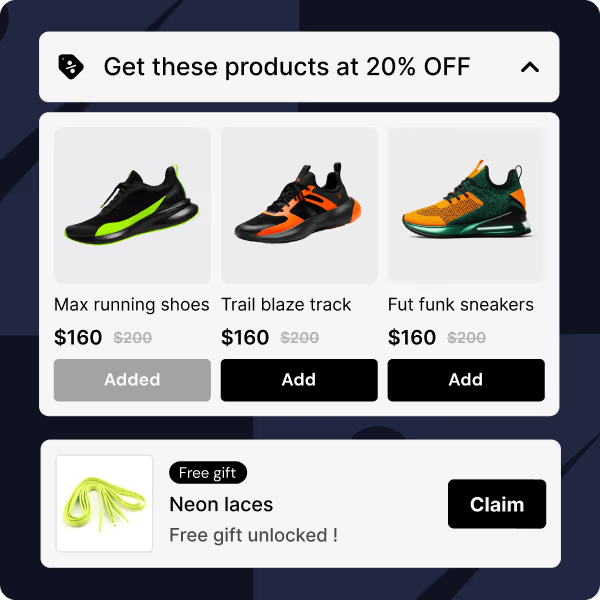
For the full setup breakdown, including eligibility rules and anti-gaming configuration, see the BOGO setup guide, which covers both native and app-based approaches.
Discount Stacking Problem 3: Customers Are Getting Too Many Free Items
What You See: A customer triggers two separate BXGY campaigns in one order and receives free items from both, more than intended.
The Cause: Two BXGY campaigns are running simultaneously with non-overlapping buy conditions, so a customer who satisfies both in a single cart triggers both rewards. Since the free items are different line items, Shopify fires both offers. This is expected behaviour, not a bug.
For example, Campaign A gives a free conditioner when buying 2 shampoos. Campaign B gives a free hair mask when buying 2 styling products. A customer who buys both qualifies for both free items simultaneously.
The Fix:
- Best long-term: Design campaigns so that a customer can't satisfy both buy conditions in a single cart, and clearly separate the eligible product groups.
- Quick cap: Set a usage limit (e.g., one use per customer) on each discount to limit unintended stacking.
- Blunt stop: Disable combination settings on one BXGY discount to prevent both from firing together, but this may block other intended stacking too.
- Plus merchants only: Use Shopify Functions to write custom logic that prevents double-triggering across campaigns.
Discount Stacking Problem 4: Volume or Tiered Discounts Are Giving Away Too Much
What you see: Customers are receiving a larger discount than what was configured for their cart size or spend level.
- The Cause: There are two causes here
- App misconfiguration: Tiered and spend-based discounts require a third-party app (Shopify doesn't natively support spend-based tiers). Some apps apply all qualifying tiers simultaneously instead of just the highest one.
- Stacking with a native discount: The app discount is working correctly, but a separate Shopify automatic discount is stacking on top, inflating the total reduction beyond what any single tier intended.
- The Fix:
- For app misconfiguration: Open your discount app's settings and look for an "apply best tier only" or "prioritize highest tier" rule, and enable it if available.
- For stacking conflicts: Disable combination settings on the app discount, or pause the conflicting native Shopify discount.
- To isolate the issue: Test with a clean cart and no coupon codes active. If the over-discounting stops, a stacking conflict is the cause. If it persists, the app configuration is the problem.
For the full breakdown of how to set up tiered discount campaigns correctly, the guide to volume discounts on Shopify covers four setup methods and the combination settings relevant to each.
Discount Stacking Problem 5: The Progress Bar Promises "Free Shipping," but Checkout Charges For It
What You See: The storefront progress bar confirms the customer has unlocked free shipping. Checkout charges full shipping anyway.
The Cause: Progress bar widgets calculate eligibility on the frontend using cart data, but have no visibility into how checkout resolves competing discounts. If a separate shipping discount is active in the background without combination permissions enabled, Shopify drops one of the two shipping discounts at checkout. The widget doesn't know this happened, so it continues showing "free shipping unlocked" while the customer is charged.
This is a combination settings conflict, not a hard platform rule. Shopify can stack shipping discounts when both are configured to allow it.
The Fix:
- Open both the app-generated and background shipping discounts. Enable "combine with shipping discounts" on both. This may resolve the issue without pausing anything.
- If stacking isn't possible, go to your Shopify admin, filter discounts by "Shipping," and pause any background shipping discounts that conflict with your progress bar campaign.
- To confirm the cause, test a checkout with only the progress bar active and no other shipping discounts running. If free shipping applies correctly, a combination conflict is the culprit.
Discount Stacking Problem 6: Bundles and Promo Codes Aren't Working Together
What you see: A sitewide promo code or automatic discount does not apply as expected to a bundled cart.
- The Cause: Different bundle apps change prices in different ways. Some act like regular Shopify discounts, while others change the price directly in the cart.
- The Fix: Test your bundle with a promo code before launching. If they conflict, look at the bundle app's settings or contact their support team to see how they handle combination rules.
- Bundle apps handle pricing in two fundamentally different ways, and that difference determines how they interact with promo codes. Apps built on the Cart Transform API adjust line item prices directly in the cart, so Shopify treats the reduced bundle price as the new base price.
- A promo code then discounts from that already-reduced price, which can produce unexpected totals or appear to do nothing at all. Apps that create native Shopify discounts under the hood behave more predictably, but still require combination permissions enabled on both the bundle discount and the promo code to stack correctly.
There is also a product-targeting issue specific to the Shopify Bundles app. Discounts must target the parent bundle product, not the individual components. A sitewide automatic discount set to apply to "all products" may skip the bundle parent entirely, making it look like the promo code is broken when it is actually just misapplied.
Before launching any promotion alongside a bundle, confirm which pricing method your bundle app uses, check that combination settings are enabled on both sides, and verify that your promo code explicitly includes the bundle parent product.
So, always test the combination in a development or test environment before putting it in front of customers. For a comparison of how different bundle apps handle their combination settings, the guide to Shopify bundle apps with discount settings covers how each app structures its discount combination logic.
How Kite Helps You Manage Multiple Promotions and Discount Stacking
Kite doesn't bypass Shopify's rules: it just makes them much easier to manage.
- One Central Dashboard: Instead of clicking back and forth between different discount pages in Shopify to fix combination settings, Kite lets you turn stacking rules on or off from a single dashboard.
- Built for Heavy Traffic (BFCM): Kite runs on Shopify Functions (server-side). This means it won't crash or slow down your checkout during massive sales events like Black Friday, unlike older apps that rely on glitchy storefront scripts.
- Fewer Accidents: Kite gives you advanced controls, such as limiting discounts by customer tags or setting strict cart limits, which make it much easier to prevent customers from accidentally combining deals they shouldn't use together.
Because Kite works within Shopify's framework, you still need to make sure the "allow combinations" boxes are checked on both your Kite campaigns and your native Shopify discounts!
A Quick Discount Stacking Checklist Before You Go Live
To avoid frustrated customers and lost sales, test your discounts using this quick checklist:
- Check both sides: Ensure both discounts have the "combine" boxes checked.
- Act like a real customer: Don't just test a perfect cart. Try adding items, changing sizes, or removing things to see if the discount breaks.
- Test a coupon code: Put the items in the cart, then enter a promo code to make sure it doesn't cause your automatic discounts to disappear.
- Test on mobile: Make sure the discounts look correct and work properly on a phone, all the way to the final payment step.
Quick Reference: Discount Stacking Problems and Their Fixes
| If you see this problem |
Check this first |
Do this to fix it |
| One discount disappears at checkout |
Are combination settings enabled on both discounts? |
Enable stacking permissions on both discounts. One-sided permission is not enough. |
| BOGO or free gift vanishes at checkout |
Did the customer change their cart, or enter a coupon code? |
Test without a code first. Fix combination settings on both discounts, or tighten the eligibility conditions in your app. |
| Customers get too many free items |
Do you have two BOGO campaigns where a customer can qualify for both at once? |
Separate your product groups so a single cart cannot trigger both campaigns simultaneously. |
| Tiered discounts are giving away too much |
Is your discount app applying all tiers instead of just the highest? Is a separate automatic discount stacking on top? |
Enable "best tier only" in your app settings, or disable combination permissions on the app discount to stop it stacking with native discounts. |
| Shipping shows free on the page but checkout charges |
Do you have two shipping discounts active at once? |
Check combination settings on both shipping discounts first. If stacking isn't supported, pause the background shipping discount. |
| Bundles won't combine with a promo code |
Does your bundle app use Cart Transform API or native Shopify discounts? |
Check combination settings on both, and confirm your promo code targets the bundle parent product, not just components. |
| A new automatic discount won't activate |
Have you hit Shopify's limit of 25 active automatic discounts? |
Go to Discounts → Automatic and turn off old or expired campaigns to free up slots. |

.svg)
.svg)

.svg)
.svg)



%20(1).jpg)
.jpg)

.svg)









.svg)


.avif)