
.svg)
.svg)

.svg)
.svg)


%20(1).jpg)
.jpg)
Our Apps Have Driven
5X AOV | 2X Conversions | $30M+ Additional Revenue
5X AOV | 2X Conversions | $30M+ Additional Revenue
.svg)


5.0 (3000+ Reviews)


Shopify Apps





.svg)

Most Shopify merchants are calculating their Shopify AOV = Average Order Value incorrectly. Not because of anything they set up incorrectly, but because the formula most guides teach and the formula Shopify actually runs are not the same thing. The difference is not small, and if you are using your AOV to set free shipping thresholds, upsell offers, or growth targets, you may be working from the wrong baseline. This guide covers the correct formula, how to pull your AOV directly from the Shopify dashboard, how to benchmark it against your industry, and what to do with the number once you have it.
If you have been tracking your AOV in Shopify, you may be working with a number that is off, and not by a small margin. The formula most guides teach is a simplified version of what Shopify actually calculates, and depending on how heavily you discount, the gap can be significant.
This guide walks you through the correct formula, how to pull your AOV directly from Shopify, what your number means for your store type and industry, and how to start growing it. For the full growth tactics playbook, see: How to Increase AOV on Shopify.
Average Order Value (AOV) is the mean revenue your Shopify store generates per transaction over a given time period. Put simply, it tells you how much a typical customer spends in a single order.
AOV is one of three inputs to revenue: traffic, conversion rate, and order value. Most marketing budget goes toward traffic. Most optimization effort goes toward conversion rate. AOV is frequently the most underinvested lever and often the most cost-efficient one. Getting a customer who has already committed to a purchase to spend more costs nothing in acquisition.
Revenue can grow while AOV falls. If a sitewide discount doubled your order volume this month, revenue looks strong but your AOV likely dropped. More orders at lower values and fewer orders at higher values can produce identical revenue totals while representing very different business health. AOV tells you whether you are growing the value of each transaction, or just adding volume.
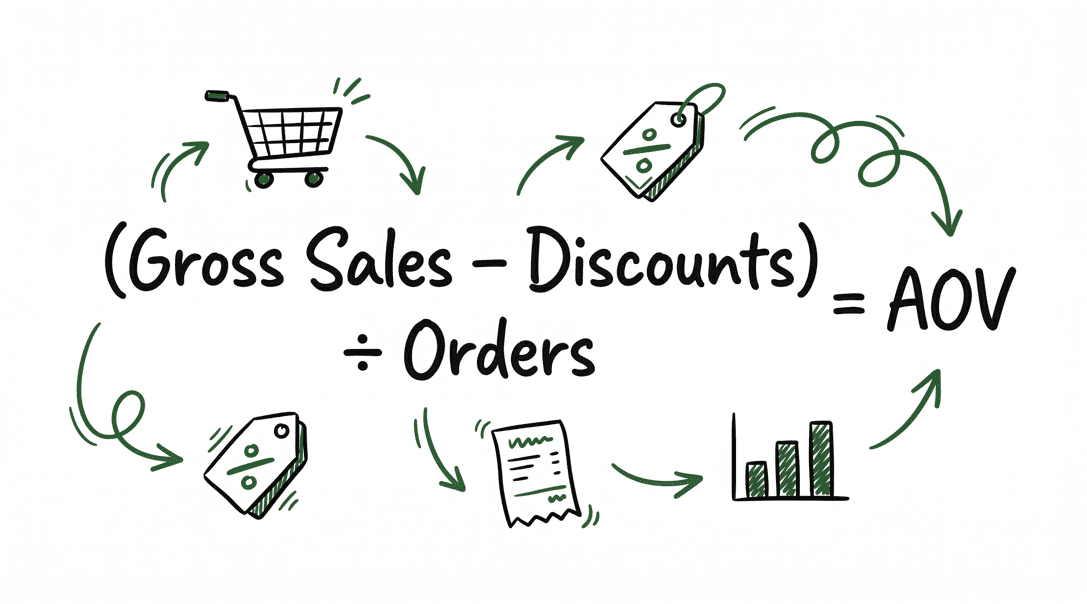
Here is where most guides get it wrong. The Shopify-AOV-Average Order Value formula repeated across almost every blog is:
| Source | Formula |
|---|---|
| Most guides | Total Revenue ÷ Number of Orders |
| Shopify’s actual formula | (Gross Sales − Discounts) ÷ Number of Orders |
Shopify updated its AOV definition in January 2023 to reflect this. [1] What the platform explicitly excludes from its calculation:
| Item | Amount |
|---|---|
| Gross sales | $1,200 |
| Discounts applied | $200 |
| Taxes | $96 |
| Shipping | $150 |
| Number of orders | 10 |
| Method | Calculation | AOV |
|---|---|---|
| Most guides: total revenue ÷ orders | $1,646 ÷ 10 | $164.60 |
| Shopify’s formula: (gross sales − discounts) ÷ orders | $1,000 ÷ 10 | $100.00 |
A $64.60 difference per order, a 64% overstatement of what customers are actually spending on your products. If you are setting upsell thresholds or free shipping minimums using the inflated number, you are optimizing off the wrong baseline.
The heavier your discounting, the wider this gap becomes. Shopify retroactively applied this updated definition to all historical data in the admin when the change went live, so your full historical trend line reflects this formula throughout. [1]
Shopify has a built-in AOV report that uses the correct formula automatically. No manual calculation needed when trying to access your Shopify AOV Average Order Value Calculation. [5]
Step 1: In Shopify Admin, go to Analytics → Reports.
Step 2: Open “Average order value over time.” This is the primary AOV report.
Step 3: Set your date range. Use the “Compare to” feature to benchmark against a prior period, such as this month vs. last month, or this quarter vs. the same quarter last year.
Step 4: Click “Group by” to choose your time unit: day, week, month, quarter, or year. Grouping by day of week or month of year helps surface patterns. Does AOV spike on weekends? Does it fall during promotional windows?
Step 5: Go to Analytics → Reports → Total sales over time to see order volume alongside total revenue. Cross-reference your Shopify AOV-Average Order Value and understand the transaction volume behind the average.
Step 6: On your main Analytics home page, add AOV as a metric card for at-a-glance monitoring alongside sessions, conversion rate, and revenue.
| Report | What It Shows | When to Use |
|---|---|---|
| Average order value over time | AOV trend across any date range | Primary tracking, before and after promotions |
| Total sales over time | Orders and total revenue together | Cross-checking AOV, understanding volume |
| Total sales breakdown | Gross sales, discounts, net sales, taxes, shipping | Diagnosing what is driving or dragging AOV |
| Total sales by order | Each individual transaction by date | Finding outlier orders that skew your average |
| Sales by customer name | Order history per customer | B2B account analysis, loyalty program insights |
Before deciding whether your AOV needs work, benchmark your calculated Shopify AOV Average Order Value against the right category. Here are typical AOV ranges for US Shopify stores by industry: [6]
| Industry | Typical AOV Range |
|---|---|
| B2B / Wholesale | $300 – $1,000+ |
| Luxury & Jewelry | $200 – $500+ |
| Electronics & Tech | $150 – $400 |
| Home & Furniture | $150 – $350 |
| Sporting Goods & Outdoors | $100 – $250 |
| Apparel & Fashion | $50 – $150 |
| Health & Beauty | $50 – $120 |
| Pet Supplies | $50 – $110 |
| Food & Beverage | $40 – $100 |
| Toys & Games | $40 – $90 |
| Books & Media | $20 – $60 |
The median AOV across all US Shopify stores is $85. Top 10% of stores exceed $311 per order. The bottom 20% sit below $54. [2]
A healthyShopify AOV- Average Order Value is one that covers your customer acquisition cost (CAC) and leaves room for profit on the first order. If your AOV does not cover your CAC, you are relying entirely on repeat purchases to break even. That works in high-retention verticals. In lower-retention categories, it is a fragile foundation to build on. [2]
| Store Type | What to Track | Key Risk |
|---|---|---|
| General / multi-product | AOV by product category and channel | Blended average hides which lines drag overall value |
| Single-product / niche (skincare, supplements) | AOV over time | Bundles, subscriptions, and quantity breaks are the primary levers |
| Discount-heavy / promo stores | AOV before, during, and after each campaign | Discounting inflates order count while depressing AOV |
| B2B / wholesale | AOV by customer or company | Spot high-value account drop-off early |
| Multi-channel (online + POS + social) | AOV segmented by channel | Online and in-store customers often have very different spending patterns |
| AOV Pattern | What It Signals | Where to Focus |
|---|---|---|
| Below your industry range | Customers are not adding enough to each order | Bundles, free shipping thresholds, post-purchase upsells |
| Inconsistent across time | One channel or product segment is dragging the average | Segment by channel and product, identify the source of variance |
| Falls during and after promotions | Discounts are attracting lower-value buyers | Redesign your thresholds: tie free gifts or free shipping to a value above your baseline AOV |
| Strong AOV, low order count | Product-market fit is solid | Acquisition is the constraint, not product value |
Bundles are the most reliable Shopify AOV (Average Order Value) driver in ecommerce. Instead of selling one product at a time, you group complementary products together at a slight discount. Customers spend more in one order, and your per-order revenue goes up without any extra acquisition cost.
With Easy Bundle Builder, Shopify merchants can create several bundle types depending on their product mix:
Merchants like Cove ($4.4M in bundle revenue), Evry Jewels ($465K), and Marin Skincare ($457K) have used Easy Bundle Builder to build bundle strategies that meaningfully lift AOV. You can see live examples in the Shopify Bundle Gallery.
Offer Volume Discounts and Quantity Breaks
“Buy 2, get 10% off. Buy 3, get 20% off.” This tactic works especially well for consumables, apparel basics, and anything customers naturally buy in multiples. See discounting strategies for a full breakdown.
Kite Discount and Free Gift lets you set up tiered volume discounts natively on Shopify. You can configure discount tiers by quantity, by spend amount, or by product collection, and customers see a clear discount table as they add more items to cart. No code required.
Easy Bundle Builder is built for quantity breaks and pre-curated sets. It adds a quantity break table directly on the product page and supports cross-sell suggestions alongside the discount tiers to further increase basket size.
Kits work differently from DIY bundles. You curate the set for the customer, such as a Skincare Starter Kit, a New Pet Essentials Box, or a Coffee Lover’s Bundle, and present it as a single premium offering. Customers pay for the curation and convenience, which means your AOV goes up without requiring the customer to make a complex decision.
Easy Bundle Builder supports pre-curated sets with infinite variants and inventory sync, so you do not need to create separate Shopify products for each kit configuration.
“Spend $80, get a free gift.” Free gift campaigns drive customers toward a spend threshold without the margin hit of a straight discount. They protect margin better than a percentage-off promotion and create excitement around the purchase. See Skai Lama’s gifting strategies for more on how this works across different store types.
Kite Discount and Free Gift handles free gift campaigns natively on Shopify, including auto-adding the gift to cart when the threshold is met and a progress bar that shows customers exactly how close they are to qualifying. Merchants also use Kite Discount and Free Gift for BOGO offers and Buy X Get Y campaigns, all from the same dashboard.
Setting a free shipping minimum at roughly 30% above your current AOV is one of the lowest-friction Shopif AOV- Average Order Value tactics available. [4] It creates a visible incentive at the exact moment customers are already committed to buying, with no discount required.
The checkout is the highest-intent moment in the buying journey. A customer who has already clicked “Buy” is the easiest person to sell one more item to. No new traffic needed and no new persuasion required. Learn more about Shopify checkout upsells and how merchants use them.
Checkout Wiz, built for Shopify Plus merchants, lets you add post-purchase upsell offers, trust badges, and cross-sell recommendations directly in the checkout flow using Shopify’s native Checkout Extensions. No custom code required.
For a full playbook on each of these tactics with setup examples, threshold recommendations, and category-specific benchmarks, see: How to Increase AOV on Shopify.
FAQ On How To Calculate AOV On Shopify


.avif)

Free webinar
BFCM prep, live on one store.
We take one Shopify store through the whole BFCM funnel on screen, from AI search to checkout. You leave with the playbook to run the same on yours.
Thu, Oct 15
1 PM ET · 10 AM PT
60 minutes
Can't make it live? Register anyway. The recording and the playbook go to everyone who signs up.
Save your free seat
BFCM Prep Live. Thu, Oct 15 at 1 PM ET, 10 AM PT, 6 PM UK. 60 minutes.

