
.svg)
.svg)

.svg)
.svg)



%20(1).jpg)
.jpg)
Our Apps Have Driven
5X AOV | 2X Conversions | $30M+ Additional Revenue
5X AOV | 2X Conversions | $30M+ Additional Revenue
.svg)


5.0 (3000+ Reviews)


Shopify Apps





.svg)

Imagine setting up BOGO deals, free gifts, bundle pricing, and custom shipping rules for your Shopify store, without a $2,000/month Shopify Plus subscription or a single line of code. That's the power of Shopify Functions, Shopify's game-changing replacement for the deprecated Scripts system.
These invisible, server-side WebAssembly modules run in under 5 milliseconds during cart and checkout, letting any store (Basic plan and up) apply sophisticated logic via apps from the Shopify App Store. No more paywalls for promotions that drive revenue. Developers get precise control through Rust or JavaScript; merchants get results through no-code Shopify apps like Kite Discounts & Free Gifts or Easy Bundle Builder.
Whether you're optimizing your Shopify store for higher conversions or migrating before the June 2026 Scripts shutdown, this guide breaks it all down; from technical specs to real-world results generating millions in revenue.
Shopify Functions are custom backend rules that control how your store handles discounts, shipping rates, payment options, and checkout behavior. They run invisibly in the background every time a customer interacts with your cart or checkout. No theme code involved, no visible UI changes. Just logic that tells Shopify exactly what to do: apply this discount, hide that shipping option, validate this cart before purchase.
Not a developer? Skip to the section "How Can You Use Shopify Functions Without Writing Code?" to see which apps handle this for you with zero code required.
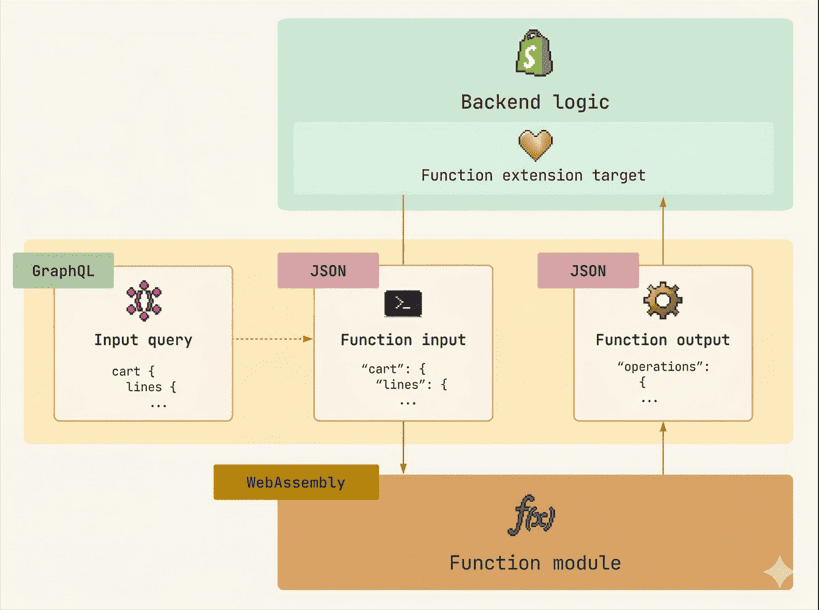
Shopify Functions are WebAssembly modules executed server-side in a sandboxed runtime at specific extension points in the Shopify backend pipeline. They accept structured input via GraphQL, process it through compiled logic (typically Rust or JavaScript), and return a declarative JSON output describing operations for Shopify to carry out. There are no cold starts. Execution must complete in under 5 milliseconds. The model is entirely stateless: input in, output out, nothing stored between runs.
That 5ms constraint is not a limitation. It is the design choice that makes the entire Shopify Functions system possible. Because Shopify Functions execute so fast, Shopify can safely let custom code run inside buyer-facing flows (cart, checkout, payments) without risking abandoned purchases from slow page loads.
Before Shopify Functions, this level of control required Shopify Scripts, which were locked behind the Shopify Plus plan at $2,000/month minimum. Only Plus merchants could run BOGO offers, tiered discounts, free gift campaigns, volume breaks, or custom shipping logic. Everyone else was stuck with Shopify's built-in discount system.
Shopify Functions changed that equation. Because Shopify Functions run through apps distributed via the Shopify App Store, any merchant on any plan can access this functionality. Kite, for example, gives stores on the Basic Shopify plan the same free gift and BOGO capabilities that previously required a Plus subscription and a developer. No code, no $2,000/month commitment, no agency retainer.
Every Shopify Function follows the same three-part anatomy: Input, Logic, Output.
Input is a GraphQL query that defines exactly what data the Shopify Function receives. This might include the customer's cart contents, product metafields, customer tags, or delivery options. The developer writes this query, and Shopify uses it to assemble a JSON payload at runtime.
Logic is the code that processes that input. It is written in any language that compiles to WebAssembly (Rust and JavaScript have official Shopify support) and runs entirely server-side. This is where the business rules live: "If the cart total exceeds $100, apply 15% off shipping" or "If the customer has the VIP tag, show the expedited payment option."
Output is a JSON document describing the operations Shopify should execute. The Shopify Function never modifies anything directly. It simply tells Shopify what to do, and Shopify carries it out. This declarative model keeps Shopify Functions safe, predictable, and fast.
For merchants using no-code apps (like Kite, Easy Bundle Builder, or Checkout Wiz), steps 1 and 2 collapse into a single action: install the app and configure your rules through a visual interface. The Shopify Function code runs behind the scenes.
When multiple Shopify Functions of the same type are active on a store (for example, three different discount apps), they do not chain sequentially. Instead, each Shopify Function runs independently and Shopify combines their outputs using its own merging algorithm. This means one app cannot break another app's logic, and execution stays fast regardless of how many Shopify Functions are active.
Shopify Functions are configured through shopify.extension.toml, which defines the extension point (target), the GraphQL input query path, and optional build settings. Scaffolding a new Shopify Function takes one CLI command:
shopify app generate extension
This creates the TOML configuration, GraphQL schema, input query template, and starter function code. From there, you define your input query, write your logic, compile to WebAssembly, and deploy with shopify app deploy. The canonical reference for Shopify Functions examples is the Shopify/function-examples GitHub repository, which covers discount, checkout, and order routing patterns in both Rust and JavaScript.
Shopify Functions cover 11 distinct customization areas. Here is the full breakdown of every Shopify Function type, what it does, and what legacy Script it replaces (if any).
| Shopify Function Type | What It Does | Replaces | Plan Required |
|---|---|---|---|
| Product Discount | Applies discounts to individual products or variants (tiered pricing, BOGO, volume discounts) | Line Item Scripts | Any plan (via public apps) |
| Order Discount | Applies discounts to the entire order (spend thresholds, bundle pricing, loyalty rewards) | Line Item Scripts | Any plan (via public apps) |
| Shipping Discount | Reduces or eliminates shipping costs based on cart rules | Shipping Scripts | Any plan (via public apps) |
| Cart Transform | Expands or merges cart line items (bundles into components, add-ons into parents) | No equivalent (net-new) | Any plan (via public apps) |
| Delivery Customization | Hides, renames, or reorders shipping methods at checkout | Shipping Scripts (visibility) | Shopify Plus |
| Pickup Point Delivery Option Generator | Generates pickup point options for delivery | No equivalent (net-new) | Shopify Plus |
| Local Pickup Delivery Option Generator | Generates local pickup options for delivery | No equivalent (net-new) | Shopify Plus |
| Payment Customization | Hides, renames, or reorders payment gateways at checkout | Payment Scripts | Shopify Plus |
| Cart and Checkout Validation | Blocks checkout with custom error messages when conditions are not met | No equivalent (net-new) | Shopify Plus |
| Order Routing Location Rule | Controls which warehouse or location fulfills an order | No equivalent (net-new) | Shopify Plus |
| Fulfillment Constraints | Defines rules for how fulfillment groups are created and restricted | No equivalent (net-new) | Shopify Plus |
Six of these 11 Shopify Function types have no Script equivalent at all. They are entirely new capabilities that only exist because of the Shopify Functions platform.
Shopify Discount Functions come in three sub-types covering product-level pricing, order-level discounts, and shipping cost adjustments. They are the most widely adopted Shopify Function type, available on all Shopify plans through public apps. Discount Functions actually run twice in the checkout pipeline: once in Phase 2 for cart line and order discounts, and again in Phase 5 for shipping discounts after delivery rates have been generated. Apps that implement these functions handle all three sub-types through a single no-code interface, so merchants can launch BOGO, volume breaks, free gifts, and shipping promotions without any code.
Read our Shopify Discount Functions developer guide for a full technical breakdown covering BOGO, free gift with purchase, volume discounts, and discount stacking behavior.
The Cart Transform API is a net-new capability with no Shopify Scripts equivalent, used to expand bundled products into their component line items or merge add-on products into a parent. It runs first in the 7-phase checkout pipeline, before any discount or delivery logic, so every downstream function sees the restructured cart. This is the Shopify Function type that powers modern bundle apps on Shopify, enabling BYOB, mix-and-match, and quantity break experiences while keeping inventory tracking and tax calculation accurate at the individual product level.
PRO-TIP: Easy Bundle Builder is an app built on the Shopify Cart Transform API. Use it to create bundles where the final checkout showcases each bundle item as a part of the bundle, yet individually.
The Delivery Customization API controls which shipping methods appear at checkout and how they are presented: hiding specific options, renaming them for clarity, or reordering them so a preferred method appears first. It is separate from the Shipping Discount Function (which controls pricing, not visibility) and encompasses three sub-generators: Pickup Point, Local Pickup, and the core Delivery Customization function. This Shopify Function type requires Shopify Plus even when accessed through a public app.
For a broader overview of what Shopify checkout extensions can do for shipping and payment, see our guide to Shopify checkout extensions for shipping and payment methods.
The Payment Customization API lets apps hide, rename, or reorder payment gateways at checkout based on rules like cart value, customer tag, or shipping region. Common use cases include hiding COD for international orders, showing buy-now-pay-later options only above a spend threshold, and prioritizing the highest-converting gateway. Payment Customization runs in Phase 6 of the checkout pipeline, after all discounts and delivery costs are finalized, and requires Shopify Plus.
The Cart and Checkout Validation API runs last in the 7-phase pipeline (Phase 7) and can block checkout with a custom error message when specific conditions are not met. Merchants use it to enforce business rules: blocking incompatible product combinations, enforcing minimum order quantities for wholesale accounts, restricting certain categories from shipping to specific regions, and preventing checkout when required customization fields are empty. This Shopify Function type requires Shopify Plus.
Read our practical guide: 4 steps to optimize checkout validation rules on Shopify.
Order Routing Location Rules and Fulfillment Constraints are the two Shopify Function types focused on post-purchase logistics. Order Routing assigns orders to the right warehouse or fulfillment location using custom priority logic, while Fulfillment Constraints define rules for how fulfillment groups are created (such as requiring certain products to ship together). These functions run in Phase 3 of the checkout pipeline and are most relevant to merchants operating multiple warehouses, retail locations, or third-party logistics providers.
Order routing and fulfillment constraints are most relevant to merchants with complex logistics needs. See our complete guide to Shopify Plus features for a full overview of enterprise-tier capabilities.
Every Shopify Function runs at a specific point during checkout. Shopify follows a strict 7-phase pipeline, and each phase feeds its output into the next. Understanding this pipeline is essential if you are building custom Shopify Functions or troubleshooting unexpected behavior.
Cart Transform runs first. It modifies cart line items before anything else happens. If you are using a bundling app (like Easy Bundle Builder), this is where the Shopify Function executes. Individual products get merged into a single bundle line item, quantities adjust, and the cart structure changes. Every phase that follows sees the modified cart, not the original one.
Product discounts and order discounts apply here. This includes percentage off, fixed amount off, BOGO, tiered pricing, volume breaks, and free gift with purchase logic. Apps like Kite execute their Shopify Discount Functions at this stage. The discount calculations use the cart lines that Phase 1 already transformed.
Shopify creates fulfillment groups and decides which warehouse or location should fulfill each item. Shopify Functions Order Routing Location Rules run here, prioritizing fulfillment locations based on custom logic.
This phase generates and modifies the delivery options your customer sees at checkout. It runs through three sub-generators in sequence:
5. Pickup Point Delivery Option Generator
6. Local Pickup Delivery Option Generator
7. Delivery Customization (hides, reorders, or renames the final list)
Shopify Discount Functions run twice during checkout. Phase 2 handled product and order discounts. Phase 5 handles shipping discounts (free shipping thresholds, reduced-rate shipping promotions). By this point, Shopify knows the delivery methods and their costs from Phase 4, so shipping discounts calculate accurately against real carrier rates.
Shopify Functions Payment Customization filters, hides, reorders, or renames payment methods. This phase uses the cart totals that already reflect all discounts and delivery costs from the previous five phases.
The final gatekeeper. Shopify Functions Validation checks the entire checkout state and can block the purchase if conditions are not met. This phase runs last because it needs the complete, finalized checkout data to make accurate decisions.
The strict dependency chain means changes in early phases cascade through every phase that follows. A Cart Transform Shopify Function in Phase 1 changes the line items that Discount Functions see in Phase 2. A discount applied in Phase 2 changes the order total that delivery options in Phase 4 are calculated against. If you are debugging unexpected behavior, trace the Shopify Functions pipeline from Phase 1 forward.
One of the most common questions merchants ask about Shopify Functions is whether they need Shopify Plus to use them. The answer depends on which Shopify Function types you need.
| What You Get | Plan Required |
|---|---|
| Shopify Discount Functions and Cart Transform via public apps | Any Shopify plan (Basic, Shopify, Advanced) |
| Checkout Validation, Payment Customization, and Delivery Customization Shopify Functions via public apps | Shopify Plus ($2,300/month) |
| Custom apps using any Shopify Function type | Shopify Plus |
| Fetch targets (external network access at Shopify Function runtime) | Shopify Enterprise only |
Before Shopify Functions, the only way to run custom promotional logic (BOGO, tiered discounts, volume breaks, free gifts with purchase) was through Shopify Scripts. Scripts required a Shopify Plus subscription at $2,000+ per month. That locked out the vast majority of Shopify stores.
Shopify Functions changed the technical architecture. Apps changed the plan restriction.
Because Shopify Discount Functions and Cart Transform work on any Shopify plan through public apps, the promotional mechanics that were once reserved for enterprise merchants are now accessible to every store. Kite Discount & Free Gift delivers BOGO, tiered discounts, free gifts, and volume breaks to a store on the $39/month Basic plan, using the same underlying Shopify Functions infrastructure that a Plus merchant would use. The Shopify Function runs identically regardless of plan level.
Not every merchant needs a developer to use Shopify Functions. If your use case falls into standard promotional or checkout customization territory, a Shopify Functions-native app handles the same server-side logic through a no-code interface.
A growing ecosystem of apps in the Shopify App Store is built directly on Shopify Function APIs. They compile the same WebAssembly modules, run the same server-side logic, and produce the same results as custom-coded Shopify Functions. The difference is that you configure them through a visual dashboard instead of writing Rust or JavaScript.
The table below shows some example apps built on Shopify Function APIs. Many other apps in the Shopify App Store use these same APIs. This is not an exhaustive list.
| What You Need | Example App | Shopify Function API Used |
|---|---|---|
| BOGO, tiered discounts, free gift with purchase, volume discounts | Kite: Discounts and Free Gifts | Shopify Discount Functions API |
| Bundle pricing, quantity breaks, BYOB bundles | Easy Bundle Builder | Shopify Functions Cart Transform API |
| Hide, rename, or reorder shipping methods | Checkout Wiz | Shopify Functions Delivery Customization API |
| Hide, rename, or reorder payment gateways | Checkout Wiz | Shopify Functions Payment Customization API |
| Checkout validation rules | Checkout Wiz | Shopify Functions Cart and Checkout Validation API |
A custom Shopify Function requires a development environment, code in Rust or JavaScript, WebAssembly compilation, and app deployment. With a no-code Shopify Functions app, you configure and launch a campaign in minutes.
When Shopify releases quarterly API versions, custom Shopify Functions need manual updates. Apps handle this automatically.
Custom Shopify Functions produce no native analytics. Apps like Kite include campaign performance dashboards, revenue attribution, and redemption rate tracking out of the box.
Apps offer visual previews of Shopify Functions campaigns before they go live. With custom Shopify Functions, testing requires deploying to a development store.
Kite: Discounts and Free Gifts is one example of an app built entirely on Shopify's native Discount Functions API. It supports campaign scheduling, customer tag targeting, country targeting, a goal-based progress bar, and live preview. Kite works on all Shopify plans, not just Plus. Other apps in the Shopify App Store also use the Discount Functions API for similar use cases.
The results below come from app like Kite, Easy Bundle Builder, and Checkout Wiz). Many other apps built on Shopify Functions deliver comparable outcomes across different use cases and merchant categories.
This section is for developers. If you prefer using Shopify Functions without code, skip to the next section.
Building a custom Shopify Function follows a defined workflow: scaffold, write logic, test, deploy, activate.
Start with the Shopify CLI:
shopify app generate extension
Select the Shopify Function type during scaffolding (product discount, order discount, delivery customization, etc.), and the CLI generates the correct template.
In src/run.graphql, define exactly what cart data your Shopify Function needs. Be selective: every field counts against a 30-point query complexity limit.
shopify app function run --input ./tests/mock-cart.json
Create mock cart JSON files for different scenarios (empty cart, single item, bulk order) and validate your Shopify Function returns correct output.
Deploy with shopify app deploy. Then activate using GraphQL Admin API mutations: discountAutomaticAppCreate for automatic discounts, or discountCodeAppCreate for code-based discounts.
For the complete code walkthrough, read our Shopify Discount Functions developer guide.
Shopify Functions are powerful but not without constraints. Understanding these limitations upfront prevents surprises during development and deployment.
Compiled Shopify Function files must stay under this limit. Rust binaries with large dependencies can exceed it.
Shopify Functions fail when processing large carts. JavaScript Shopify Functions start hitting this ceiling at around 34 cart line items. Rust handles larger carts more reliably (69 to 125 line items depending on optimization).
Every field in your Shopify Function's GraphQL input query costs points toward a shared 30-point budget. Public app developers call this a major constraint.
A secondary bottleneck that surfaces at around 135 cart line items.
Shopify Functions cannot make HTTP requests during execution. External data must be pre-synced to Shopify metafields. Exception: Enterprise plans can use Fetch targets.
Shopify Functions carry no state between runs. No randomization or clock functionality.
Two Shopify Discount Functions targeting the same cart line cannot both apply. Shopify resolves conflicts using discountApplicationStrategy: FIRST, MAXIMUM, or ALL (ALL only applies to order-level and shipping discounts, not product discounts). This is the single biggest behavioral change from Scripts.
Shopify Functions do not work on stores using the legacy checkout.liquid template. Migration to checkout extensibility is required first.
For workarounds on the stacking limitation, read the discount stacking section in our Shopify Discount Functions guide.
Shopify Scripts were Ruby-based backend customizations exclusive to Shopify Plus, managed through the Script Editor app. Shopify deprecated Scripts because the Ruby runtime could not scale to modern performance requirements, was limited to three script types, and locked customization behind the Plus paywall.
Shopify Functions are the direct replacement: faster (executing in under 5ms via WebAssembly), more extensible (11 Shopify Function types instead of 3 Script types), and available to all Shopify plans through the app ecosystem.
April 15, 2026: Scripts freeze completely (no new Scripts, no edits to existing ones).
June 30, 2026: Full shutdown. All Scripts stop executing permanently on every store.
If your store depends on Scripts, read our full migration guide: How to Migrate from Shopify Scripts to Shopify Functions in 5 Steps.
Shopify Scripts had a good run. For Shopify Plus merchants with development resources, they unlocked discount logic, shipping rules, and payment controls that the broader merchant base simply could not access. But the architecture had real limits: Ruby-only, three types, Plus-only pricing, and scale constraints that showed at checkout.
Shopify Functions replace all of that. Eleven types. WebAssembly. Sub-5ms execution. Available to every Shopify plan through the app ecosystem. Six of those 11 types are entirely net-new capabilities, which means the migration is not just a rebuild, it is an upgrade to tools that Scripts never offered.
The June 30, 2026 shutdown is the deadline that matters. If your store still runs Scripts for discounts, shipping visibility, payment logic, or checkout rules, the migration window is closing. The good news: the path is clear, and for most use cases, no developer is required.
For merchants: Start with the Scripts-to-Functions migration guide to audit your current Scripts and map them to the right Function type. Then explore apps built on Shopify Functions APIs, including Kite for discounts and free gifts, Easy Bundle Builder for bundle logic, and Checkout Wiz for Plus-level checkout customization.
For developers: The Shopify Discount Functions developer guide covers the technical implementation in detail, including Rust vs JavaScript tradeoffs, GraphQL input query patterns, and how discount stacking works under the new model. The official Shopify Functions documentation and the function-examples GitHub repository are the canonical references for building from scratch.
Shopify Functions are not just a migration requirement. They are the platform's next chapter, and understanding them now puts you ahead of merchants who are still treating this as a compliance task rather than a growth opportunity.
FAQ On What Are Shopify Functions


.avif)

Free webinar
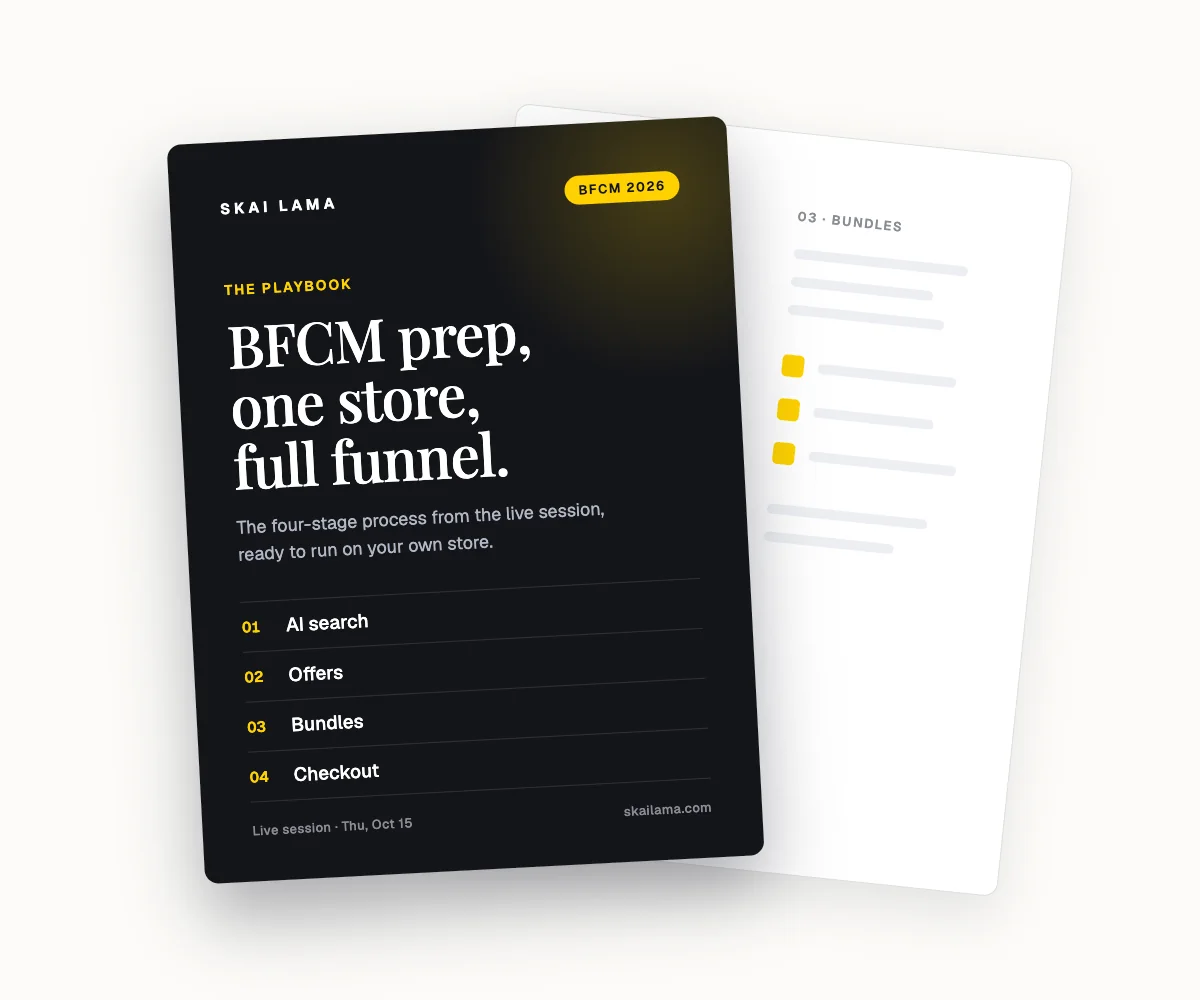
BFCM prep, live on one store.
We take one Shopify store through the whole BFCM funnel on screen, from AI search to checkout. You leave with the playbook to run the same on yours.
Thu, Oct 15
1 PM ET · 10 AM PT
60 minutes
Can't make it live? Register anyway. The recording and the playbook go to everyone who signs up.
Save your free seat
BFCM Prep Live. Thu, Oct 15 at 1 PM ET, 10 AM PT, 6 PM UK. 60 minutes.

