.svg)
.svg)
.svg)
.svg)
.svg)


.svg)

Our Apps Have Driven
5X AOV | 2X Conversions | $30M+ Additional Revenue
5X AOV | 2X Conversions | $30M+ Additional Revenue
.svg)


5.0 (3000+ Reviews)


Shopify Apps





.svg)

• Shop Pay is Shopify's accelerated checkout used by 250M+ shoppers: It stores shipping, billing, and payment details so customers can complete purchases with a single tap across any Shopify store — no re-entering information.
• Up to 50% higher conversion vs guest checkout: Shopify's own research shows Shop Pay drives up to 50% higher conversion. Even when a customer does not use it, the presence of Shop Pay on your checkout page lifts lower-funnel conversion by 5%.
• Shop Pay Installments is now available in the US, Canada, and the UK: BNPL terms up to 24 months. Requires Shopify Payments to be active. Capital One and Chase credit cards are not accepted for monthly payment options.
• Winter 2026 added Apple Pay inside Shop Pay and a personalised checkout button: The last four digits of a customer's saved card now appear on the Shop Pay button, and Apple Pay is available as a payment method within Shop Pay.
• Is Shop Pay safe? Yes: it is PCI-compliant, uses two-factor authentication, and carries no added fraud liability for merchants.
In a world where convenience is king, the checkout experience can make or break a sale. For Shopify merchants, Shop Pay has become a game-changer. With over 250 million shoppers across 24 countries and growing, Shop Pay is more than just a payment method. It is a full-fledged conversion tool that simplifies purchases for customers and boosts revenue for brands.
In this guide, we'll break down what Shop Pay is, how it works, and why it might be the missing piece in your eCommerce funnel.
Shop Pay is Shopify's native accelerated checkout solution, used by over 250 million shoppers across 24 countries. Launched in 2017 as Shopify Pay and rebranded to Shop Pay in 2020, it lets customers complete purchases with a single tap by securely storing their email address, shipping address, billing details, and payment information across all Shopify stores.
Unlike creating a separate account for every store you shop at, Shop Pay works across the entire Shopify ecosystem. Once a customer saves their details on any Shop Pay-enabled store, those details are available the next time they check out on any other Shopify store, no re-entering information, no extra steps.
For merchants, Shop Pay is built directly into Shopify Payments. There is no additional app to install and no separate activation fee. Once Shopify Payments is active on your store, Shop Pay can be enabled from your Payments settings with a single toggle.
Beyond fast checkout, Shop Pay includes four additional layers of value: Shop Cash (a 1% cashback rewards program on purchases made through Shop Pay in the US and Canada), Shop Pay Installments (buy now, pay later in partnership with Affirm, available in the US, Canada, and the UK), the Shop App (a mobile shopping experience that lets customers track orders and shop using their saved details), and carbon-neutral shipping (Shopify offsets the carbon emissions for every Shop Pay order at no cost to merchants or customers).
According to Shopify's own research, Shop Pay drives up to 50% higher conversion compared to guest checkout, and the mere presence of Shop Pay on a checkout page lifts lower-funnel conversion by 5%, even when a customer chooses not to use it.
• One-click checkout experience
• Save info securely across stores
• Works via the Shop App for mobile-first users
• Offers Shop Cash rewards to incentivize repeat purchases

When a customer uses Shop Pay for the first time:
1. They enter their details: shipping, payment, and phone number.
2. Those details are encrypted and stored securely by Shopify.
3. Next time, all they need is a verification code sent to their phone.
Result: A 4x faster checkout process compared to traditional methods.
As a merchant, enabling Shop Pay means:
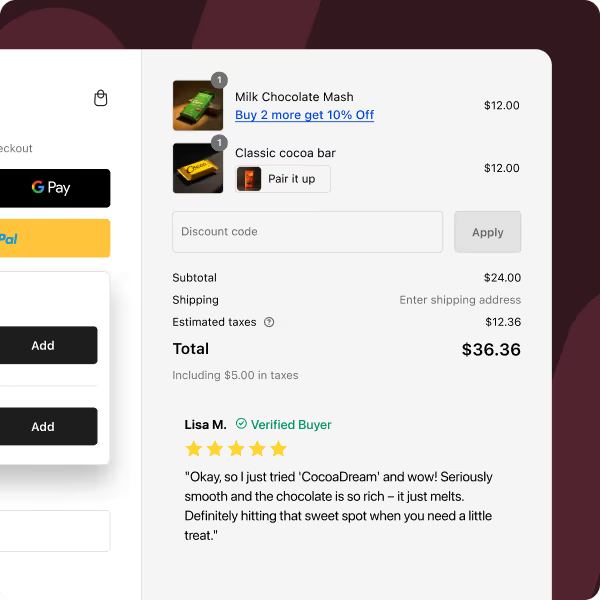
• Customers see the Shop Pay button on the checkout page
• Shopify handles all backend security and updates
• Customers who've used Shop Pay elsewhere will autofill instantly
According to Shopify, merchants who use Shop Pay see up to 50% higher conversion rates compared to guest checkout.
Shop Pay is not just fast, it is flexible. Through a partnership with Affirm, it allows customers to split their purchase into smaller payments. Shop Pay Installments is available in the US, Canada, and the UK (UK support added in Winter 2026, with payment terms up to 24 months).
| Plan Type | Repayment Schedule | Fees/Interest |
|---|---|---|
| Pay in 4 | Bi-weekly | 0% interest |
| Monthly Plans | 3 to 12 months | Varies by credit profile |
• No impact on credit score for basic eligibility checks
• Increases Average Order Value (AOV)
• Merchants get paid upfront; Affirm handles collections
Note: Installment fees are higher at 5.9% + $0.30 per transaction, so factor that into pricing.
To offer Shop Pay Installments, both Shopify Payments and Shop Pay must be active on your store. Your primary business entity must be based in the US, Canada, or UK with a matching payout currency (USD, CAD, or GBP). Only one Shopify Payments account per market is allowed.
On the customer side, buyers need a billing address in the US, Canada, or UK. Capital One and Chase credit cards are not accepted for monthly payment plans. Accounts can be suspended by Affirm if the store is password-protected, uses a non-English primary language, operates in a non-eligible currency, is B2B-primary, or sells regulated products such as gambling or financial services.
To protect your margins, consider layering in cashback strategies to increase AOV alongside Shop Pay Installments.
Absolutely. Shopify has built Shop Pay to meet the highest standards of security.
• PCI DSS-compliant encryption
• One-time SMS code verification
• 2FA protection in the Shop App
• Shopify never shares full card info with merchants
For customers wary of sharing card details repeatedly, Shop Pay provides peace of mind and convenience.
| Feature | Shopify Payments | Shop Pay |
|---|---|---|
| Type | Payment gateway | Accelerated checkout method |
| User | Used by merchants to process payments | Used by customers for faster checkout |
| BNPL (Buy Now Pay Later) | Not supported | Available via Affirm |
| Speed & Conversion | Standard checkout process | Up to 50% higher conversion vs guest checkout |
| Customer Info Storage | Not stored for reuse | Securely stored across devices and stores |
Shop Pay requires Shopify Payments to be enabled, but it functions as an added frontend optimization layer.
Want to go even further? Before enabling Shop Pay, it's a good idea to optimize your Shopify cart before checkout to reduce drop-offs and keep users flowing smoothly.
While enabling Shop Pay is free, the fees vary depending on the usage:
Standard transactions use Shopify Payments rates (typically 2.9% + $0.30 for online orders). Shop Pay Installments carries a higher merchant fee of 5.9% + $0.30 per transaction, which Affirm charges to cover the cost of financing.
Pro tip: Use tools like Checkout Wizard to optimize your AOV and absorb the installment fee overhead strategically.
Shop Pay offers more than speed. It delivers data-backed performance:
• Outperforms other accelerated checkouts by at least 10%, with 77% of Shop Pay users more likely to make repeat purchases
• Increased AOV with installment plans
• Lower cart abandonment due to seamless UX
• Carbon offsetting for each delivery — eco-friendly branding
• Syncs with the Shop App for order tracking and discovery
Pair Shop Pay with mobile checkout experiences that convert to boost performance across devices.
1. Go to Shopify Admin > Settings > Payments
2. Select Shopify Payments > Manage
3. Enable Shop Pay
4. To offer installments, agree to Affirm's terms
Just click Deactivate Shop Pay in the same section.
Want to customize the checkout even more? Use Checkout Wizard to:
• Add upsells or order bumps
• Insert post-purchase offers
• Personalize messages around Shop Pay
1. Want to remove Shop Pay?
Merchants can toggle it off from the Payments settings.
2. Why do some users get denied Installments?
Eligibility is decided by Affirm, based on credit checks and risk factors.
3. Customer can't access Shop Pay?
They may need to verify via SMS or update browser cookies.
Shopify's Winter 2026 Editions release introduced several notable Shop Pay updates.
The last four digits of a customer's saved card now appear directly on the Shop Pay button at checkout. This reduces hesitation by letting customers confirm exactly which card will be charged before they tap.
Apple Pay is now available as a payment method within Shop Pay. Customers who prefer Apple Pay can use it through the Shop Pay checkout flow without the merchant needing any separate integration.
BNPL through Shop Pay Installments is now live in the UK with payment terms up to 24 months. Previously only available in the US and Canada, the UK expansion opens Shop Pay Installments to a significantly larger merchant base.
Shop Pay now functions across all markets, with domestic orders processed via Shopify Payments and international orders routed through Global-e. Merchants selling internationally no longer need to choose between Shop Pay and cross-border functionality.
Subscribers now automatically receive a notification before their saved payment method expires on a Shop Pay subscription order, reducing involuntary churn from failed payments.
Shop Pay is available on any Shopify store that has Shopify Payments enabled. As of 2026, that includes tens of thousands of brands across every product category, from global DTC names to independent Shopify merchants.
Well-known brands that accept Shop Pay include Gymshark, Olaplex, Allbirds, Spanx, and Dossier, among many others. Because Shop Pay is built into Shopify's checkout infrastructure, any merchant running on Shopify Payments automatically has the option to activate it.
Since 2024, Shop Pay has also expanded beyond Shopify stores to merchants on other platforms and social channels, including Instagram and Facebook, where customers can check out using their saved Shop Pay details without leaving the app.
If you are a shopper, look for the Shop Pay logo at checkout on any Shopify-powered store. If you are a merchant, Shop Pay activation takes under two minutes from your Shopify Payments settings.
Shop Pay is no longer a "nice to have." It is a must-have for Shopify brands aiming to increase speed, conversion, and customer satisfaction. From one-tap checkouts to flexible installments, it empowers both the buyer and the seller.
Want to go deeper into your optimization strategy? Here are two powerful next steps:
• Customize your Shopify checkout flow with extensions and post-purchase offers.
• Increase customer lifetime value with retention-focused checkout.


.avif)