.svg)
.svg)

.svg)
.svg)


.jpg)
Our Apps Have Driven
5X AOV | 2X Conversions | $30M+ Additional Revenue
5X AOV | 2X Conversions | $30M+ Additional Revenue
.svg)


5.0 (3000+ Reviews)


Shopify Apps





.svg)

Product bundling can look very different depending on what a business sells.
The common thread is simple: several related products are presented as one clearer, more valuable buying decision.
In this guide, we will examine 14 real product bundling examples from Shopify stores. Some are built with Easy Bundle Builder and show how specific bundle capabilities work in practice, while others are broader Shopify examples chosen for the merchandising strategy they demonstrate. The same underlying mechanic can solve very different problems depending on the catalogue, customer, and buying decision.
Product bundling is a strategy in which two or more related products or services are grouped into one offer. The products may be chosen by the merchant, selected by the customer, or combined through a set of quantity and pricing rules.
Bundles are often discounted, but the value can also come from convenience, curation, personalization, or access to a complete solution. Shopify similarly defines a bundle as a set of related products commonly offered together at a discount.
A simple example is a skincare set containing a cleanser, serum, and moisturizer. Instead of asking the shopper to evaluate three separate products, the brand presents them as one routine.
For merchants, the key question is not simply, “Which products can I group together?” It is:
Which combination makes the customer’s decision easier or more valuable?
To show you just how flexible bundling can be, we've pulled together 14 real examples from Shopify stores. Many use the same core mechanic: the kind of build-your-own, mix-and-match flexibility a bundle builder like Easy Bundle Builder makes possible, but each brand uses it to solve a different problem. Some make a big catalogue easier to shop, some nudge shoppers to add more to their cart, others just make gifting effortless. As you go through them, you can see how a little structure turns a simple group of products into an offer people actually want to say yes to.
.webp)
Sodii lets customers build a hydration box by combining flavors and formats, including sachets and tubs. The offer starts rewarding the shopper with two products and increases the savings as more products are added: 5% for two, 10% for three, 15% for four, and 20% for five or more.
Electrolyte customers often want variety for different routines, travel needs, or flavor preferences. The bundle preserves that choice while giving every additional item a visible purpose. Because the first saving appears at only two products, the offer does not demand a large initial commitment.
If you sell replenishable products in several flavors, scents, or formats, begin the reward ladder close to your shopper's normal basket size. The next tier should feel achievable, not distant. For that, you can create a visible progress bar toward the discount, the kind Easy Bundle Builder builds in, which will keep that gap feeling close instead of far off.
.png)
Remedy's Protocol Builder moves shoppers through three steps: choose a cleanser, a treatment, and a moisturizer. Products are labeled by function rather than product name, so options read "for cleansing," "for rich moisture," or "for dark spots."
A live "My bundle" panel: a built-in feature of Easy Bundle Builder's multi-step layout, fills in as the shopper completes each step. Remedy carries its clinical branding through the experience with an Rx mark and Dr. Muneeb Shah's signature.
While assembling a skincare set is easy to do, building a clinically guided protocol is not. This clinical framing turns three separate product decisions into one guided routine, while the function-first labels help shoppers choose even if they aren't familiar with the catalogue.
The builder generated $128K in bundle revenue at a 43% higher AOV on bundle orders (you can see the case study below to know how Easy Bundle Builder made this possible for Remedy).
If your brand has genuine expertise behind its products, build the bundle around that expertise instead of confining it to a generic "About page." In Easy Bundle Builder's Step Setup, each step's title is a free text field, independent of any product name. You can use that to frame the step by its function, like "Choose your cleanser" or "Choose your treatment," rather than a generic label.
Also read: How Remedy Science Generated $128K with a Skincare Protocol Bundle Builder
.webp)
Neutonic’s 12-can pack setup maps well to Easy Bundle Builder’s Box Selection pattern: shoppers choose a predefined pack option, such as a single-flavour pack or mixed pack, and the bundle experience guides them toward that selected box.
Customers can then choose between a one-time purchase (£29.99) or a “Subscribe & Save” option (£25.50), with delivery every 4, 6, 8, or 12 weeks. The recurring plans themselves are powered by the connected subscription app, while Easy Bundle Builder’s subscription display settings let the merchant control how the intervals, discounts, and savings are presented within the bundle experience.
For a product typically purchased by the case, Neutonic makes the price difference easy to evaluate by showing the unit cost alongside the total: £2.50 per can for a one-time purchase versus £2.13 with the subscription.
The customer can compare pack composition, purchase type, delivery frequency, and effective unit price without leaving the product-selection experience. That makes the subscription feel like part of configuring the purchase rather than a separate commitment introduced later.
For multipack consumables, make the comparison concrete. Show the unit price alongside the total pack price, and let your shoppers compare one-time and subscription options while they are still configuring their purchase.
If you use Easy Bundle Builder with a subscription app, use EBB’s display controls to make the delivery interval and associated savings clear, while leaving the underlying recurring billing and cadence to the connected subscription platform.
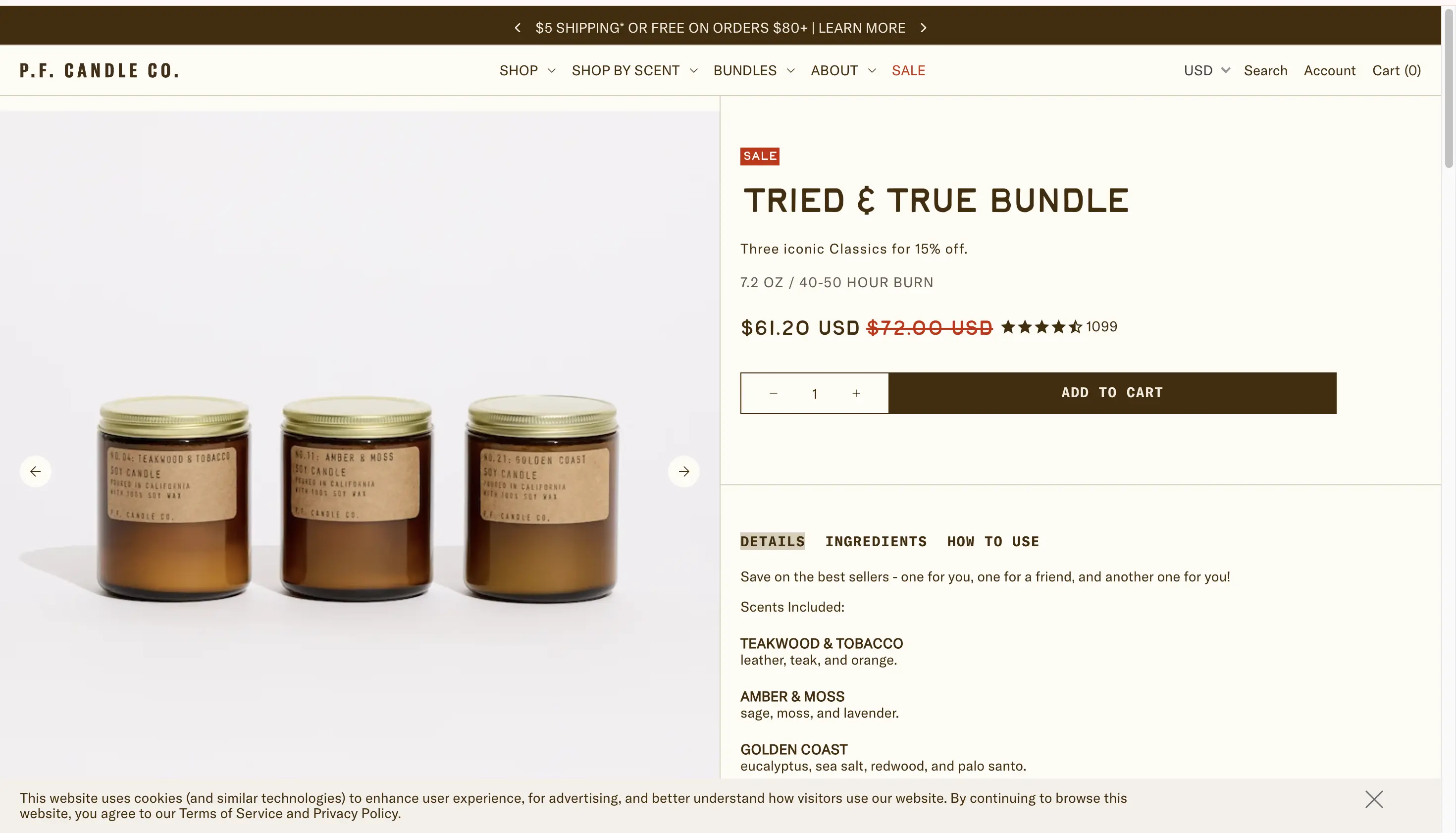
P.F. Candle Co.'s "Tried & True Bundle" packages three best-selling scents, viz., Teakwood & Tobacco, Amber & Moss, and Golden Coast, as one pre-set box. The shopper doesn't choose the scents; they just pick a quantity and add the whole set to the cart. Elsewhere in its Bundles section, the brand also runs a build-your-own trio for shoppers who want to pick every scent themselves.
For a "best sellers" set like this, removing the scent decision entirely is the offer. The product's own copy makes the pitch explicit: "one for you, one for a friend, and another one for you", framing the box as easy gifting or stocking up rather than a discovery exercise. Running this alongside a separate build-your-own trio lets the brand serve confident scent-pickers and undecided gift buyers without either format compromising the other.
If you have a small number of proven best-sellers, package them as one fixed set at a single flat discount, and name it plainly, say, "Best Sellers," "Tried & True", rather than asking the shopper to assemble something you could just hand them. Keep a flexible build-your-own version as a separate offer for shoppers who want control, instead of blending the two into one confusing experience.
.png)
CleanCo's build-a-box flow begins by asking customers to choose an alcohol-free spirit, the kind of first step Easy Bundle Builder's Step Setup is built for, where each step owns its own curated product pool. Elsewhere in the range, the brand pairs spirits with matching mixers in recognizable serves such as a G&T, Paloma, and ginger-based drinks.
The bundle is organized around what the customer wants to make, not simply around product categories. A spirit and its matching mixer form a complete occasion, which makes the complementary purchase feel useful rather than promotional.
When customers need several items to use the main product properly, bundle the complete experience. Coffee plus filters, a camera plus essential accessories, or a cocktail base plus mixer are easier to understand than unrelated add-ons. For a single-choice step like "pick your spirit," Easy Bundle Builder can auto-advance the shopper to the next step the moment that one choice is made, keeping the flow feeling like "first this, then this" instead of a shopping grid.
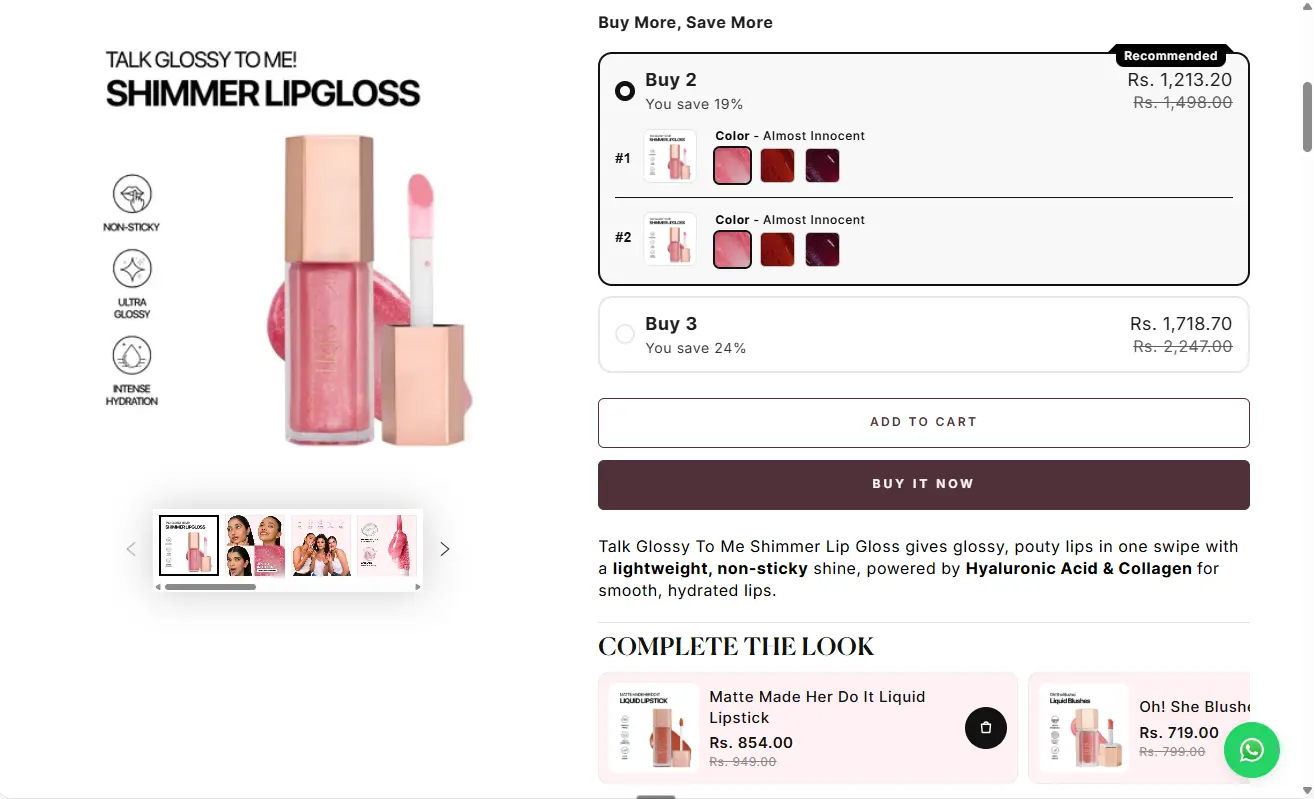
On its shimmer lip gloss product page, Iris Cosmetics prominently features a “Buy More, Save More” quantity break widget right above the main call-to-action. Customers are offered tiered volume discounts (e.g., Buy 2 to save 19%, or Buy 3 to save 24%) directly on the single-product view before adding items to their cart.
Quantity breaks incentivize shoppers to purchase multiple units of a product they already like in exchange for a higher percentage discount. It increases Average Order Value (AOV) by shifting a single-item purchase into a multi-unit bundle without requiring the merchant to create separate SKU bundles or complex product sets.
If you sell consumable or shade-variable products that customers often repurchase or stock up on, volume discounts are one of the simplest ways to start bundling. You don’t need to configure a multi-product kit. With Easy Bundle Builder’s Quantity Breaks feature, you can add ‘buy-more-save-more’ offers directly to existing product pages, without building a dedicated bundle landing page.
.webp)
Covert Threads lets shoppers mix and match socks to build their own bundle. As products are added, the bundle panel tracks their selections and shows progress toward the next reward. The offer uses free products at bundle milestones to encourage shoppers to continue adding items.
The shopper keeps control over which products go into the bundle, while the visible reward gives them a reason to increase its size. Instead of simply applying one fixed discount to the completed bundle, the offer turns adding products into a progression toward the next free item.
If you sell products customers often buy in multiples, combine product choice with visible reward milestones. Showing shoppers what they unlock next can give them a clearer reason to keep building their bundle.
.webp)
Crate 61's soap bundle builder, built on Easy Bundle Builder, uses a single-category grid where shoppers can add any combination of bar soaps from the full range, with a live quantity stepper on each product. A "Your Bundle" panel on the side tracks the build in real time and shows the running total.
Soap is a replenishable, scent-driven purchase. Shoppers often want variety rather than a merchant-picked assortment. Letting the discount grow with quantity turns "I'll just get my usual bar" into "I might as well fill out the set and get the best value." The live running total and explicit "best offer" messaging also remove any guesswork about whether adding one more item is worth it.
An open, single-category builder does not need multiple product types to justify a tiered discount. If the core product is naturally bought in varieties, such as multiple scents, colors, or flavors, providing larger rewards builds directly and tells shoppers clearly when they have reached the best available tier instead of leaving them to guess.
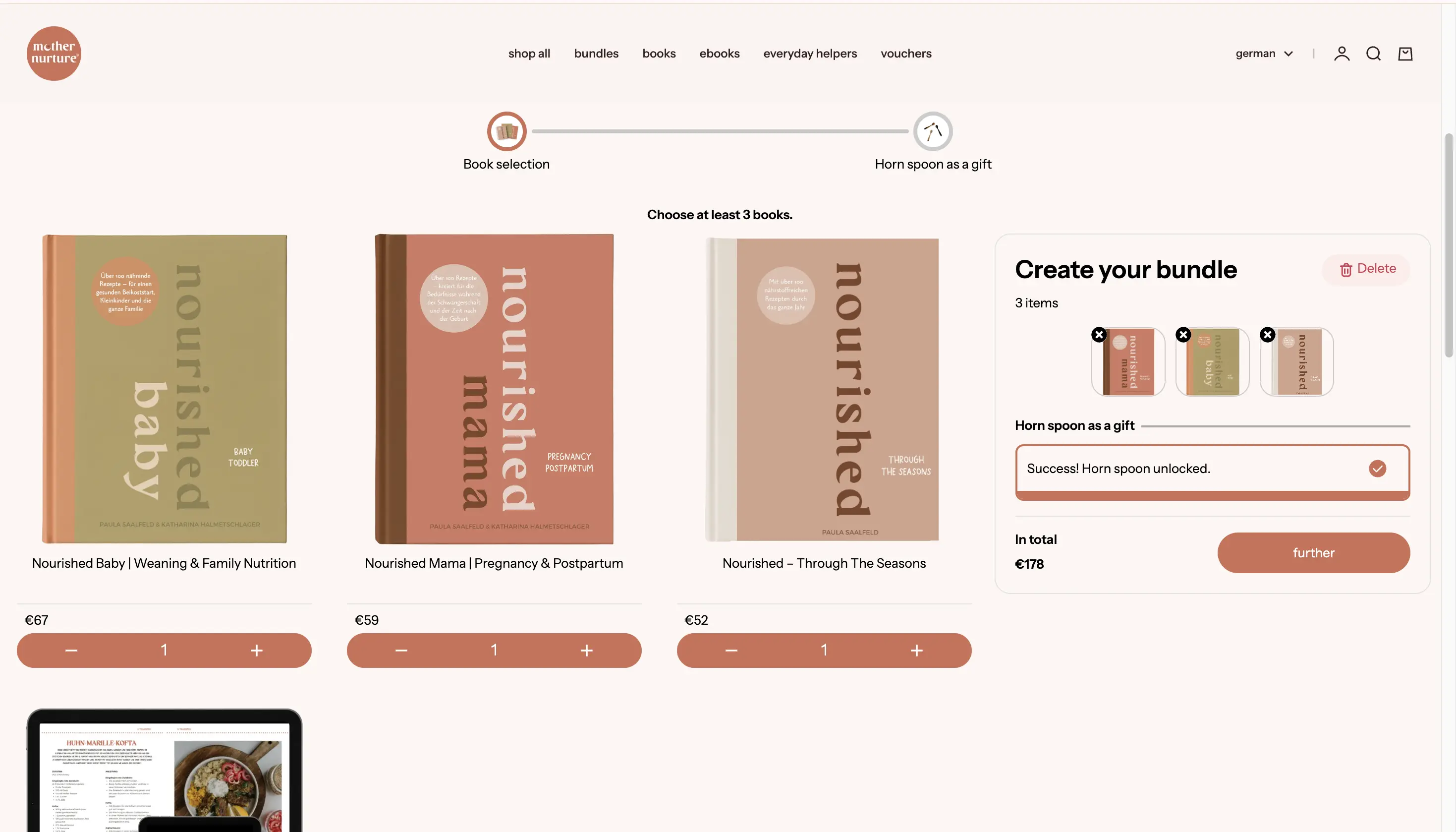
Mother Nurture uses a multi-step bundle builder where shoppers first choose at least three books from the available selection. Once they meet the minimum quantity, they move to the next step and receive a horn spoon as a gift. Rather than offering a fixed three-book set, the bundle lets shoppers choose the titles and quantities that suit them.
The bundle gives the merchant control over basket size without taking product choice away from the shopper. Instead of preselecting three books, Mother Nurture sets only the minimum quantity and lets customers decide what goes into the bundle. The gift then gives shoppers a clear reward for completing that requirement.
The multi-step structure also matters. Rather than presenting the product selection and gift in a single step, the experience separates them into stages. Shoppers first build the core bundle by choosing at least three books, before moving to the gift step. This keeps the initial decision focused on product choice while positioning the gift as the next part of the bundle journey.
If your goal is to increase the minimum number of products purchased while preserving customer choice, set the quantity rule around the basket rather than individual products. Then use the next step to introduce a free gift or another reward for completing the bundle. This works particularly well when customers have strong preferences about the products they want, but you still need a reason for them to build a larger basket.
These five build-your-own bundle examples vary in how much control they give shoppers. Some let customers choose anything, while others guide them with pre-set rules. The best approach depends on your shopper: confident customers prefer freedom, while browsers benefit from clear choices. Below are five examples ranging from fully flexible to highly structured.
.webp)
Color Wow gives "Build Your Own Bundle" a prominent place alongside its value sets, travel sets, and subscription options. Its catalogue spans shampoos, conditioners, treatments, styling products, and concern-based ranges such as frizz, dryness, curls, and thinning hair.
Haircare needs vary substantially by texture, concern, routine, and styling preference. A flexible builder lets shoppers create a set that reflects their needs without forcing every customer into the same predefined routine.
An open builder is most useful when customers already understand their needs but want control over the exact products. Use filters, categories, or concern labels to prevent a large catalogue from becoming overwhelming.
.webp)
Nutrition Kitchen organizes its meal-prep range around proteins, carbohydrates, and vegetables. Customers can choose components based on their preferences and combine them into macro-controlled meals rather than purchasing a rigid weekly menu. The brand also makes nutritional information part of the selection experience.
The customer is not merely buying separate food items. They are building meals around a health or fitness goal. Organizing the assortment by meal function reduces the effort required to plan, calculate, and prepare food.
If your customers shop with a specific goal in mind, such as improving sleep, targeting a skincare concern, hitting a fitness target, or following a meal plan, design your builder around that specific outcome rather than copying your site's standard navigation. This offers helpful direction while preserving flexibility.
.webp)
Graze&Co.'s Graze & Glitz Box asks shoppers to pick six cheese flavors to create a complete spread. The quantity is fixed, but the assortment remains flexible, giving customers control without leaving the endpoint open-ended.
"Pick six" is easier to understand than an unrestricted shopping grid. It creates a clear completion state and connects the bundle to a specific occasion: building a varied cheese board for sharing.
Fixed-size mix-and-match bundles work well for snacks, drinks, candles, coffee, and other products where variety matters. Choose a quantity that feels like a complete experience, not an arbitrary threshold.
.webp)
Secret Alchemist lets customers select fragrances for boxes of four, five, or six products, with a fixed price attached to each box size. The builder brings together perfumes across floral, fresh, woody, and warm scent families while keeping the shopper focused on completing the chosen box.
Fragrance is discovery-driven. A customer may want several scents for different moods and occasions rather than multiple units of one fragrance. Fixed box sizes create a helpful boundary, while the single box price removes repeated price comparison during selection.
If your assortment contains similarly priced products and customers value variety, fixed-size package deals can make selection simpler than calculating a separate price for every item.
.webp)
FAE Beauty offers a three-step lip kit in which the structure is predetermined, but shoppers can choose their preferred shades. The wider bundle collection also includes complete face and lip routines, while the custom lip kit combines a liner, lip color, and gloss into one finished look.
The merchant retains control over the composition of the routine, while the shopper retains control over the variants that determine whether the set feels personal. This balances curation with customization.
You do not always need a fully open builder. When product roles are fixed but variants matter, lock the structure and let shoppers personalize shades, sizes, flavours, or scents within each slot.
Which Product Bundling Strategy Is Right for Your Store?
The most successful product bundling examples are not necessarily the most complex. They solve one clear shopping problem, make the relationship between the products easy to understand, and give the customer an obvious reason to complete the offer.
For deeper store-by-store teardowns focused on execution and conversion mechanics, you can explore our product bundle examples from real Shopify stores. Or if you like, you can also browse the Shopify bundle gallery to see how these builders look live.
Product bundling, cross-selling, and upselling can all increase the value of a purchase, but they change the customer’s decision in different ways. Shopify also distinguishes cross-selling as recommending related items and upselling as moving the customer toward a higher-value option.
The difference is easiest to see in the examples above. Iris Cosmetics currently uses a cross-sell-led “Complete the look” module. CleanCo, Crate 61, and Secret Alchemist go further by structuring several items as a combined offer or guided purchase.
Not every bundle has to compete on price. A no-discount bundle can still be valuable when it gives the customer:
Once you have chosen a structure, the pricing model is largely decided for you:
The harder questions, such as, how deep to discount, how to protect margin at each tier, and how to test the offer, are covered in our complete guide to bundle pricing strategy.
A strong product bundling strategy begins with customer behavior, not with a discount rule. Use the following process to move from an idea to an offer that fits your catalogue.
Look at how customers already shop for and use your products.
Ask:
The strongest bundle often already exists in the customer’s behavior. Your job is to make it easier to recognize and buy.
Match the structure to the problem you are solving. The comparison table earlier in this guide maps common goals to bundle types with a live example of each. If you are choosing between two structures, pick the one that requires the fewest decisions from the shopper.
Do not add extra steps merely because a bundle builder supports them. The shortest flow that explains the offer is usually the clearest.
Decide why the shopper should choose the bundle instead of buying one item.
The value may be:
Choose one primary value driver. Too many competing messages can make the offer harder to understand.
A good bundle experience should answer four questions immediately:
Use clear quantity rules, visible progress, helpful product information, and a live review of the selected items.
For large catalogues, add filters or categories. For guided routines, explain the role of each step. For tiered offers, show the next reward before the shopper reaches it.
Measure whether the offer changes the behavior it was designed to change.
Useful metrics include:
Avoid using a single benchmark to judge every bundle. A two-item furniture set and a six-item snack box are designed to change very different buying behaviors, so their results should not be compared in the same way. Instead, measure whether the bundle improves the behavior you designed it for. That could mean increasing items per order, helping shoppers complete a routine, improving attachment of complementary products, or encouraging repeat purchases.
Once the structure is clear, build the experience around that goal. Easy Bundle Builder supports build-your-own and build-a-box flows, fixed-price and mix-and-match offers, quantity breaks, tiered discounts, subscriptions, free gifts, and add-ons.
Start with one customer problem and one clear bundle offer. Then expand only after you can see how shoppers are actually using it.
For a fuller framework on this, you can also see our guide to product bundling strategies for Shopify.


.avif)