
.svg)
.svg)

.svg)
.svg)






Our Apps Have Driven
5X AOV | 2X Conversions | $30M+ Additional Revenue
5X AOV | 2X Conversions | $30M+ Additional Revenue
.svg)


5.0 (3000+ Reviews)


Shopify Apps





.svg)

Shopify is evolving, and so should your store. With Shopify's decision to deprecate Scripts in favor of Shopify Functions, merchants have an opportunity to upgrade their store's discount offerings and checkout experience, improve scalability, and future-proof their Shopify store.
Whether you're a Shopify Plus merchant, a freelancer/developer who has set up Scripts for your clients, or a Shopify Agency that manages Plus stores, migrating from Shopify Scripts to Functions is mandatory.
This guide will walk you through the why, what, and how of this transition, ensuring your store remains functional and optimized.
Shopify Scripts consisted of lightweight Ruby snippets executed server-side during checkout on Plus plans. They analyzed inputs such as cart items, buyer attributes (like tags or location), available shipping rates, and payment methods, then modified outputs like item pricing, delivery choices, or gateway visibility. Housed in the Script Editor app, they enabled brands to deliver highly targeted checkout experiences without relying on third-party servers or complex integrations. Shopify Scripts have long been the backbone of custom checkout experiences for Shopify Plus merchants. Since you are now migrating from Shopify Scripts to Functions, lets first read into what scripts actually helped you do.

Shopify Functions are the replacement for Scripts. These arecompiled WebAssembly modules that run directly on Shopify's infrastructure. Instead of mutating a shared cart object in Ruby, a Function receives a snapshot of cart or checkout state and returns a set of operations. Faster, more predictable, and available on all Shopify plans (not just Shopify Plus). The key shift: Functions execute in under 5ms with no cold starts, and they work across all Shopify plans when used via a Shopify Functions compatible Shopify app.
Functions cover every customization type Shopify Scripts handled, plus new capabilities. Here's what the Shopify Scripts to Function migration gets you:
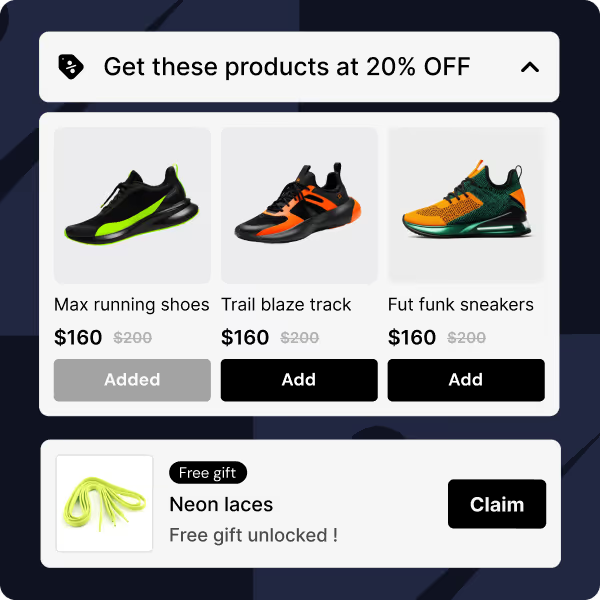
FUNCTIONS are NON-PLUS STORE INCLUSIVE ! Scripts were Shopify Plus-only. BOGO, tiered discounts, free gifts, volume breaks — none of it was available to standard Shopify stores, regardless of how much revenue they did. Any Shopify store, on any plan, can now run the same promotional mechanics that Plus brands were paying $2,000 a month and a developer to access. Now just install an app like Kite Discount & Free Gift at a very accesible price to create the most advanced promotions.
| Function Type | What It Does |
|---|---|
| Discount Functions API | Percentage, fixed, BOGO, tiered, volume discounts — replaces line item scripts |
| Cart Transform API | Expand or merge cart line items (bundles) — no Script equivalent existed for this |
| Cart & Checkout Validation API | Block checkout with custom error messages based on cart conditions |
| Delivery Customization API | Hide, rename, reorder shipping methods — replaces shipping scripts |
| Payment Customization API | Hide, rename, reorder payment gateways — replaces payment scripts |
| Order Routing Location Rules | Control which location fulfills an order — net new capability |
With Shopify Functions, you gain flexibility, scalability, and compatibility with Shopify’s latest development tools.
PRO TIP: Instead of migrating from Shopify Scripts to Functions via Code, use apps already built on the powerful Shopify Scripts platform such as Kite Discount & Free Gift.
Scripts were built for a different era of Shopify Ruby-based, Plus-exclusive, and difficult to scale. As Shopify's infrastructure modernized around GraphQL APIs and WebAssembly, Scripts became the bottleneck they were never designed to outlast.
The Shopify Scripts to Functions migration gives every merchant (not just Shopify Plus) access to powerful checkout customization, while giving Shopify a single, performant execution layer to maintain.
| Shopify Scripts | Shopify Functions | |
|---|---|---|
| Language | Ruby (mruby subset) | Any language → WebAssembly (JS, Rust most common) |
| Execution | Server-side, interpreted, variable speed | Compiled WASM, consistent sub-5ms, no cold starts |
| Available to | Shopify Plus only | All plans (public app) / Plus only (custom app) |
| External data at runtime | Limited | Not allowed — data must be pre-synced to metafields |
| Discount stacking | Full control within one script | Each Function runs in isolation; one product discount per line item |
| Deployment | Script Editor in Shopify Admin | Deployed as part of a Shopify app (public or private) |
| Network calls | Supported | Not supported — stateless input/output only |
| Scalability | Degrades under high traffic | Built for high-volume, no performance ceiling |
| Legacy Script Function | Replacement Shopify function | Core Modifications |
|---|---|---|
| Line item/pricing | Discount Functions | Item/order/shipping adjustments, bundles |
| Shipping management | Delivery Functions | Rate visibility, ordering, conditions |
| Payment handling | Payment Functions | Gateway show/hide/reordering |
| Cart adjustments | Cart Transform Functions | Line merges/splits, pre-checkout tweaks |
| Rule enforcement | Functions + workflow apps | Blocks and compliance checks |
| Date | What Happens |
|---|---|
| April 15, 2026 | Scripts freeze — no new Scripts can be published, existing ones can no longer be edited |
| June 30, 2026 | Full shutdown — all Scripts stop executing permanently. No rollback. |
The April 15 2026 freeze is the more urgent deadline. After that date, if something breaks in a live Script, you cannot fix it, you can only replace it with a Function.
If you do nothing: your Scripts don't migrate automatically. They simply stop running on June 30, 2026. Any discount logic, shipping rule, or payment customization built on Scripts will silently break at checkout.
When it comes to migrating from Shopify Scripts to Shopify Functions, you have two paths. Which one is right for you depends on the complexity of your Scripts.
Before choosing your path, here is the full picture. Shopify Scripts covered three types of customization: line item (discounts and promotions), shipping, and payment. No single app replaces all three on its own. Kite Discount & Free Gifts covers everything on the discount and promotion side. Checkout Wiz covers the remaining two: shipping method visibility and payment gateway customization. Together they replace every Script type your store was running, with no code and no developer required. If your Scripts spanned multiple types, you will likely need both apps.
If your Scripts handle discounts, free gifts, BOGO offers, tiered pricing, bundles, shipping rules, or payment customizations there's almost certainly an app that already does this natively on Shopify Functions. No code, no developer, no deployment pipeline.
This is the right path if:
For line item scripts i.e. discounts, free gifts, BOGO, tiered pricing:
Kite: Discounts & Free Gifts is built entirely on Shopify Functions and replaces line item Scripts with a no-code setup. You get every promotional type your Script was handling plus campaign scheduling, customer tag targeting, and a native progress bar without writing a single line of code. No hacks.
For quantity break scripts:
Easy Bundle Builder handles quantity breaks built on Shopify Functions.
For shipping scripts and payment scripts:
Checkout Wiz handles the visibility side of both. If your Scripts were hiding or renaming shipping methods, reordering payment gateways, or showing and hiding BNPL options based on cart value, Checkout Wiz replicates all of this through a no-code interface built on Shopify's Delivery Customization and Payment Customization APIs. No developer required, available on all Shopify plans.
The migration path with an app looks like this:
If your Scripts contain highly store-specific logic — custom stacking rules, external data dependencies, or conditions no app can replicate — you'll need to build a custom Function. This requires a developer and familiarity with Shopify CLI, JavaScript or Rust, and WebAssembly.
This is the right path if:
Custom Functions are deployed as private Shopify apps and require a Shopify Plus plan.
Not sure which path you're on? Run the Scripts Customizations Report in your Shopify Admin (Settings → Apps → Script Editor). Shopify maps each of your Scripts to a suggested replacement — it's the fastest way to know whether an app covers your use case before you plan a build.
Before you migrate from Shopify Scripts to Shopify Functions, you need to know exactly what you're migrating.
Go to Shopify Admin → Settings → Apps and Sales Channels → Script Editor and run the Scripts Customizations Report. This tool lists every active Script on your store — its type, what it does, and Shopify's suggested replacement app for each one. Export it as a CSV.
For each Script, document:
Then categorize each Script into one of three paths:
| Path | When to use it |
|---|---|
| Delete | Script is unused or redundant |
| Replace with an app | Standard discount, shipping, or payment logic — covered by an existing Functions-native app |
| Build a custom Function | Highly store-specific logic that no app replicates |
Note on third-party apps: Some apps programmatically created Scripts on your store without you writing any code. Those Scripts stop working on June 30, 2026 regardless. Contact those vendors now to confirm they've rebuilt on Functions if they haven't, find an alternative before April 15.
Once you've audited, match each Script to its Functions-native replacement. The table below maps script type to the right tool:
| Script Type | What It Did | Shopify Functions API | Recommended App |
|---|---|---|---|
| Line item (discounts) | BOGO, tiered pricing, free gifts, volume breaks | Discount Functions API | Kite: Discounts and Free Gifts |
| Line item (bundles) | Merge or expand cart line items into bundles | Cart Transform API | Easy Bundle Builder |
| Line item (checkout validation) | Block checkout based on cart conditions | Cart and Checkout Validation API | Checkout Wiz |
| Shipping (discount side) | Conditional free shipping, percentage off shipping rates | Shipping Discount API | Kite: Discounts and Free Gifts |
| Shipping (visibility side) | Hide, rename, or reorder shipping methods | Delivery Customization API | Checkout Wiz |
| Payment scripts | Hide, rename, or reorder payment gateways | Payment Customization API | Checkout Wiz |
If your Scripts contain complex stacking logic i.e. multiple discounts applying to the same line item; read the stacking section before choosing a path. That behavior works differently in Functions and requires a deliberate decision. You need not worry about this when using an app like Kite Discount & Free Gift as discount stacking is built into the solution. Kite and Checkout Wiz together cover every Script type. Kite handles all discount and promotional logic. Checkout Wiz handles shipping method visibility and all payment gateway customization. Together they are the complete no-code replacement for every Script your store was running.
If you're using an app: Install it, configure it to replicate your Script's logic, and test it against your documented Script behavior before touching anything live.
If you're building a custom Function (share this with your developer) :
npm install -g @shopify/cli
shopify app init my-functions-app
shopify app generate extension --type discount
Key things to design for:
src/run.graphql, specify exactly what cart data your Function needs. Functions only receive what you ask for.shopify app function run --input ./tests/mock-cart.jsonUSE AN APP INSTEAD: Remember, configuring your own Shopify function can be intitmidating. Instead use an that already uses Shopify Functions.
Don't cut over cold. The safest approach is to run your new Function alongside the existing Script for 2+ weeks before going live.
How to do it without disrupting live customers:
functions-testOne caveat: Scripts and Functions don't always coexist cleanly. There are documented cases where an active Discount Function causes Scripts to fail with a nil conversion error. If you see unexpected Script failures during this window, that's why isolate by script type and test each replacement independently.

Once parallel testing is solid:
shopify app deployDo this before June 30, 2026. Don't wait for the shutdown to do it for you. Scripts disabled by Shopify on June 30 cannot be re-enabled. There is no rollback.
Moving off Shopify Scripts is not just a compliance exercise. The tools you are moving to do things Scripts were never capable of. Here is what changes.
Scripts had zero storefront presence
A Script ran invisibly at checkout. Customers had no visual prompt before checkout to add more to their cart, no progress bar showing how close they were to a reward, no product page widget, no announcement bar. Kite puts the offer in front of customers before they reach checkout: on product pages, in the cart drawer, and in the side drawer, driving the behaviour that makes the promotion worthwhile.
Scripts had zero analytics
Merchants running Scripts had no way to know whether their BOGO campaign was actually driving additional units, or whether their tiered discount was genuinely lifting AOV versus just giving money away to customers who would have spent that amount anyway. Kite's analytics surfaces AOV lift, redemption rates, and customer segment behaviour compared against a control group of orders where no offer was applied.
Every Script change required a developer
Adjusting a discount threshold, adding a new tier, swapping a gift product: all of these required editing Ruby code. With Kite, an ecommerce manager can make those changes directly from the Shopify Admin without touching any code.
Scripts could not be tested before going live
Every Script change went live immediately with no preview. Kite provides a live storefront preview and a guided test flow so you can confirm the offer is working exactly as intended before any customer sees it.
The analytics layer is worth calling out specifically: Shopify Plus brands running Scripts had less visibility into promotional performance than any Shopify merchant using Kite has today.
Shopify Scripts were available exclusively on the Shopify Plus plan, which starts at $2,000 per month, meaning the promotional mechanics that drive real revenue growth (BOGO offers, tiered discounts, free gifts with purchase, volume breaks, and customer tag pricing) were reserved entirely for enterprise brands. Shopify Functions technically extended access to all plans, but the implementation still required a developer to build and maintain custom code, so the plan paywall was simply replaced by a technical one. Kite removes both barriers: it runs on every Shopify plan and requires no developer to configure, deploy, or manage any of these campaign types. A mid-market brand on a standard Shopify plan using Kite today has access to more sophisticated promotional mechanics than most Shopify Plus brands had with Scripts.


Functions empower merchants to create faster, smoother checkout processes. For example, you can implement advanced discount applications that calculate dynamically based on customer behavior or cart value, delivering a superior user experience.
Unlike Scripts, Functions can handle high-traffic scenarios without compromising performance. They also integrate effortlessly with Shopify’s GraphQL APIs, enabling complex customizations with ease.
These targeted cart contents, extending far beyond basic discounts to sophisticated pricing adjustments.
Common examples:
In essence, these acted as the intelligent core for promotional pricing on stores needing flexibility beyond Shopify's standard tools.
These managed shipping visibility, labeling, and occasionally pricing based on order context.
Typical scenarios:
This transformed rigid shipping setups into responsive, customer-centric offers.
These influenced which payments appeared and their sequence, often tied to business or risk factors.
Key uses:
They provided strategic oversight of the payment stage.
Not a formal category but widely applied, these enforced rules to prevent issues.
Examples:
These served as operational safety nets alongside revenue tools.


.avif)


