.svg)
.svg)
.svg)
.svg)
.svg)


.svg)
%20(1).jpg)
.jpg)
Our Apps Have Driven
5X AOV | 2X Conversions | $30M+ Additional Revenue
5X AOV | 2X Conversions | $30M+ Additional Revenue
.svg)


5.0 (3000+ Reviews)


Shopify Apps





.svg)

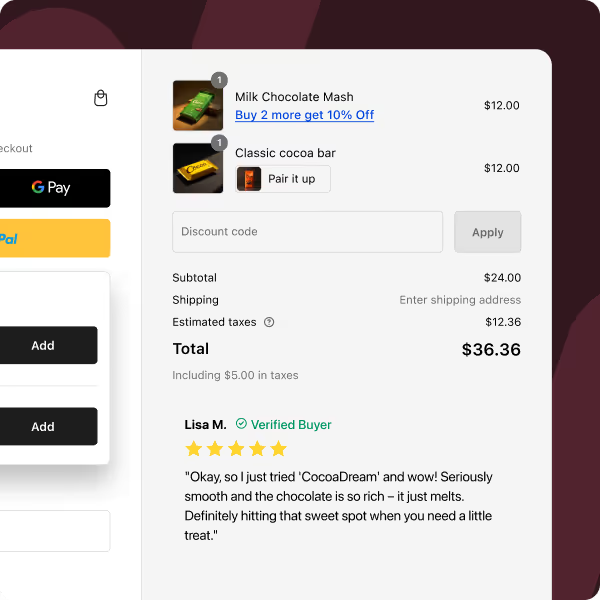
Your Shopify checkout flow can play a crucial role in your ecommerce conversions. A well-structured checkout flow not only simplifies the purchase journey but also significantly reduces cart abandonment rates. However you must be all too familiar with Shopify obsession with prioritising single click checkouts. That's where the Shopify single page checkout comes into play.
But does that work better than the other?
In this post, we delve into the two predominant strategies, one-page vs. multi-page checkout, to understand which is more effective in optimizing conversions.
Also known as the Shopify single page checkout, the one-page checkout model simplifies the purchasing journey by consolidating all steps into a single, streamlined page. This approach is designed to make the checkout process more efficient and user-friendly.
Let's look at the advantages and disadvantages of implementing a one-page checkout in ecommerce:
The Shopify one-page checkout significantly accelerates the purchase process. Compared to the average 1:40 minutes required for a multi-page checkout, a one-page system can trim this down to just 53 seconds.
This reduction in time not only enhances the user experience but also plays a crucial role in improving conversion rates, as customers appreciate and respond positively to a quicker checkout experience.
Want to know more about optimizing your Shopify checkout for faster conversions?
By condensing the checkout process into a single page, the number of clicks and interactions required from the customer is significantly reduced. This streamlined approach not only makes the process faster but also more convenient, as customers can enter all their details in one go without having to navigate through multiple pages.
The reduction in clicks also means there's less chance for customers to second-guess their purchase, leading to a smoother transaction.
Presenting all the necessary checkout steps on 1-page makes the process inherently intuitive. Customers can see the entirety of their checkout journey at a glance, which helps understand how far they have progressed and what's left to do. This clarity in navigation can greatly reduce confusion and hesitation, contributing to a more positive user experience and potentially higher conversion rates.
I should highlight that if you have a Shopify Plus single page checkout, you can do a lot more in terms of using banners, opt-ins, button designs. These are easily editable Shopify one page checkout apps such a Checkout Wiz that supports Shopify Checkout Extensibility.
One of the key advantages of a Shopify one-page checkout is its ability to reduce cart abandonment rates. With every step and requirement clearly visible on a single page, customers are less likely to get frustrated or overwhelmed, which are common reasons for abandoning carts. The simplicity and transparency of seeing everything at once reassure customers, encouraging them to complete their purchase. That is why Shopify one-page checkout conversion rate is often higher than a multi-page checkout.
Discover effective strategies to reduce cart abandonment in your Shopify store.

One of the main drawbacks of a Shopify one-page checkout is the potential to overwhelm customers with too much information at once. When a checkout page is densely packed with numerous fields and options, it can lead to confusion and frustration, particularly for customers who prefer a more guided and segmented approach. This overwhelming experience can be counterintuitive to the checkout's primary goal of simplifying the process.
Therefore, it's essential to carefully design Shopify one-page checkouts to ensure they are intuitive and user-friendly without bombarding customers with an overload of information that could deter them from completing their purchases.
A Shopify one-page checkout can pose challenges for in-depth analytics, especially for businesses that rely on tools like Google Analytics to track customer behavior through the checkout process. In a multi-page setup, it’s easier to identify at which specific step customers drop off, allowing for targeted improvements.
However, with a one-page checkout, this granularity in data is lost. As all actions take place on a single page, it becomes more challenging to pinpoint where customers decide to abandon their carts and why. This lack of detailed analytical data can hinder the optimization process and make it more difficult to refine the checkout experience based on customer behavior.
Also Read: Everything you need to know about Shopify Checkout Customisation
Now since the main goal of this blog is considering a multi-step vs one-step checkout, let's get to it.
A multi-page or multi-step checkout divides the checkout process into distinct steps and pages, guiding customers through a series of actions to complete their purchase.
The multi-page checkout design offers customers a greater degree of control over their purchasing process. By breaking down the checkout into distinct stages, it allows customers to focus on one set of details at a time.
This step-by-step approach not only minimizes the risk of input errors but also gives customers the opportunity to review and confirm information at each stage. As a result, customers feel more in control and assured that their order details are accurate, leading to a more satisfying purchase experience.
Multi-page checkouts offer a distinct advantage when it comes to analytics and performance tracking. Tools like Google Analytics can be used more effectively in this setup to monitor customer behavior across different stages of the checkout process.
This detailed analysis makes it easier for businesses to pinpoint exactly where customers are dropping off. Knowing which specific page or step has a higher abandonment rate allows for more targeted and efficient optimizations, potentially increasing overall conversion rates.
One strategic benefit of a multi-step checkout is the early collection of customer contact information, usually in the initial steps. If a customer starts the checkout process but doesn't complete their purchase, the gathered information (such as email addresses) can be utilized to re-engage them.
Follow-up emails can be sent to these customers, reminding them of their incomplete purchase or offering assistance, thus providing a chance to recover potentially lost sales. This proactive approach to re-engagement can be a key factor in boosting conversions and enhancing customer relations.

A significant downside of multi-page checkouts is the extended time it takes to complete a transaction. Each additional page or step in the process adds to the overall duration, which can test the patience of customers.
In today's fast-paced digital environment, where speed is often equated with efficiency, the prolonged nature of multi-step checkouts can lead to higher instances of cart abandonment. Customers, particularly those accustomed to quick online transactions, might find the extended process tedious and may lose interest midway, moving on to other tasks or websites.
From a user experience standpoint, multi-page checkouts present several potential hurdles. Customers often have to navigate through multiple pages to enter or modify information, which can be especially cumbersome if they need to make changes to previously entered details, like adjusting their shipping address or adding special instructions.
This back-and-forth navigation can not only be time-consuming but also frustrating, diminishing the overall quality of the user experience. Such UX challenges can be particularly off-putting for new or less tech-savvy customers, who might find the process confusing and, consequently, are more likely to abandon their carts.
Choosing the right checkout style is crucial for optimizing your eCommerce store's conversion rates. Here's a breakdown to help you decide:
If you want to see some inspiring single page checkout examples, read our blog.
Recommended Read: Everything about upgrading from checkout liquid to checkout extensibility
Whether opting for a one-page checkout on Shopify or a multi-step checkout approach, the key objective remains the same: to facilitate a checkout experience that is both smooth and efficient, ultimately driving higher conversion rates.
For brands seeking an optimized checkout solution specifically tailored to Shopify stores, exploring Checkout Wiz by Skailama could be a game-changer. The app is designed to help you customize your checkout page for maximum conversions.
But that’s not all, our checkout optimization also opens up new opportunities to help you sell more to an engaged visitor, thereby increasing your average order value and business revenue! You can do this via high converting checkout upsells to earn significant checkout revenue. All the best.
To optimize your Shopify checkout to it's full extent, you need to migrate your Shopify Checkout from Checkout.liquid to Checkout.extensions. Here's a easy 6 step process for you to migrate your Checkout right away:


.avif)

Free webinar
BFCM prep, live on one store.
We take one Shopify store through the whole BFCM funnel on screen, from AI search to checkout. You leave with the playbook to run the same on yours.
Thu, Oct 15
1 PM ET · 10 AM PT
60 minutes
Can't make it live? Register anyway. The recording and the playbook go to everyone who signs up.
Save your free seat
BFCM Prep Live. Thu, Oct 15 at 1 PM ET, 10 AM PT, 6 PM UK. 60 minutes.