
.svg)
.svg)
.svg)
.svg)
.svg)


.svg)
%20(1).jpg)
.jpg)
Our Apps Have Driven
5X AOV | 2X Conversions | $30M+ Additional Revenue
5X AOV | 2X Conversions | $30M+ Additional Revenue
.svg)


5.0 (3000+ Reviews)


Shopify Apps





.svg)


Shopify conversion rate optimization (CRO) is the practice of lifting the percentage of store visitors who complete a purchase, by removing friction across the four-stage funnel: sessions, added to cart, reached checkout, completed purchase.
The Shopify-wide conversion rate median sits at 1.4–2.0%. A store below 1.5% with 1,000+ monthly visitors has a CRO problem, not a traffic problem. A store at 2–3% is healthy; above 3.5% is top decile.
Always start with a Shopify CRO audit before changing anything. Use the Shopify admin's Online Store Conversion Rate report (Analytics → Reports → Behaviour), then layer heatmaps and session replay tools (Microsoft Clarity, Hotjar, Lucky Orange) to see why the leak is happening.
Eight Shopify CRO best practices move the needle for most stores: speed and Core Web Vitals, navigation, trust signals, product page conversion, checkout, abandoned cart recovery, social proof, and mobile CRO optimization.
Shopify Plus CRO unlocks 9 additional levers that regular Shopify cannot replicate: Checkout Extensibility, post-purchase one-click upsells, Shopify Functions, native bot protection, Launchpad, B2B checkout, A/B-testable checkout, advanced Flow automation, and a dedicated Merchant Success Manager.
The highest-leverage tactical Shopify CRO strategies are enabling Shop Pay (1.5–1.7x lift over guest checkout), fixing Core Web Vitals (LCP under 2.5s), adding a free shipping threshold banner (10–25% AOV lift), and per-cart single-use codes for abandoned cart recovery.
Shopify CRO (conversion rate optimization) is the practice of increasing the percentage of store visitors who complete a purchase, by removing friction across the storefront, checkout, and post-purchase experience. The Shopify-wide median conversion rate sits between 1.4% and 2.0%, so anything below 2% on a store with consistent traffic is a clear optimization opportunity. Done well, Shopify conversion rate optimization turns existing traffic into revenue without raising ad spend, which is why it compounds faster than any acquisition channel. The Shopify admin reports the conversion funnel as four sequential stages — sessions, added to cart, reached checkout, completed purchase — which means conversion rate optimization work has four distinct intervention points, each with its own diagnostic and fix set. This guide covers the full Shopify conversion rate optimization playbook: how to audit your store's current performance using the Online Store Conversion Rate report, the 8 levers that consistently move the needle (speed, navigation, trust, product page, checkout, abandoned cart recovery, social proof, and mobile), what Shopify Plus unlocks for CRO that regular Shopify cannot match, 5 tactical strategy examples, how to run A/B test experiments on Shopify, the tools and apps worth installing, and the common mistakes that quietly drain conversion rates.
This guide covers:
1. What Is Shopify CRO and Why It Matters
2. Shopify CRO Audit: How to Diagnose Your Conversion Funnel
3. The Shopify CRO Checklist: 8 Levers That Move the Needle
4. Shopify Plus CRO: 9 Levers Regular Shopify Cannot Match
5. Shopify CRO Strategy Examples
6. Shopify CRO Experiment Playbook: How to A/B Test on Shopify
7. Shopify CRO Tools and Apps: What to Install and When
8. Common Shopify CRO Mistakes to Avoid
9. FAQs on Shopify CRO
Shopify conversion rate optimization (CRO) is the systematic process of using analytics, user behavior data, and structured experiments to lift the percentage of Shopify store visitors who complete a purchase. Conversion rate optimization is not a one-off tactic, it is a discipline that compounds with every audit cycle, theme update, app installation, and pricing change.
The Shopify admin tracks conversion as a four-stage funnel inside the Online Store Conversion Rate report (Analytics → Reports → Behaviour):
| Funnel stage | What it measures | Typical drop-off |
|---|---|---|
| Sessions | Total visitors to the storefront | Baseline |
| Added to cart | Visitors who added at least one product to cart | 50–80% drop from sessions |
| Reached checkout | Visitors who initiated checkout | 20–40% drop from added to cart |
| Completed purchase | Visitors who paid | 25–35% drop from reached checkout |
Industry benchmarks vary by category. Apparel sees higher cart-add rates and lower checkout completion; consumables see the inverse.
A Shopify store with a 1.5% overall conversion rate and 10,000 monthly sessions delivers 150 orders per month. Moving the conversion rate to 2.0%, modest by industry standards, delivers 200 orders per month. At a $75 average order value, that is $3,750 in incremental monthly revenue with zero added marketing spend.
Why conversion rate optimization beats acquisition spend. Acquisition costs (CPC on Google, CPM on Meta) have risen year over year. Improving the conversion rate of existing traffic is the only growth lever that compounds without ad spend. Every visitor who would have bounced is now revenue, and that revenue is captured at the same acquisition cost.
The 2% benchmark. The Shopify median across all stores hovers between 1.4% and 2.0%, depending on category and traffic mix. A store consistently below 1.5% with 1,000+ monthly visitors has a real CRO problem (not a traffic problem). A store at 2–3% is healthy. A store above 3.5% is in the top decile and likely has strong product-market fit plus tight execution.
A Shopify conversion rate optimization audit starts in the Shopify admin's Online Store Conversion Rate report, then expands into heatmaps, session replays, and device or source segmentation. The goal is to find the highest-leakage stage in the funnel before changing anything, because optimizing the wrong stage is the single most common CRO mistake.
In the Shopify admin, go to Analytics → Reports → Behaviour → Online store conversion rate. The report shows the four funnel stages with absolute numbers, percentages, and trend lines over a date range. Set the range to the last 30 days for a baseline, then compare to the previous 30 days to spot trend direction.
Bot traffic distorts the session count without affecting cart-adds or purchases, which makes the conversion rate look worse than it is. In the report's filters, segment by the "Human or bot session" dimension and focus only on Human sessions. Most stores see 5–20% of raw sessions are bots; some categories (beauty, electronics, sneaker drops) see 30%+ bot share during product launches.
Calculate the drop-off percentage at each stage:
• Sessions to Added to cart: 100% minus (cart-adds divided by sessions)
• Added to cart to Reached checkout: 100% minus (checkouts divided by cart-adds)
• Reached checkout to Completed purchase: 100% minus (orders divided by checkouts)
The stage with the highest drop-off is the priority. A store leaking 80% between sessions and cart-add has a product page, pricing, or trust problem. A store leaking 60% between reached checkout and completed purchase has a checkout problem (surprise shipping costs, payment failures, or required account creation).
The same report filters by device (desktop, mobile, tablet), referrer source (organic search, paid social, email, direct), and Markets region. Mobile conversion rates typically run 30–50% lower than desktop, and a store that converts well on desktop but poorly on mobile has a very different problem than one that underperforms everywhere.
The Shopify admin reports tell you what is happening (sessions, cart-adds, drop-offs) but not why. Heatmaps and session replays fill that gap:
| Tool | What it does | Free or paid | Best for |
|---|---|---|---|
| Microsoft Clarity | Unlimited session replays, heatmaps, rage click detection | Free | The right starting tool for most Shopify stores |
| Hotjar | Heatmaps, scroll maps, session replays, on-page surveys | Free–$$ | Stores wanting surveys + session replay in one tool |
| Lucky Orange | Heatmaps, session replays, form analytics, live chat | $–$$ | Stores wanting form analytics for checkout debug |
Install one tool, watch 20–30 sessions of users who abandoned, and the friction points become obvious, usually within the first 10 minutes of watching.
Create a CRO findings document with three columns: where in the funnel the friction occurs, what the diagnostic data shows (specific drop-off percentage, specific heatmap finding), and the hypothesized fix. This becomes the input for the test prioritization framework covered in the experiment playbook section below.
This Shopify conversion rate optimization checklist is the canonical reference for Shopify CRO best practices in 2026. Once the audit identifies the priority funnel stage, the 8 levers below cover the full surface area of where Shopify stores typically gain (or lose) conversion rate. Each lever maps to a documented set of Shopify CRO best practices with a clear primary impact on the funnel and known implementation paths inside Shopify.
| Lever | Primary funnel stage impacted | Time to implement |
|---|---|---|
| Speed and Core Web Vitals | Sessions, cart-adds | 4–20 hours |
| Navigation and UX | Sessions, cart-adds | 2–8 hours |
| Trust and Credibility | All stages | 6–16 hours |
| Product Page Conversion | Cart-adds | 4–12 hours per template |
| Checkout | Reached checkout, completed purchase | 2–8 hours |
| Abandoned Cart Recovery | Completed purchase | 4–8 hours |
| Social Proof | All stages | 8–16 hours ongoing |
| Mobile CRO Optimization | All stages (mobile traffic) | 6–20 hours |
Page speed is directly tied to revenue. Shopify reports performance against Google's Core Web Vitals inside the admin under Online Store → Themes → Performance. The three metrics that matter:
| Metric | What it measures | Target |
|---|---|---|
| Largest Contentful Paint (LCP) | How long it takes the main content to render | Under 2.5 seconds |
| Cumulative Layout Shift (CLS) | How much the layout shifts while loading (elements jumping around) | Under 0.1 |
| Interaction to Next Paint (INP) | How fast the page responds to taps and clicks | Under 200ms |
The four practical fixes that move Core Web Vitals on most Shopify stores:
| Fix | What to do | Impact |
|---|---|---|
| Images | Use .jpg or .webp instead of .png, compress before uploading, install an image optimization app if the storefront has 100+ product images | Biggest single LCP improvement on image-heavy stores |
| Apps | Audit installed apps quarterly, uninstall what is not actively used, check theme code for leftover snippets after each uninstall | Each unused app injects unnecessary JavaScript that slows LCP and INP |
| Theme choice | Use Shopify's native themes (Dawn, Sense, Refresh) which are performance-optimized out of the box, or migrate from heavily customized older themes | Older themes carry significant speed debt that custom fixes cannot fully recover |
| Redirects | Run a broken link checker after catalog changes or URL migrations | Every unnecessary redirect adds a round trip that delays LCP |
Shopify Plus only: Plus stores can use the Performance Inspector tool inside the admin for deeper diagnostic data and can use Shopify Functions to optimize the checkout-side payload.
The goal of navigation is zero friction between landing and finding the right product.
| Navigation element | What to do | Why it matters |
|---|---|---|
| Main menu items | 7 or fewer | More than 7 items overwhelms first-time visitors. Push FAQs, policies, and secondary pages to the footer. |
| Standard layout conventions | Cart icon top-right, search top-center or top-right, navigation at the top | Customers have mental models from years of online shopping. Deviating costs conversions. |
| Search functionality | Make search visible, fast, and accurate. Add filters with Searchanise or Boost Commerce for catalogs over 100 SKUs | Visitors who use search convert at 2–3x the rate of browsers. |
| Pop-ups | One well-timed popup (exit-intent with a discount or value-add email capture). No stacked popups. | Multiple stacked popups (email + cookie + chat + promo) tank conversion. Audit and trim. |
New visitors arrive with zero baseline trust. The job is to remove doubt as fast as possible.
| Trust signal | What to do | Why it matters / how to implement |
|---|---|---|
| Shipping costs upfront | Display estimated shipping in the cart, before checkout | Surprise shipping costs at the final step are the #1 driver of cart abandonment globally. Baymard Institute finds 48% of US cart abandonment is shipping-cost-related. Add a free shipping threshold banner to lift AOV and reduce abandonment at the same time. |
| Return policy | Easy to find, easy to understand | Generous and clearly written policies cut purchase anxiety. Link the policy from the product page and the cart, not just the footer. |
| Product reviews | Display review count and star rating on collection pages, not just product pages | Validation needs to be visible before the click. Shopify has native Shop product reviews; apps like Judge.me, Okendo, and Loox add photo reviews, video reviews, and review-collection automation. |
| About Us and Contact | Real About Us page with founder story + visible contact page (email and ideally phone) | Signals legitimacy. Shopify Inbox adds live chat, which converts at significantly higher rates than non-chat sessions. |
| Professional email | Use a @yourdomain.com email in all customer-facing communications | A branded email beats a Gmail or Yahoo email for credibility, especially in B2B or higher-AOV categories. |
| Security signals | SSL active (https), payment trust badges at checkout, PCI compliance language in the FAQ | Reduces final-step hesitation, especially for first-time visitors and higher-AOV categories. |
The product page is the digital salesperson. It has to do the full job of convincing someone to buy.
| Product page element | What to do | Why it matters / Tools |
|---|---|---|
| Multiple high-quality images | Show the product from multiple angles, in lifestyle context, with scale references. Add video where possible. | Video on the product page lifts add-to-cart rates by 10–30% in most categories. |
| Scannable descriptions | Short paragraphs, bullet points for key features and specs, bold text on the most important details | Most customers skim. Walls of text get ignored. |
| Size charts | Add a size chart as a popup or collapsible section directly on the product page | Missing size charts on apparel are a documented conversion killer. |
| Back-in-stock forms | For sold-out products, capture demand with an email signup | Apps like Klaviyo, Back in Stock, or Notify Me restock both the product and the visitor relationship. |
| Collection filters | Robust filtering by size, color, price, type, and in-stock for catalogs over 50 SKUs | Cuts bounce from collection pages, especially for larger catalogs. |
| Bundle value proposition | Make the savings visible on the product page — "Save 20% vs buying separately" in the buy box, not buried in the description | For Shopify stores running bundle campaigns, see the guide on how to create bundles on Shopify. |
Checkout is where intent is highest. Losing customers here is the most expensive failure in the funnel.
| Checkout element | What to do | Why it matters |
|---|---|---|
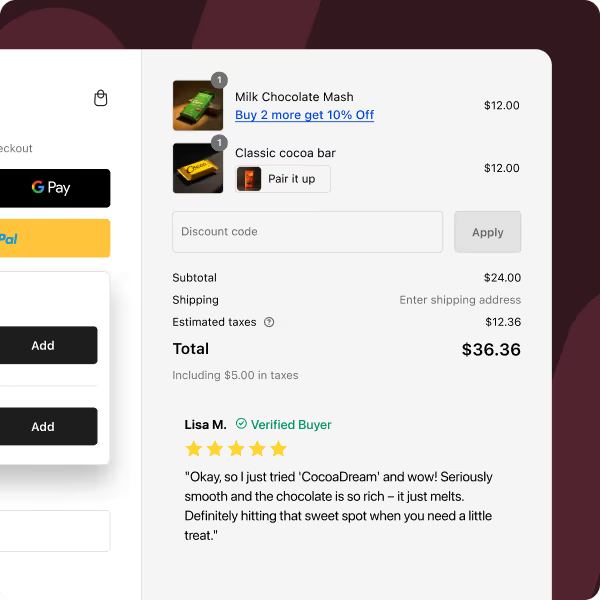
| Shop Pay | Enable Shop Pay in checkout settings | Shopify's own data shows Shop Pay converts 1.72x better than guest checkout on mobile. Free to enable. |
| Minimize steps and fields | Only collect what is required to ship and bill the order | Every additional input is a drop-off risk. |
| Multiple payment methods | Credit and debit cards, Shop Pay, PayPal, BNPL (Klarna, Afterpay, Affirm), and regional methods (UPI for India, iDEAL for the Netherlands) | The more familiar the payment option, the lower the friction. |
| Guest checkout | Always allowed | Forcing account creation before purchase is a documented conversion killer. |
| Cross-browser, cross-device testing | Test the full checkout flow on Chrome, Safari, Firefox, on iOS and Android, with BrowserStack for devices not owned | A broken checkout on a single browser version can silently destroy a meaningful share of revenue. |
Shopify Plus only: Use Checkout Extensions to add app blocks for upsells, trust badges, gift messages, shipping protection, and loyalty point displays directly inside the checkout. This is the single biggest CRO unlock Plus delivers. See the dedicated Shopify Plus section below.
Most visitors who add to cart never complete the purchase. Recovery flows are how to win the highest-intent traffic back.
| Recovery channel | What to do | Why it matters / Tools |
|---|---|---|
| Native abandoned checkout email | Enable in Settings → Checkout → Abandoned checkouts. Customize the template to match brand voice with a clear product image and CTA back to checkout. | Free, built-in, works on day one. |
| Multi-step sequences | Trigger emails at 1 hour, 24 hours, and 72 hours after abandonment with escalating incentives | Tools like Klaviyo, Omnisend, and Shopify Email add multi-step flows. Per-cart single-use codes prevent the recovery offer from leaking. For the full breakdown, see how to create Shopify discount codes. |
| Exit-intent popups | Trigger a discount or reminder when a desktop visitor moves the cursor toward the browser close. Mobile equivalent: scroll-based or time-on-page trigger. | Captures the email of visitors who would have otherwise bounced. |
| Browse abandonment | Target visitors who viewed products but did not add to cart | Klaviyo, Privy, and Bloomreach support browse flows. Warmer than cold traffic, colder than cart abandonment. |
| SMS recovery | For opted-in customers, add SMS abandoned cart messages | SMS open rates run 90%+ vs email's 20–30%. Apps like Postscript and Attentive integrate cart abandonment into SMS flows. |
People buy what other people are buying. The work is to make that visible everywhere a buying decision is made.
| Social proof element | What to do | Why it matters / Tools |
|---|---|---|
| Product reviews | Collect actively via post-purchase email triggers. Display on product pages with photos when possible. | Photo reviews convert about 2x text-only reviews. Apps: Judge.me, Okendo, Loox, Yotpo. |
| Review volume | Focus on collecting more reviews, not just higher ratings | 50 reviews at 4.8 stars converts better than 5 reviews at 5.0. Volume signals legitimacy. |
| Aggregate ratings on collection pages | Show star rating + review count on collection cards, not just product pages | Validation needs to be visible before the click into the product page. |
| UGC (user-generated content) | Repost customer photos to social channels, embed UGC galleries on the homepage and product pages | Loox, Yotpo, and Foursixty automate Instagram UGC pull. |
| Social media presence | Maintain active Instagram and TikTok with real engagement. Link from the storefront footer and About page. | Signals a real, alive brand. |
| External reviews | Monitor and respond to Google reviews and Trustpilot. Reply to all reviews within 30 days. | Recency matters. A business with replied-to recent reviews looks far more trustworthy than one with stale, ignored reviews. |
| Press and media mentions | Add an "As seen in" bar with publication logos to the homepage | Lifts credibility, even for minor features. |
For most Shopify stores, mobile is 60%+ of traffic. Mobile conversion rates are typically 30–50% lower than desktop, which makes mobile CRO the highest-leverage surface for most stores.
| Mobile element | What to do | Why it matters |
|---|---|---|
| Test on actual devices | Test the full purchase flow on a real iPhone and a real Android device | Browser emulators miss tap target issues, scroll inertia, and keyboard behavior. |
| Tap targets | Minimum 44x44px per Apple's HIG and Material Design | Smaller buttons cause mistapping, which causes frustration and abandonment. |
| Mobile checkout simplification | Pre-fill what can be pre-filled (Shop Pay, Apple Pay, Google Pay). Hide unnecessary fields. Minimize keyboard switching. | Mobile form input is the biggest single drop-off cause on mobile checkout. |
| Sticky add-to-cart on mobile PDPs | Keep the buy CTA visible as the visitor scrolls through images, description, and reviews | Most modern Shopify themes include this; older themes do not. |
Shopify Plus CRO (sometimes called Shopify enterprise CRO) does not change the underlying CRO principles. Speed, trust, social proof, and abandoned cart recovery work identically on every plan. What Plus changes is the surface area of what can be customized, especially around checkout, post-purchase, retention tactics, and high-volume sales events. For Shopify stores at or above $1M ARR, the checkout and post-purchase customization Plus unlocks often pays for the plan upgrade through conversion rate optimization gains alone.
| CRO lever | Regular Shopify | Shopify Plus |
|---|---|---|
| Funnel analytics | ✅ | ✅ |
| Product page optimization | ✅ | ✅ |
| Shop Pay | ✅ | ✅ |
| Abandoned cart recovery | ✅ | ✅ |
| Checkout branding | Limited | Full (Checkout Branding API) |
| Checkout extensions and upsells | ❌ | ✅ |
| Post-purchase one-click upsells | Limited (via apps) | ✅ Native |
| Custom checkout logic (Shopify Functions) | ❌ | ✅ |
| Checkout bot protection | ❌ | ✅ Native |
| Launchpad (sales event automation) | ❌ | ✅ |
| B2B checkout (separate experience + Catalogs) | ❌ | ✅ |
| A/B test checkout variations | ❌ | ✅ |
| Merchant Success Manager | ❌ | ✅ |
On regular Shopify, checkout is a standardized template. Colors, logo, and a few text fields can be edited, but the structure is fixed. On Plus, Checkout Extensibility allows custom UI components — app blocks for upsells, trust badges, gift messages, loyalty point displays, shipping protection, gift wrap, custom form fields — to be added directly inside the checkout. Checkout is the highest-intent moment in the funnel, and the ability to layer revenue and trust signals at that exact moment is what makes Plus CRO meaningfully different from regular Shopify CRO. Apps like Checkout Wiz, Checkout Plus, and Rebuy build on the Checkout Extensions framework.
Plus stores can build post-purchase pages — the page shown immediately after order confirmation — with one-click upsell offers that do not require the customer to re-enter payment details. This is one of the highest-converting upsell moments in ecommerce, with post-purchase offer accept rates running 10–25% on well-tuned funnels. Regular Shopify stores can run post-purchase offers only via specific third-party apps with more limited native integration. For the full post-purchase upsell playbook, see best Shopify checkout upsell apps.
Plus stores can use Shopify Functions to write custom logic against the checkout: custom discount stacking rules, payment method visibility rules (e.g., hide COD for orders over $200 or for specific regions), shipping rate customization based on cart contents, and cart transformations (bundle-to-line-item, line-item-to-bundle). Regular Shopify is limited to native discount types (percentage, fixed, BXGY, free shipping) with no custom logic on top.
Native Plus-only feature. For high-demand product drops, flash sales, and inventory-limited campaigns, the bot protection prevents automated scripts from sweeping inventory before real customers can buy. Protects conversion quality during the moments when traffic is highest and the margin for execution error is lowest.
Plus-exclusive automation tool for scheduling and automating sales events — price changes, theme changes, discount activations, product publishes — all timed precisely. Removes human error during high-traffic events (BFCM, product launches, brand collaborations). A misfired manual price change at 12:01 AM on Black Friday costs more than the entire Plus subscription.
Plus stores can run a separate B2B checkout experience with custom pricing, net payment terms, company-specific catalogs, and tax exemption handling, all natively. For Shopify stores with both DTC and wholesale channels, this is a major CRO lever specifically for the B2B segment. For the broader breakdown of B2B-specific pricing models, see how to set up tiered pricing on Shopify.
Neither plan has native A/B testing on the storefront, but Plus stores have meaningfully more flexibility because they can duplicate themes and split traffic between them, and because checkout itself can be experimented on via Checkout Extensions. Tools like Intelligems and Convert.com integrate with Plus stores to run checkout-side experiments — A/B testing trust badges, payment method ordering, upsell offers, and post-purchase flows. Regular Shopify stores can A/B test storefront pages but cannot meaningfully test checkout.
Flow is available on all plans, but Plus unlocks more advanced triggers, conditional logic, and cross-store workflows. Used for personalized CRO automation at scale: tag-based customer segmentation, dynamic discount eligibility, programmatic abandoned cart triggering, and review-collection automation.
Plus merchants get a dedicated Merchant Success Manager — a non-technical CRO advantage that is genuinely valuable for stores newer to the Plus tier. The MSM reviews analytics, advises on CRO strategy, and connects the store with vetted Shopify Partners (theme developers, agencies, app vendors) when specialized work is needed.
The 8 levers above describe the full surface area. The strategies below are 5 specific, high-leverage tactics that Shopify stores use to lift conversion rate in measurable ways.
Mechanism: a banner at the top of the storefront announces "Free shipping on orders over $X." The threshold is set 15–30% above the current average order value. Customers who would have ordered $42 see they need to add $8 more to hit free shipping and add the extra item.
Implementation in Shopify: enable a free shipping rate in Settings → Shipping → Rates with a minimum order value condition. Add the threshold banner via the theme editor (most modern themes support this natively) or via an app like Shopify Free Shipping Bar.
Impact: lifts AOV by 10–25% in most categories and reduces cart abandonment by removing the shipping-cost surprise at checkout. Often the single highest-leverage change a store can make.
Mechanism: a popup triggers when a desktop visitor moves the cursor toward the browser close (or after 60+ seconds of inactivity on mobile). Offers a small discount (typically 10%) in exchange for an email address. Captures the email of warm leads who would have otherwise bounced.
Implementation in Shopify: apps like OptiMonk, Privy, and Klaviyo build the popup, the email capture, and the discount code issuance in one workflow. For per-customer single-use codes (the right setup to prevent the discount from leaking to coupon aggregator sites), see how to create Shopify discount codes.
Impact: lifts email list growth by 30–60% and recovers 5–15% of would-be-bounced traffic into the post-purchase funnel.
Mechanism: on the product detail page, present a curated bundle ("Frequently bought together" or "Complete the set") with a small bundle discount (typically 10–15%). Customers who arrived to buy one item add the bundle, increasing AOV without lifting acquisition cost.
Implementation in Shopify: apps like Easy Bundle Builder, Pumper Bundles, and Fast Bundle add the bundle widget to the product page with one-line discount math ("Save $12 vs buying separately"). For the full bundle setup playbook, see how to create bundles on Shopify.
Impact: lifts AOV by 15–35% for stores with strong cross-sell logic (skincare routines, supplement stacks, apparel sets, gift kits). Lower lift for stores selling single high-consideration items.
Mechanism: after the order confirmation page, present a one-click upsell offer (typically a complement to the purchased product at a 15–25% discount). The customer can accept the offer without re-entering payment details. Conversion rates on well-targeted post-purchase offers run 10–25%.
Implementation in Shopify: requires Plus plus a post-purchase app like Checkout Wiz, ReConvert, or AfterSell. The offer is configured against the parent order, the upsell product, and the discount.
Impact: lifts total order value by 8–15% on average across the entire order base. Pure margin, no acquisition cost, no checkout friction (the customer has already paid).
Mechanism: when a customer abandons checkout, the recovery email sequence issues a single-use discount code unique to that cart. The code expires in 24–72 hours and cannot be redeemed by anyone other than the original cart owner. Prevents the recovery offer from being screenshotted, shared, and leaked.
Implementation in Shopify: requires a discount app that supports bulk unique code generation (the native Shopify Generate codes feature creates the unique codes, and a tool like Klaviyo or Kite issues per-cart codes via the abandoned cart flow). For the bulk unique code setup, see how to create Shopify discount codes.
Impact: lifts abandoned cart recovery rate by 2–5 percentage points (from a baseline of 5–10%) and protects margin by preventing code leakage.
Shopify does not include native A/B testing on the storefront, which is the single biggest gap in Shopify's conversion rate optimization tooling for stores at scale. The workaround is third-party A/B testing apps that integrate with Shopify themes via traffic splitting and event tracking. The right testing program is structured around a prioritization framework and a clear statistical bar for declaring a winner.
ICE scoring (Impact, Confidence, Ease) is the standard prioritization framework for conversion rate optimization test backlogs. Each test idea gets scored 1–10 on each dimension; the highest combined score moves to the front of the queue.
| Test idea | Impact | Confidence | Ease | ICE score |
|---|---|---|---|---|
| Move trust badges to product page from cart | 7 | 8 | 9 | 504 |
| Add bundle widget to top 10 products | 9 | 7 | 6 | 378 |
| Reorder PDP image gallery (lifestyle first) | 6 | 6 | 9 | 324 |
| Test BNPL placement at checkout | 8 | 5 | 7 | 280 |
| Move free shipping bar to sticky header | 7 | 7 | 5 | 245 |
Score = Impact × Confidence × Ease for prioritization. Some teams use the average of the three instead.
| App | What it does | Pricing | Best for |
|---|---|---|---|
| Convert.com | Full-featured experimentation platform with Shopify integration, supports server-side testing | $$ | Stores running 5+ concurrent tests |
| VWO | Visual editor, multivariate testing, heatmaps and session replays bundled | $$ | Stores wanting testing + heatmaps in one tool |
| Intelligems | Pricing and discount A/B testing | $$ | Plus stores running price elasticity experiments |
| GrowthBook | Open-source experimentation framework, integrates with Shopify | Free–$ | Engineering-resourced teams wanting full control |
| Crossing Minds | AI-powered personalization and A/B testing | $$ | Stores with large catalogs running recommendation tests |
For checkout-side experiments specifically, Plus stores have the cleanest setup because Checkout Extensions can be variant-loaded and Intelligems integrates natively with the Plus checkout.
A common conversion rate optimization mistake is calling a winner too early. Two heuristics for stores running 1,000–10,000 monthly sessions:
• Minimum sample per variant: 1,000 sessions per variant (more for low-traffic categories).
• Minimum test duration: 14 days (covers weekday-weekend traffic mix and at least one full pay cycle).
• Statistical significance threshold: 95% confidence (the standard in commercial CRO).
Stores running tests on under 1,000 monthly sessions per variant rarely hit 95% confidence inside a reasonable test window. For these stores, sequential testing or multi-armed bandit approaches work better than classic A/B.
Mobile and desktop traffic should be tested independently. A variant that wins on desktop can lose on mobile because the screen real estate, tap target sizes, and scroll behavior are fundamentally different. Most A/B testing apps support device-segmented experiments — use that segmentation aggressively.
A Shopify CRO testing roadmap is the structured 60–90 day plan that turns the ICE-prioritized backlog into a sequenced testing program. The standard roadmap structure:
• Days 0–30: Run the audit, build the testing backlog, ICE-score the top 20 ideas, set up the A/B testing app and event tracking.
• Days 31–60: Launch the top 2–3 tests in parallel (one per funnel stage so variants do not interfere). Run each for 14+ days at 95% confidence.
• Days 61–90: Roll winners into the theme, document losers (loss memos are as valuable as wins), refresh the backlog, and start the next batch.
For Shopify stores with under 1,000 monthly sessions per variant, slow the cadence to one test at a time and extend the test duration to 21–28 days for statistical confidence.
The best Shopify conversion rate optimization apps for 2026 are not a long list. Most stores need 5–7 well-chosen tools across analytics, behavior tracking, A/B testing, reviews, email, and recovery. There are no fully integrated CRO platforms for Shopify that handle every category natively, so the right Shopify CRO software stack is built from one tool per category, integrated through Shopify's app ecosystem and a tag manager (GTM, native Shopify pixels).
| Category | Recommended tools | Free or paid | When to install |
|---|---|---|---|
| Funnel analytics | Shopify native + GA4 | Free | Day 1 |
| Heatmaps + session replay | Microsoft Clarity (free), Hotjar, Lucky Orange | Free–$$ | Day 1 |
| A/B testing | Convert, VWO, Intelligems, GrowthBook | $$ | After 1,000+ monthly sessions per variant |
| Reviews + UGC | Judge.me, Okendo, Loox, Yotpo | Free–$$ | Day 1 |
| Email + SMS marketing | Klaviyo, Omnisend, Postscript | Freemium–$$$ | Day 1 |
| Abandoned cart recovery | Klaviyo, Shopify Email, Privy | Freemium | Day 1 |
| Post-purchase upsells (Plus) | Checkout Wiz, ReConvert, AfterSell | $$ | After Plus upgrade |
| Bundle widgets | Easy Bundle Builder, Pumper Bundles | Free–$$ | When AOV becomes a focus |
| Discount and free gift apps | Kite, Discount Master | Free–$$ | When running bulk unique codes |
For the deep dives on each app category, see Skai Lama's existing app guides: best Shopify bundle apps, best Shopify checkout upsell apps, best Shopify bulk discount code generator apps, and best Shopify tiered pricing apps.
Tool selection rule of thumb: install one tool per category, not three. Tool sprawl creates app bloat (which hurts speed, ironically the number one CRO lever) and data fragmentation. Consolidate where possible. Klaviyo handles email + SMS + abandoned cart + reviews in one stack, which beats stitching together 4 separate apps.
The 6 mistakes below quietly drain conversion rate at scale. They appear in nearly every store audit.
| Mistake | Why it hurts | What to do instead |
|---|---|---|
| Optimizing without diagnosing first | Stores jump to changing the product page when the real leak is at checkout (or vice versa). The single most expensive CRO mistake is fixing the wrong stage. | Always audit the funnel before changing anything. Identify the highest-leakage stage first. |
| Over-discounting | Every percentage point off the price is a percentage point off the margin. Constant sitewide 20% promotions train customers to wait for the next sale and erode margin. | Use targeted, time-bound, or per-customer single-use codes instead. See how to combine discounts on Shopify for the discount stacking playbook. |
| Hiding shipping costs until checkout | Baymard Institute research consistently identifies surprise shipping costs as the #1 cause of cart abandonment. | Display shipping in the cart, at minimum. Better: add a free shipping threshold and surface the threshold prominently. |
| Ignoring mobile | Mobile is 60%+ of traffic for most stores and converts at 30–50% of desktop rates. Stores that A/B test only desktop variants miss the highest-leverage CRO surface entirely. | Test mobile and desktop as separate experiments. Audit mobile checkout flow on real devices. |
| Vanity metrics over revenue | Sessions, time on site, and pages per session are inputs, not outcomes. | Tie every CRO report back to conversion rate and revenue per visitor. |
| Too many pop-ups, too soon | Three pop-ups stacked on the first second of the visit (email + cookie + chat + promo) destroy first impressions. | One well-timed pop-up (exit-intent or 30-second delay) beats four poorly-timed ones every time. |
Shopify CRO (conversion rate optimization) is the practice of increasing the percentage of Shopify store visitors who complete a purchase, by removing friction across the storefront, checkout, and post-purchase experience. The work includes funnel analytics audits, A/B testing, heatmap analysis, checkout optimization, abandoned cart recovery, and trust signal improvements.
The Shopify-wide median sits between 1.4% and 2.0%. A store consistently below 1.5% with 1,000+ monthly visitors has a real CRO problem. A store at 2–3% is healthy. A store above 3.5% is in the top decile. Category matters: consumables and beauty often run 3%+, while high-consideration apparel and home goods run closer to 1.5–2%.
Start in the Shopify admin's Analytics → Reports → Behaviour → Online Store Conversion Rate report. Filter out bot traffic, identify the highest-leakage funnel stage, segment by device and source, then install a heatmap tool (Microsoft Clarity, Hotjar, or Lucky Orange) to see why the leak is happening. Document findings before changing anything. Full walkthrough in section 2 above.
The starter stack: Shopify native analytics + GA4 (free), Microsoft Clarity for heatmaps and session replay (free), Klaviyo for email + SMS + abandoned cart (freemium), Judge.me or Okendo for reviews (free–$$), and Convert or VWO for A/B testing once traffic justifies it ($$). For Shopify Plus stores, add Checkout Wiz or ReConvert for post-purchase upsells.
Most stores under $2M ARR can run effective conversion rate optimization in-house with the tool stack above plus a structured ICE-prioritized testing program. Agencies become valuable above $2M ARR when test velocity needs to scale, when development resources are the bottleneck, or when the store moves to Shopify Plus and the Checkout Extensions playbook gets technical. For agency recommendations, see the best Shopify CRO agencies guide.
The principles are identical, but Plus unlocks 9 additional CRO levers: Checkout Extensibility (the biggest unlock), post-purchase one-click upsells, Shopify Functions for custom checkout logic, native checkout bot protection, Launchpad for sales event automation, B2B checkout and catalogs, native A/B testing flexibility, advanced Shopify Flow automation, and a dedicated Merchant Success Manager. Full breakdown in section 4 above.
Monthly review of the Online Store Conversion Rate report and the funnel drop-off percentages. Quarterly deeper audit including heatmap review, app stack review, and theme performance audit. Annually a full speed and Core Web Vitals review, especially after theme updates or major app installations.
For most stores, enabling Shop Pay (1.5–1.7x conversion lift over guest checkout) and fixing Core Web Vitals (especially LCP under 2.5 seconds and CLS under 0.1). Both are free, both take under a day to implement, and both move the needle measurably for nearly every Shopify store.


.avif)


