
.svg)
.svg)

.svg)
.svg)


%20(1).jpg)
.jpg)
Our Apps Have Driven
5X AOV | 2X Conversions | $30M+ Additional Revenue
5X AOV | 2X Conversions | $30M+ Additional Revenue
.svg)


5.0 (3000+ Reviews)


Shopify Apps





.svg)

Gift boxes are one of the few product formats that sell themselves. A customer who cannot decide what to buy for someone will default to a gift box almost every time. A customer who wants to send something personal will look for a "build your own" option before settling for a fixed option.
The problem is not demand.
The problem is that most Shopify stores either have no gift box option at all or they have a fixed, pre-built set with no personalization. Both approaches leave money on the table.
This guide covers how to create gift boxes on Shopify across three setup approaches, with a full walkthrough of how Easy Bundle Builder handles the formats that actually convert.
A Shopify gift box is a product experience that lets customers purchase multiple items together as a single gift. It can be fixed (you decide what goes in it) or customizable (the customer picks the items). Most high-converting gift box experiences are some version of the latter.
A gift box differs from a standard product bundle in one meaningful way: the gifting context changes what the customer cares about. For a bundle, the buyer cares about value and savings. For a gift box, the buyer cares about personalization, presentation, and confidence that the recipient will like it. That distinction should shape how you build and present the experience.
A strong gift box experience on Shopify has four elements:
The simplest way to offer a gift box without any app is to create it as a single Shopify product with multiple variants, where each variant represents one specific combination.
Shopify caps products at 100 variants. A gift box with 5 categories and 5 options per category hits that cap immediately, and the approach breaks entirely beyond it.
Inventory does not deduct at the component level. If "Cleanser" sells out in one variant, it does not auto-deduct from other variants containing the same product. Overselling is a real operational risk.
There is no customer-facing "pick your items" interface. Customers select a pre-built combination from a dropdown, which is not a true gift-building experience.
This works for a small, fixed "gift set" product. It is not a gift box builder.
The Shopify Bundles app does not support customizable gift boxes.
Shopify explicitly states that mix-and-match bundles are not supported. Customers cannot choose which products go into a bundle. They can only select variants (size, scent, color) of products you pre-selected. If your goal is a "build your own gift box" experience, this app will not get you there.
It supports a fixed, curated set in which the product lineup is determined entirely by you. If that is what you need, here is how to set it up.
The Shopify Bundles app is a reasonable option for a fixed "gift set" product. For any store that wants customers to choose what goes in their gift box, Easy Bundle Builder is the next step.
Easy Bundle Builder is the dedicated Shopify app for build-your-own gift boxes, mix-and-match bundles, BYOB flows, and product-page bundle experiences. Rated 4.9 on the Shopify App Store with over 997 reviews and the Built for Shopify badge, it is the most complete no-code solution for stores that want customers to genuinely build their own gift box.
Easy Bundle Builder is consistently rated among the top-reviewed apps in its category, not just for features but for the support behind them. Merchants regularly cite ease of setup and responsive support as reasons they stay, which matters when you are launching a gift box experience for the first time before a key seasonal window.
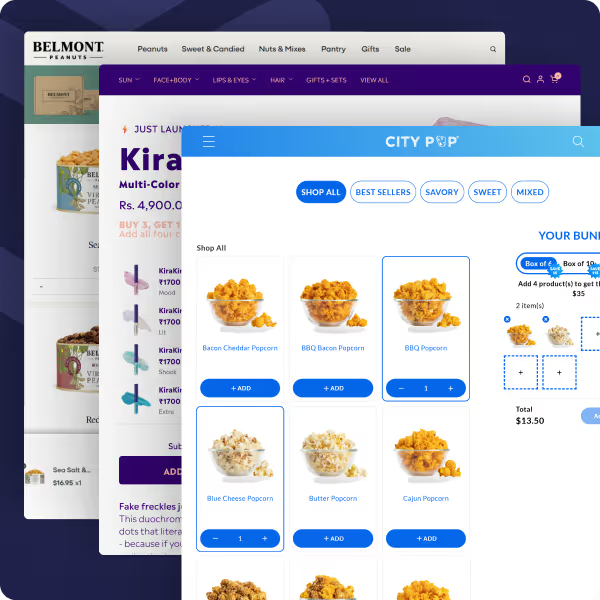
The core difference from native options is that Easy Bundle Builder gives customers genuine product choice within the rules you set. You define what is available, how many items they can pick, and what discount they receive. The customer fills the box their way. Inventory syncs in real time, checkout is clean, and the whole experience can be built without a developer.
After installing Easy Bundle Builder, the AI bundle creator lets you describe your offer in plain language. Tell it something like: "I want customers to build a 5-item skincare gift box from our best sellers at 15% off." The app sets up the category structure, selection rules, and discount logic automatically. You review, adjust, and publish.
This is the fastest path for merchants who want a working gift box before an upcoming seasonal window.
Install Easy Bundle Builder from the Shopify App Store. Before building, confirm you are on a Shopify 2.0 theme (Online Store → Themes → Customize; if your theme supports adding and rearranging sections and blocks, you are compatible). Then enable the Easy Bundle app embed: in your theme editor, go to App Embeds, toggle Easy Bundle ON, and save.
Open the app and click Create Bundle. You will choose between two display options:
For most gift box experiences, the landing page option is the stronger choice. It gives the experience its own URL, allows for richer branding and seasonal messaging, and keeps the customer focused on building without the distractions of a standard product page.
Multi-step flows are the format that most closely mirrors how customers think about building a gift. One category at a time, one decision at a time. Specifically for gifting, this guided approach consistently outperforms a single large product pool.
Add the products that customers can choose from. Organize them into categories if you are using a multi-step flow (Category 1: Face, Category 2: Body, Category 3: Hair). Set the minimum and maximum items per category and per step. Keep the product pool focused: 12 to 20 items per category is the range where customers feel a sense of choice without feeling overwhelmed.
Easy Bundle Builder supports six discount types. For gift boxes, the most effective are:
All discounts apply automatically. They stack cleanly with existing Shopify discount apps without conflicts.
Gift boxes in Easy Bundle Builder appear at checkout as a single clean line item, with each component listed below it. This matters for gifting specifically because fragmented line items at checkout create confusion about what is being sent and can make the order look less like a gift and more like a random assortment.
Because the app runs on Shopify's native Cart Transformation API, this checkout behavior is consistent across Shop Pay and third-party fulfillment flows without requiring any custom development.
Use the Preview Bundle to test the full gift-building flow before publishing. Test the minimum and maximum selection rules, confirm the discount applies at the right threshold, and complete a test purchase to verify the checkout line-item presentation. Publish when the experience is working as expected.
This is the question most merchants ask before launching a gift box experience, and rightly so. A gift box that oversells components creates a fulfillment nightmare, especially during peak gifting periods when order volumes are high.
Easy Bundle Builder handles this through real-time, component-level inventory synchronization. When a customer purchases a gift box containing three products, stock decrements for each of the three products. If any product in the pool sells out during an active session, it automatically becomes unavailable for selection.
For stores with 3PL providers, fulfillment signals are sent with product-level accuracy rather than as a bundle-level line item, so your fulfillment partner receives exactly what they need to pack and ship the correct items.
The two case studies below show what gift box builders look like in practice: one from a jewelry brand that used BFCM as the launch window, and one from a wine and spirits brand that was losing revenue to operational complexity before streamlining its entire gifting process.
Evry Jewels, founded by siblings Brittany and Jake Sigal, built a strong community-first jewelry brand through Brittany's marketing instincts and a loyal social media following. The product was working. The brand was growing. The problem was a specific and common one: customers were buying, but not enough per transaction.
The challenge was AOV, not acquisition. Evry Jewels had a captive audience already buying competitively priced jewelry. What they needed was a mechanism to increase revenue per order without changing their pricing model or running deeper discounts.
Their answer was a build-your-own gift box experience using Easy Bundle Builder. Rather than asking customers to buy more of the same product, the gift box format gave them a reason to combine multiple pieces into a single purchase: a natural behavior for jewelry buyers who already think in sets and pairings.
The timing was deliberate. Launching the gift box experience around BFCM, when gifting intent is at its peak and customers are actively looking for a complete gift rather than a single item, maximized both conversion and basket size.
The result was $465K in bundle revenue over 2.5 months and a double-digit increase in AOV, without requiring Evry Jewels to run larger sitewide discounts or change their core pricing strategy.
What made it work: The gift box format matched the natural way jewelry customers shop during gifting seasons. A customer buying a necklace as a gift is already thinking about matching earrings. A BYOB gift box builder gives them a structured way to act on that instinct, and a bundle discount gives them a reason to do it now rather than on a second order.
Whether you are creating gift boxes on Shopify for the first time or setting up gift boxes for your regular seasonal campaigns, small UX decisions have an outsized impact on revenue. The best-performing gift box experiences make the process feel simple, complete, and enjoyable from the first click to checkout.
The tips below will help you design a gift box experience that converts more browsers into buyers.


.avif)


