

Our Apps Have Driven
5X AOV | 2X Conversions | $30M+ Additional Revenue
5X AOV | 2X Conversions | $30M+ Additional Revenue


5.0 (3000+ Reviews)


Shopify Apps





In 2025, 39% of US shoppers abandoned an online purchase during checkout because of unexpected extra costs, such as shipping, taxes, or fees. For e-commerce businesses, this highlights how quickly checkout friction can turn purchase intent into lost revenue. Effective checkout process optimization helps remove these barriers, convert more shoppers, and increase average order value (AOV).
This blog explores 20 checkout optimization strategies, with a focus on Shopify. From transparent pricing to streamlined checkout flows and strategic upsells, these practices can help businesses improve conversions and revenue in the competitive US e-commerce market.
E-commerce process optimization involves improving the steps customers take from discovering a product to completing a purchase. It focuses on removing friction, making the buying journey easier, and increasing revenue without compromising the customer experience.
Checkout process optimization applies these principles to the final stages of a purchase, where small obstacles can lead to abandoned carts or lost sales. It focuses on two key outcomes:
The process covers the entire checkout journey, including contact and shipping details, delivery and payment selection, and post-purchase offers. For Shopify merchants, this also means identifying which parts of the checkout experience can be customized based on their plan and available tools.
Effective optimization is an ongoing process. Merchants should use funnel data to identify drop-off points, test specific improvements, and measure their impact on conversions and revenue.
Some cart abandonment is unavoidable. Baymard reports that 42% of US shoppers have abandoned a cart because they were just browsing or not ready to buy. Among shoppers who abandon for other reasons, however, many cite issues merchants can address. Baymard's 2026 data identifies the following reasons for abandonment:
The potential gains are significant. Baymard estimates that the average large ecommerce site could improve conversion by 35.26% through better checkout design alone. Its research also indicates that an ideal checkout requires only 7-8 form fields, compared with nearly 15 on the average US checkout.
These findings provide a useful starting point for ecommerce checkout process optimization. Prioritize the issues that affect your customers most, then validate improvements against your own conversion data.
The following 20 practices follow the customer journey: measure performance, remove unnecessary steps, establish trust, simplify payment, increase order value, and recover lost sales. For inspiration from real Shopify stores, browse the Interactive Shopify Checkout.
Before changing your checkout, establish where shoppers are leaving. Break the journey into key steps, such as contact information, delivery address, shipping method, payment, and order completion. Track how many shoppers reach each stage and where drop-offs occur.
Shopify's standard customer events can help you build a funnel in Google Analytics 4 (GA4). Use the results to identify the likely cause of each drop-off:
Segment your results before drawing conclusions. A problem affecting first-time mobile shoppers may require a different solution from one affecting repeat desktop customers.
Every unnecessary field adds another decision or action between the shopper and the purchase. Review your checkout form and remove anything that isn't essential to fulfilling the order. Prioritize fields that directly support payment processing, delivery, or customer communication.
Shopify allows merchants to choose between one-page and three-page checkout layouts. The better option depends on your products, customer behavior, and funnel performance.
Neither layout is universally better. Use your current funnel as a baseline, test the alternatives where possible, and choose the one that delivers stronger completed-order and revenue results.
Mandatory account creation introduces an extra task at a point when shoppers are ready to pay. Offering a guest checkout option helps customers complete their purchases without unnecessary friction. After the order is complete, invite them to create an account for benefits such as order tracking, faster reordering, or loyalty rewards.
Address entry can be particularly frustrating on mobile. Browser autofill, address autocomplete, and correctly configured form attributes reduce typing and help shoppers complete their details faster.
Validation is equally important. Catch missing apartment numbers, invalid postcodes, and unsupported PO boxes before an order is submitted. Clear, field-specific messages help customers correct mistakes without starting over.
CheckoutWiz supports address validation rules and discount code validation, helping merchants catch common input errors before they interfere with order completion.
Poorly handled form errors can make an otherwise straightforward checkout feel unreliable. Even minor validation issues can interrupt the purchase journey, particularly when shoppers have already entered their shipping and payment information.
Validate fields as shoppers complete them wherever practical. Display error messages beside the relevant fields, explain what needs to change, and preserve the information already entered.
Payment errors need the same attention. If a card is declined, keep the shopper's details intact and provide a clear way to try another payment method. The aim is to resolve the problem without forcing the customer to repeat completed steps.
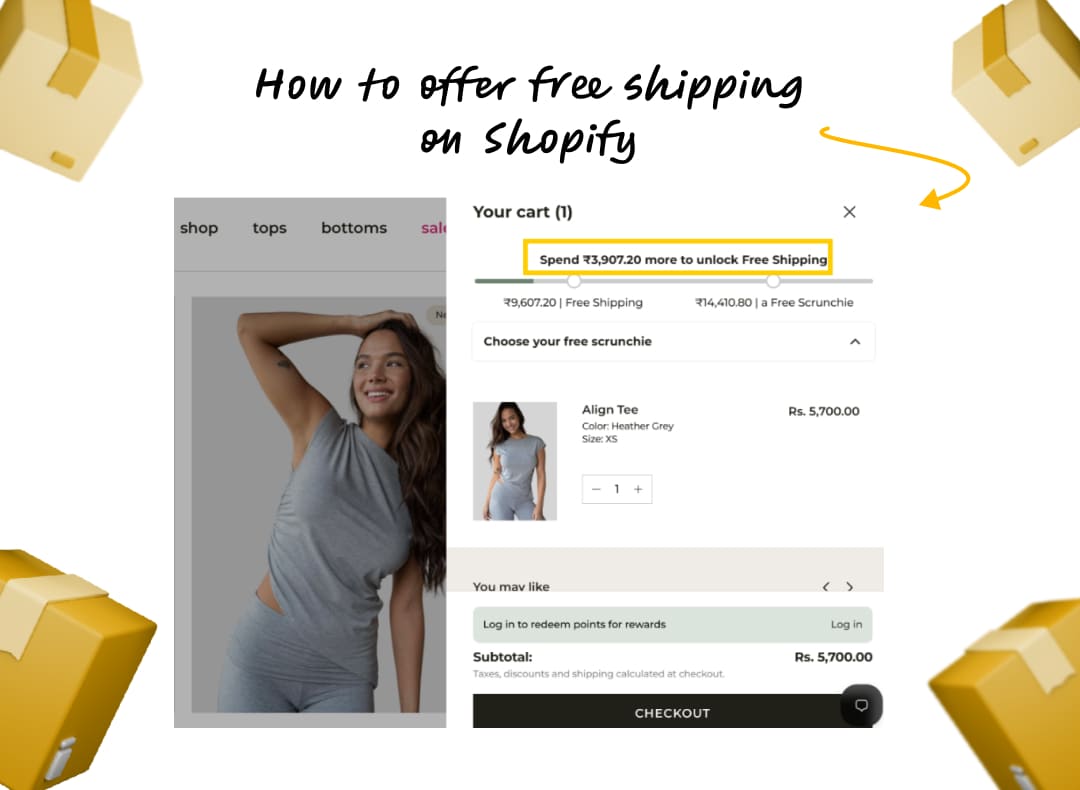
Unexpected costs are one of the biggest sources of checkout friction. Show shipping estimates in the cart, communicate applicable taxes and duties, and explain any additional fees before customers reach the final payment step. If you offer free shipping above a minimum order value, display the threshold clearly before checkout so shoppers know what to expect.
The goal is to make the final amount predictable. A shopper who understands the total before entering payment details is less likely to encounter an unpleasant surprise at the last moment.
A 2025 survey by Sendcloud found that 41.6% of UK shoppers had abandoned an online purchase because delivery was too slow. Unclear delivery estimates can add to that uncertainty, especially when customers need an order by a specific date.
Where possible, show an estimated arrival date, such as “Arrives by Thursday, Nov 12,” rather than a broad window like “3-5 business days.”
Make shipping options easy to compare. Standard delivery, express shipping, and local pickup may be enough for many stores. Clearly display the cost and estimated delivery time for each option. CheckoutWiz lets merchants hide or rename shipping methods using rules, helping them present relevant options with clearer labels.
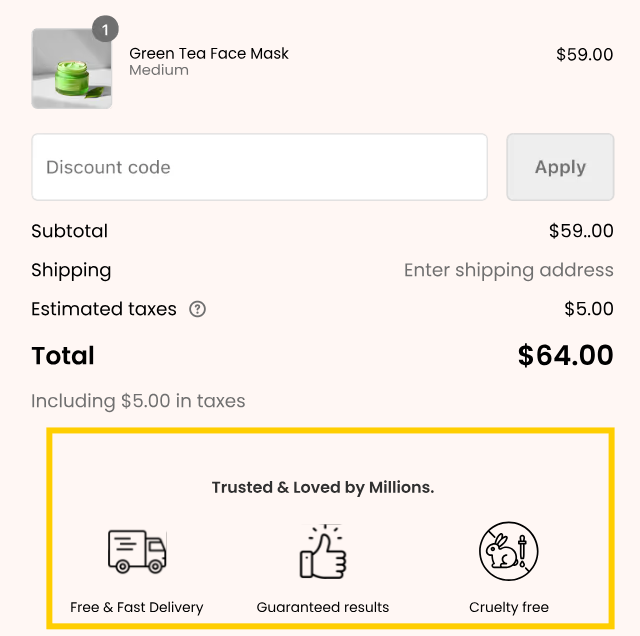
Checkout is a critical point for building customer trust because shoppers are being asked to share personal and payment information. Add a few credible trust signals near the payment section, such as:
Avoid filling the page with badges that compete for attention. Each element should answer a genuine customer concern.
CheckoutWiz lets merchants add branded trust content through drag-and-drop blocks, including:
Place these elements where shoppers need reassurance, then test their placement and presence against a control. More trust content isn't automatically better; measure whether each block improves checkout performance.
Unclear return and refund policies can make shoppers hesitate or abandon their purchases, especially when buying from an unfamiliar brand or spending more than usual.
Display a concise summary near the order total, such as "Free 30-day returns," if it accurately reflects your policy. Link to the full terms without taking customers away from checkout unnecessarily.
Clear, accessible policies help customers understand what to expect and feel more confident completing their purchase. Ensure the summary matches your actual return and refund conditions.
Shoppers may hesitate when checkout asks for information without explaining why it is needed. Collect only the data required to process the order and explain any non-obvious requests.
For example, if you need a phone number for delivery updates, state this beside the field. Keep marketing consent separate from order processing, leave opt-in boxes unchecked by default, and make your privacy policy easy to access.
Never enroll customers in a subscription or recurring purchase without their informed consent. These practices help customers understand how their information will be used and keep data collection transparent.
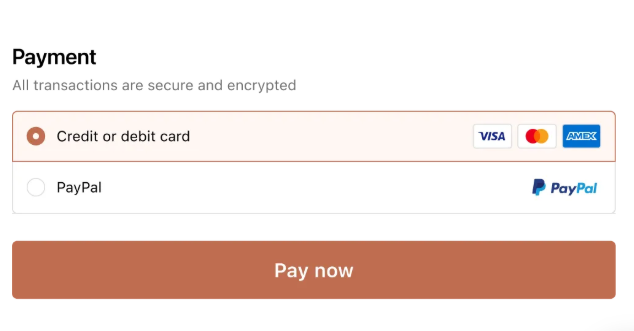
A checkout that supports only one or two payment methods can lose customers who prefer a different way to pay. Shoppers may abandon their carts if they can’t use their preferred card, digital wallet, or local payment option.
Offer a mix of payment methods based on your customers’ locations, devices, and purchasing habits. Options such as credit and debit cards, PayPal, Apple Pay, and Google Pay can make checkout faster and more convenient. Digital wallets are particularly useful on mobile because customers can pay without manually entering their card and billing details.
Buy Now, Pay Later (BNPL) options such as Klarna, Afterpay, or Shop Pay Installments can also help customers manage larger purchases by splitting payments into installments. This can be especially useful for higher-priced products, where the upfront cost may discourage shoppers from completing their purchase.
However, avoid overwhelming customers with payment options they’re unlikely to use. Review your payment data, prioritize methods popular with your audience, and make sure each option is clearly presented at checkout.
Checkout optimization shouldn’t rely on assumptions. A/B testing helps you compare different checkout experiences and identify which changes improve conversion rate, revenue, or average order value (AOV).
Start with a clear hypothesis based on checkout analytics, customer feedback, or observed friction. Test one element at a time, such as checkout layout, form fields, payment options, shipping information, trust signals, or upsell placement. Define a primary metric and guardrails before launching, and ensure the test runs long enough to collect reliable data. Avoid stopping early based on initial results.
Compare the results against your baseline and consider both conversion rate and revenue. A higher AOV may not be beneficial if fewer shoppers complete checkout or margins decline. For stores with limited traffic, usability testing and customer feedback can help identify issues before running experiments.
CheckoutWiz supports widget and full-page A/B testing, helping merchants compare supported checkout experiences. App blocks on Shopify’s information, shipping, and payment pages require Shopify Plus. In Skai Lama’s Arbor Made case study, checkout conversion reportedly increased from 56% to 63% following a broader optimization program that included A/B testing. See our full checkout A/B testing guide for more.
International customers can lose confidence when prices change unexpectedly at checkout or familiar payment options are missing. A consistent experience across the shopping journey makes cross-border purchases easier to complete.
Use Shopify Markets to display prices in local currencies where supported, adapt language and address formats to the destination, and offer relevant regional payment methods. For example, iDEAL is widely used in the Netherlands, while Bancontact is used in Belgium.
Communicate duties and import taxes clearly, and collect them at checkout where your setup supports it. This helps customers understand the total cost and reduces the risk of unexpected charges when the parcel arrives.
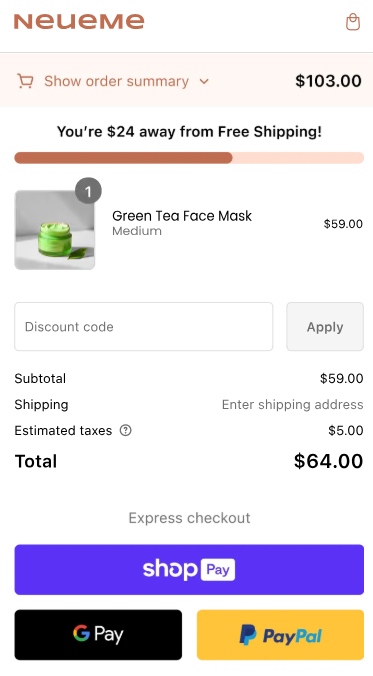
Mobile checkout magnifies small usability problems. A field that is easy to complete on a desktop can become frustrating on a narrow screen, especially when the keyboard covers important controls or a pop-up blocks the payment button. Focus on the basics:
Test the complete purchase journey on real devices and across common screen sizes. A responsive preview is useful, but it doesn't replace testing how customers actually interact with the checkout.
A slow checkout creates uncertainty at the point where customers are expected to submit payment details. Shopify provides hosted checkout infrastructure, so merchants should pay particular attention to the cart experience and any additional elements they introduce.
Compress images, remove unnecessary apps, and avoid loading large assets that don't contribute to the purchase decision. Review customizations for scripts or third-party elements that could delay the page.
Where available, choose solutions built on Shopify Checkout Extensibility rather than relying on unsupported checkout modifications. Monitor load performance alongside conversion data to determine whether technical changes improve the customer experience.
Customers are more comfortable moving through checkout when they know how much of the process is complete and what remains. On multi-page checkout, a progress indicator showing steps such as Information, Shipping, and Payment helps shoppers understand where they are in the journey.
For a one-page checkout, clearly labeled sections can provide similar guidance. Keep indicators simple and accurate, reflecting the actual checkout steps rather than adding decorative stages.
A checkout progress indicator should help customers understand how close they are to completing their purchase. Avoid confusing it with a free-shipping progress bar, which encourages shoppers to add more items to reach a spending threshold.
Repeat customers shouldn't have to enter the same information every time they shop. Saved details, customer accounts, and express checkout options can reduce the effort required to place another order.
Shop Pay can store eligible shipping and payment information and verify the customer through its supported authentication flow. Customer accounts can also make saved addresses available, while dynamic checkout buttons on product pages may allow eligible shoppers to bypass the cart for a single-item purchase.
Choose shortcuts that suit the purchase journey. Skipping the cart can be convenient for a straightforward order, but shoppers buying multiple products may still need to review quantities, bundle components, and discounts before paying.
A small unanswered question about sizing, delivery restrictions, or how a discount works can be enough to stop a purchase. Make help available without forcing shoppers to leave checkout.
Depending on your business, this could be live chat, a phone number, or a short FAQ covering common questions. Keep the interface discreet, particularly on mobile, where support widgets can obstruct the payment button.
Test how shoppers respond to the support option. Compare a visible help link with a click-to-open chat, and monitor checkout completion alongside support engagement to understand whether the feature is helping customers finish their purchases.
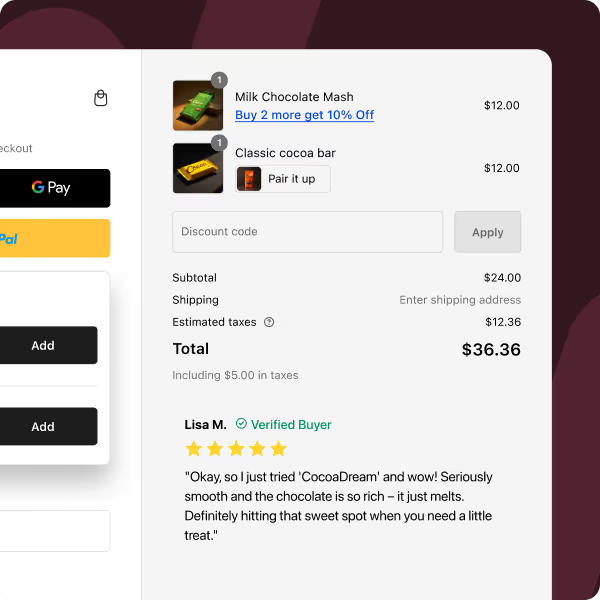
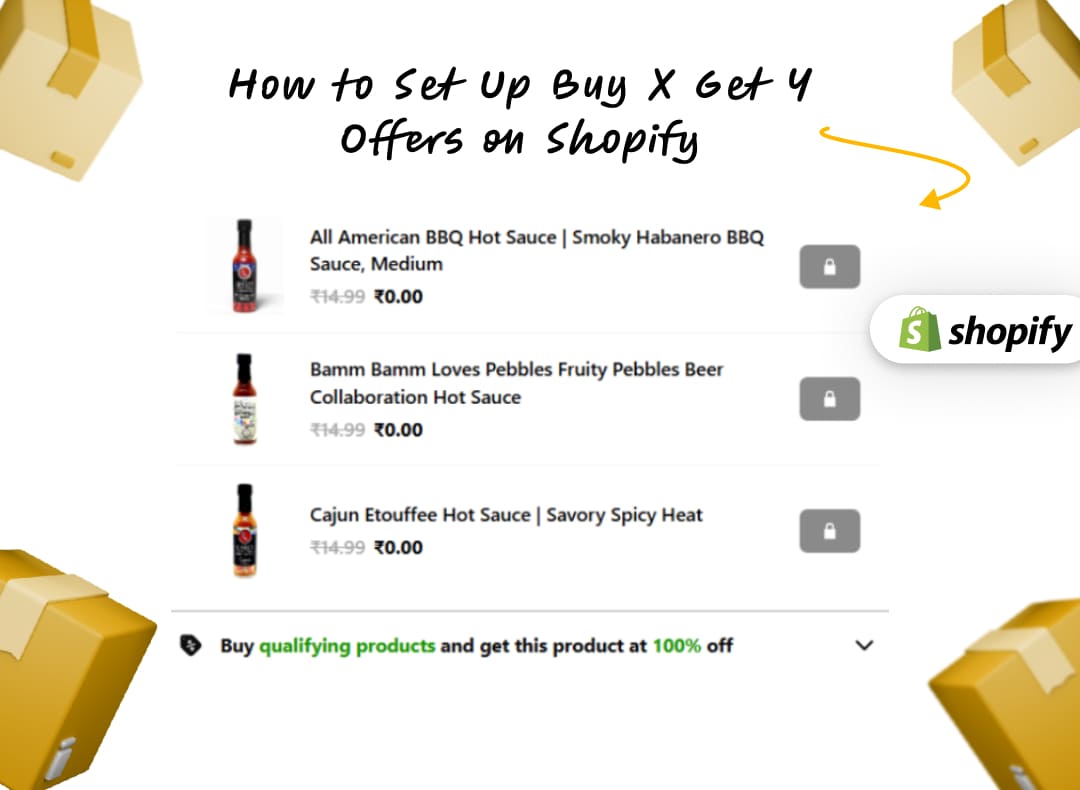
Checkout and post-purchase pages provide opportunities to increase order value through relevant Shopify checkout upsells. Focus on complementary products, upgrades, and add-ons that enhance the original purchase without distracting customers from completing payment.
Prioritize relevant additions that are easy to understand and accept. Common examples include:
Keep the experience focused. One or two well-matched offers are usually easier to evaluate than a carousel of competing recommendations. Make the price and savings clear, and ensure offers don't push the payment button out of view on mobile.
Measure additional revenue alongside checkout completion, upsell acceptance, and contribution margin. An offer that raises AOV but causes more shoppers to abandon may not improve overall performance.
Real-world results illustrate the potential: a health brand generated $889,000 in additional revenue from checkout upsells, while a CBD brand added $74,000, both using CheckoutWiz.
CheckoutWiz supports several ways to present relevant offers across checkout and post-purchase pages, including post-purchase upsells on Shopify:
Use these features to make offers more relevant to the purchase rather than simply adding more promotions.
Even a well-designed checkout won't convert every shopper. Abandoned checkout recovery helps bring customers back to unfinished purchases when they're ready to buy.
Shopify's abandoned checkout emails can reach eligible shoppers who have provided their contact details. A practical sequence might include:
Use SMS only for customers who have provided the required consent. Avoid offering discounts too early, as this can train shoppers to abandon their carts in anticipation of a promotion.
Make it easy for customers to return to unfinished purchases. Persistent carts can preserve items after a browser is closed, while logged-in customers may be able to access their carts across devices. A save-for-later or wishlist feature also lets shoppers keep track of products without having to rebuild their cart.
Yes. Shopify merchants can improve several parts of checkout on standard plans, although some in-checkout customizations require Shopify Plus. The key distinction is between configuring Shopify's native checkout settings and adding custom components directly within the checkout experience.
Depending on your plan, setup, and supported features, native options include:
The available options can vary by plan and Shopify's current feature support, so confirm eligibility before implementing a specific customization.
On Shopify Plus, CheckoutWiz enables deeper checkout customization, helping merchants increase order value, build trust, and collect additional customer information before payment. The primary CheckoutWiz features available on Shopify Plus include:
Other eligible Shopify plans can support thank-you and order-status page extensions and post-purchase offers. Shopify Plus specifically unlocks deeper customization within the main checkout. Feature availability also depends on the CheckoutWiz subscription.
Shopify’s native settings cover many essentials, but specialized Shopify checkout apps can help merchants introduce more advanced checkout features.
When choosing a checkout process optimization tool, prioritize the specific problem you need to solve, compatibility with your Shopify plan, and the impact you can measure. Here are several options worth evaluating:
Effective checkout optimization comes down to two priorities: remove the barriers that stop customers from completing purchases, and introduce relevant opportunities to increase order value.
Start with the biggest sources of friction, such as unexpected costs, unnecessary form fields, unclear delivery options, missing payment methods, and weak trust signals. Use funnel data to identify where shoppers leave, make targeted improvements, and measure the effect on completed orders and revenue.
Then test relevant upsells, free-shipping thresholds, and post-purchase offers without compromising the payment experience. A higher AOV is valuable only when the additional revenue justifies the associated costs and doesn't come at the expense of too many conversions.
CheckoutWiz brings checkout customization, upsell targeting, and A/B testing together in one app. Start a free trial to test which improvements help your store convert more shoppers and generate more value from completed orders.