
.svg)
.svg)
.svg)
.svg)
.svg)


.svg)
%20(1).png)

Our Apps Have Driven
5X AOV | 2X Conversions | $30M+ Additional Revenue
5X AOV | 2X Conversions | $30M+ Additional Revenue
.svg)


5.0 (3000+ Reviews)


Shopify Apps





.svg)

While every page on your eCommerce store is important, one page where drop-off matters the most is your store’s Checkout. Often, customers add products to their cart but don’t complete the purchase, it’s commonly known as cart abandonment. Even if you use a cart abandonment email to get those customers back, only 3% of the users return to the store. To tackle this, it's necessary to understand why customers are leaving your checkout and optimize your checkout process to prevent cart abandonment from hurting your revenue. Here are some of the most common reasons customers abandon their checkout:
Addressing these issues can significantly improve your checkout conversion rate so that customers leave with a positive impression and are more likely to return. This improvement isn't about randomly adding features to your checkout, but making strategic enhancements.
In this blog, we’ll discuss specific elements you can incorporate into your checkout process, with examples, to resolve these issues and optimize your Shopify checkout. This approach aims not just to increase conversions but also to optimize the overall revenue at the checkout stage.
Shopify's default checkout is currently the highest-converting checkout, but it often differs in design from the rest of your store. This mismatch is jarring for customers and affects their shopping experience. With checkout extensions for Shopify Plus customers, you can now fully customize your Shopify checkout branding with access to branding API.
By aligning the checkout design with your store's aesthetic, you enhance customer trust and provide a consistent shopping experience. If your store uses a specific color scheme and font, applying these elements to the checkout will make the transition less abrupt and optimize your checkout for conversions. Here’s an example of Magnolia Bakery, and how their checkout is branded to be consistent with the store.

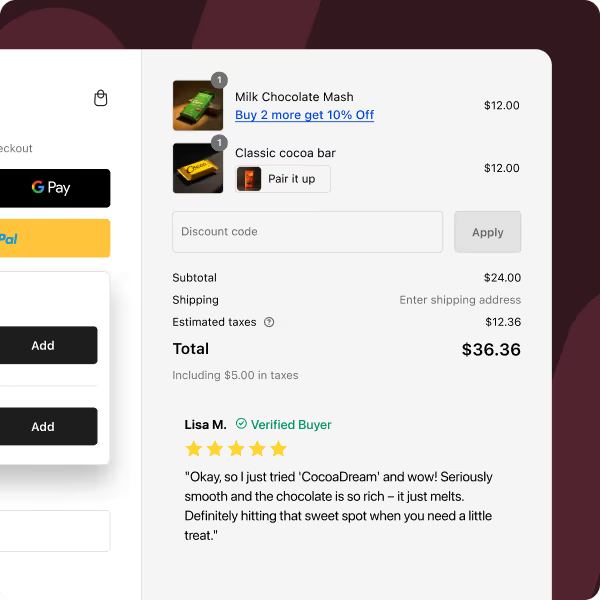
Social proof is the easiest tool for getting more conversions and building customer loyalty. Before visiting your store, customers often check reviews. These reviews continue to influence their decision on the product page and can be a decisive factor at checkout. At checkout, customer buying intent is high. They're impressed with your product and store, and a positive review at this stage can be the final nudge they need.
Additionally, conducting customer surveys and showcasing these results at checkout can further enhance conversion rates. This strategy not only provides social proof but also demonstrates your commitment to customer feedback and continuous improvement. Here's one example from Peepers.

Interested in learning other effective checkout strategies?
Store visitors especially first-timers want comprehensive information about your store before purchasing. By incorporating custom elements, you can articulate this information to build trust with customers. Here are some necessary custom elements for an optimized checkout:

By implementing these strategies, you can optimize your Shopify checkout to be a more transparent, trustworthy shopping experience to directly impact your store's conversion rates.
Need tips on creating a seamless checkout experience?
Optimizing your eCommerce checkout also includes integrating custom fields into your Checkout. These fields engage the customer and also gather important data that can be later used to provide a more personalized experience. Here are some examples of how you can use various custom fields on your store’s checkout:

Each of these custom fields serves a unique purpose, from personalizing the shopping experience to providing you with valuable customer insights. One of our customers’ Honey Bug uses custom fields with Checkout Wizard to provide a gift message option.
Read our Guide to Gifting on Checkout here.
Upselling is a crucial revenue booster for e-commerce stores but is often not used at checkout. A well-implemented upselling strategy at checkout can significantly increase your Average Order Value (AOV). For example, one of our clients used Checkout Wizard app to upsell on checkout and earned an additional $18,000 annually. Here's how you can also optimize checkout upsells:

Remember, the key to successful checkout upselling lies in continually testing and refining your approach to discover the most optimized strategies for your store. You can also explore more upselling strategies to try out in your store. By carefully selecting relevant products and strategically placing them, you can enhance the customer experience while increasing your revenue.
To let you know the effectiveness of checkout upsells, have a look at the dashboard of one of our customers who achieved over $10,000 in sales just through this method.

Want to explore more upselling techniques for your Shopify store?
In optimizing your Shopify checkout process, an effective strategy is implementing a Free Shipping Bar. It's a straightforward approach: as customers add items to their cart, they see how close they are to getting free shipping, nudging them to add just a bit more.
Moreover, pairing this with an upselling feature at checkout is the key to more sales. For instance, when a customer is buying a laptop, the upsell block might suggest adding a laptop case. This not only increases your Average Order Value (AOV) but also enhances the customer's shopping experience by offering relevant, valuable additions.

By making shipping costs transparent and integrating upsells naturally into the shopping flow, the Free Shipping Bar simplifies the decision-making process for the customer.
Curious about how to maximize sales with free shipping?
Optimizing Shopify's thank you page is crucial for your store to maintain a positive customer experience even after a purchase. This page is as important as the home page to delight customers as they complete their purchases and leave them on a high note so they want to return. Here’s how you can optimize it:
By strategically customizing your Shopify thank you page with these elements, you turn a simple transactional page into a powerful tool for enhancing customer retention, building brand loyalty, and driving sales. You can read about more Thank you page customizations you can implement in detail here.
Optimizing Shopify checkout involves strategically editing and organizing shipping and payment options. Tailoring these options to customer preferences, such as highlighting popular shipping methods and hiding less relevant payment methods, streamlines the process and reduces decision fatigue. This approach not only enhances user experience but also lowers cart abandonment rates.
Additionally, by selectively displaying secure payment options and setting specific shipping criteria, you mitigate the risk of fraud. Restricting payments to verified methods and avoiding shipments to high-risk areas provide a security layer for your business and customers.
Looking to offer more flexible shipping and payment options?
Checkout validation is another optimizing strategy that can better the Shopify checkout experience. Here’s why you should consider checkout validation as a part of your checkout optimizing strategy:

Implementing thorough checkout validation procedures not only protects your revenue and reputation but also provides a better, more secure shopping experience for your customers. You can read all about checkout validation here
Optimizing your Shopify store for mobile users is crucial in today's market, where a significant number of customers shop using their smartphones. Here's a breakdown of effective strategies you can implement right away:
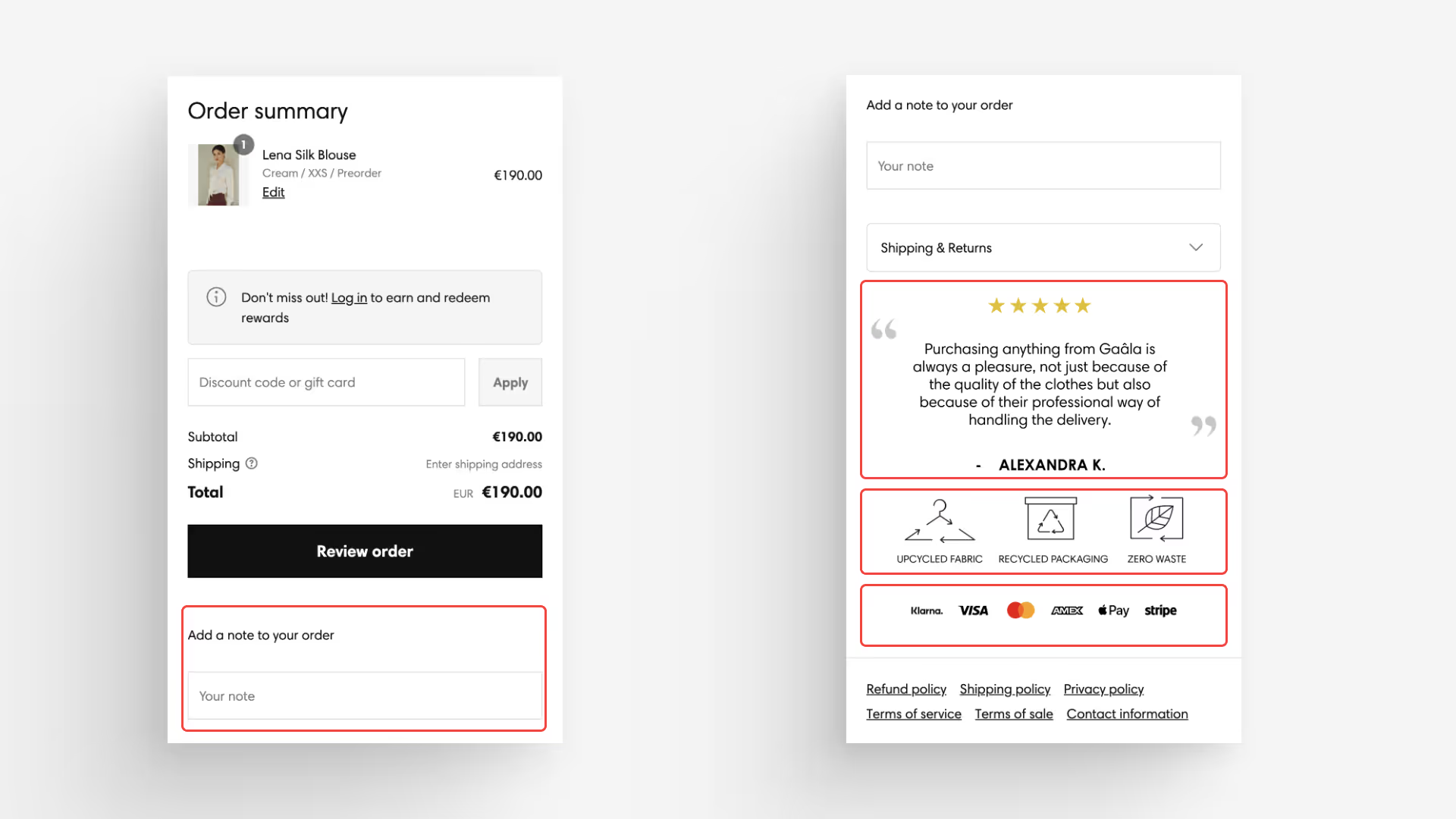
By focusing on these areas, you can create a more efficient and user-friendly mobile checkout experience. This approach not only improves customer satisfaction but also leads to increased sales and reduced cart abandonment rates.
Ready to optimize your Shopify store for mobile users?
Remember, optimizing your Shopify checkout is not about implementing every strategy mentioned in this blog. Instead, it's about trying out different elements to discover what resonates with your customers and better their shopping experience. Each store is unique, and what works for one may not work for another.
This is why Checkout Wizard offers checkout-level analytics for your Shopify store. By leveraging these analytics, you can track the performance of various checkout features you've implemented. This data-driven approach allows you to make informed decisions on which strategies to continue and discard. It's a process of trial and error, guided by real-time feedback from your store's performance.
If you haven't migrated your Shopify Checkout yet, you can watch this short video which will help you migrate in 6 easy steps:
So, while it's tempting to try out every exciting feature, select the right mix that aligns with your brand and appeals to your customer base.


.avif)


